THEFT DETERRENT SYSTEM > Intrusion Sensor Cancel Switch Circuit |
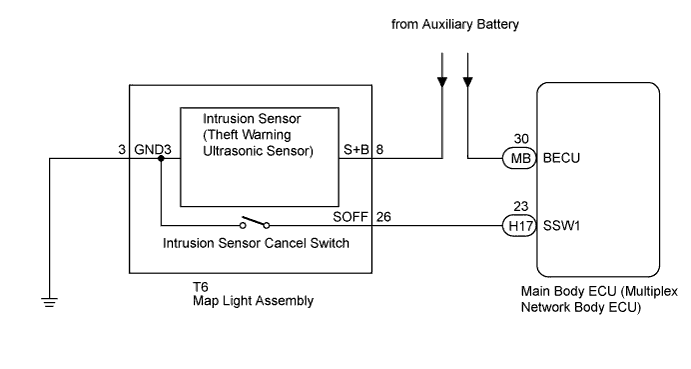
| 1.READ VALUE USING INTELLIGENT TESTER |
Connect the intelligent tester to the DLC3.
Turn the power switch on (IG).
Turn the intelligent tester on.
Select the item below in the Data List and read the display on the intelligent tester.
| Tester Display | Measurement Item/Range | Normal Condition | Diagnostic Note |
| Intrusion Sens OFF SW | Intrusion sensor cancel switch/ON or OFF | ON: Intrusion sensor cancel switch on OFF: Intrusion sensor cancel switch off | - |
|
| ||||
| OK | ||
 | ||
| ||
| 2.CHECK HARNESS AND CONNECTOR (MAIN BODY ECU - MAP LIGHT ASSEMBLY) |
Disconnect the H17 main body ECU (multiplex network body ECU) connector.
Disconnect the T6 map light assembly connector.
Measure the resistance according to the value(s) in the table below.
| Tester Connection | Condition | Specified Condition |
| H17-23 (SSW1) - T6-26 (SOFF) | Always | Below 1 Ω |
| T6-3 (GND3) - Body ground | Always | Below 1 Ω |
| H17-23 (SSW1) - Body ground | Always | 10 kΩ or higher |
|
| ||||
| OK | |
 |
| 3.INSPECT INTRUSION SENSOR CANCEL SWITCH (MAP LIGHT ASSEMBLY) |
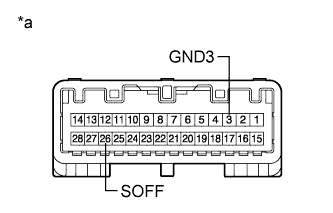 |
Remove the intrusion sensor cancel switch (map light assembly) (Click here).
Measure the resistance according to the value(s) in the table below.
| Tester Connection | Condition | Specified Condition |
| 26 (SOFF) - 3 (GND3) | Intrusion sensor cancel switch not pressed | 10 kΩ or higher |
| 26 (SOFF) - 3 (GND3) | Intrusion sensor cancel switch pressed | Below 1 Ω |
| *a | Component without harness connected (Intrusion Sensor Cancel Switch (Map Light Assembly)) |
|
| ||||
| OK | ||
| ||
| ||


