Symptom Troubleshooting - Audio driving instructions cannot be heard
Symptom Troubleshooting - Audio driving instructions cannot be heard
Audio driving instructions cannot be heard
NOTE: Always check the connectors for poor connections or loose terminals.
| 1. | Push the display unit MENU key, and select ‘‘setting''. |
| 2. | Check the audio driving instructions volume setting. Is it set to OFF? YES - Set the volume to an audible level.n NO - Go to 3. |
| 3. | Turn the ignition switch OFF. |
| 4. | Disconnect the navigation unit connector A (20P) and the audio unit 20P connector. |
| 5. | Check for continuity between body ground and navigation unit connector A (20P) terminals No. 14, No. 15 individually.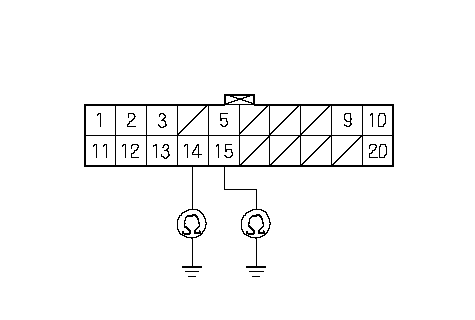 NAVIGATION UNIT CONNECTOR A (20P)Wire side of female terminalsGND RG (BLU/RED)RG L (+) NAVIGATION UNIT CONNECTOR A (20P)Wire side of female terminalsGND RG (BLU/RED)RG L (+)(WHT) Is there continuity? YES - If terminal No. 14 or No. 15 has continuity to ground, replace the affected shielded harness.n NO - Go to 6. |
| 6. | Check for continuity between navigation unit connector A (20P) terminal No. 14 and the audio unit 20P connector terminal No. 13 indivldually.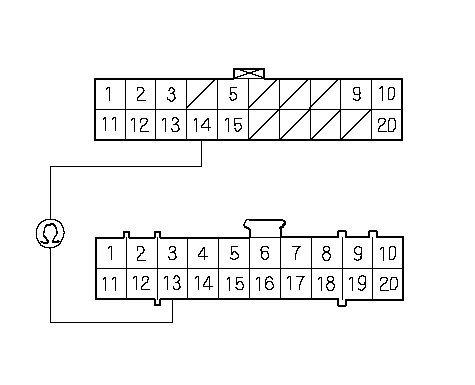 NAVIGATION UNIT CONNECTOR A (20P)Wire side of female terminalsRG L (+) (WHT)AUDIO UNIT 20P CONNECTOR NAVIGATION UNIT CONNECTOR A (20P)Wire side of female terminalsRG L (+) (WHT)AUDIO UNIT 20P CONNECTORIs there continuity? YES - Go to 7. NO - There is an open in the circuit between the navigation unit and audio unit. Check for poor connections or loose terminals at the audio and navigation units. If a poor connection or loose terminal is found, replace the affected shielded harness.n |
| 7. | Check for continuity between navigation unit connector A (20P) terminal No. 15 and the audio unit 20P connector terminal No. 12.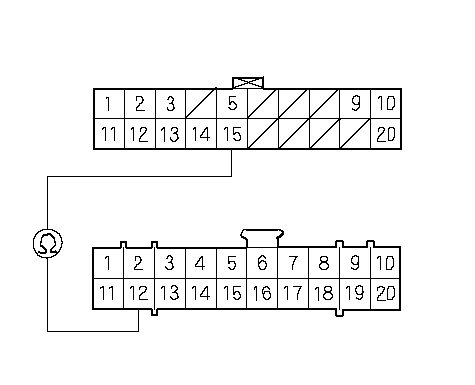 NAVIGATION UNIT CONNECTOR A (20P)Wire side of female terminalsGND RG (BLU/RED)AUDIO UNIT 20P CONNECTOR NAVIGATION UNIT CONNECTOR A (20P)Wire side of female terminalsGND RG (BLU/RED)AUDIO UNIT 20P CONNECTORIs there continuity? YES - Go to 8. NO - There is an open in the circuit between the navigation unit and the audio unit. Check for poor connections or loose terminals at the audio and navigation units. If a poor connection or loose terminal is found, replace the affected shield harness.n |
| 8. | Substitute a known-good audio unit, and recheck. Is there system OK? YES - Replace the audio unit.n |