How to Troubleshoot the Climate Control System
How to Check for DTCs with the Honda PGM Tester or the HDS
NOTE: Before troubleshooting the climate control system,
refer to the multiplex integrated control system test mode A| 1. | Make sure the ignition switch is OFF.
|
| 2. | Connect the Honda PGM Tester or the HDS (A) to the Data Link Connector (DLC) (B) located under the driver's side of the dashboard.
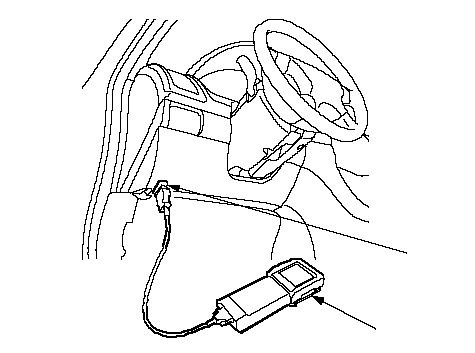 AB AB |
| 3. | Turn the ignition switch ON (II).
|
| 4. | Select DTCs in the climate control mode MENU of the Honda PGM Tester or the HDS.
|
| 5. | Check for DTCs. If a DTCs indicated, go to the next step. If no DTC(s) indicated, refer to symptom troubleshooting.
|
| 6. | Turn the ignition switch OFF.
|
| 7. | Disconnect the Honda PGM Tester or the HDS from the DLC.
|
How to Retrieve a DTC
The audio-HVAC module has a self-diagnosis function for climate control. To run the self-diagnosis function, do the following:
NOTE: Before troubleshooting the climate control system,
refer to the multiplex integrated control system test mode A.| 1. | Turn the ignition switch ON (II).
|
| 2. | Press the AUTO button and then the OFF button. Continue to hold both buttons down for 1 minute.
Without Navigation System: 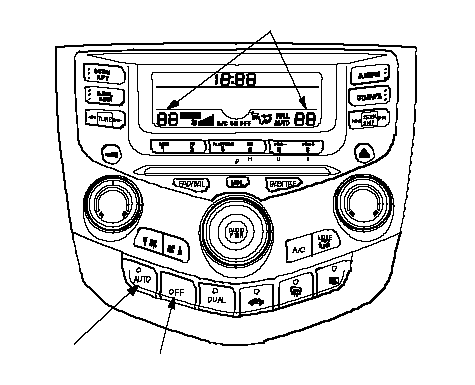 TEMPERATURE INDICATOROFF BUTTONAUTO BUTTON TEMPERATURE INDICATOROFF BUTTONAUTO BUTTONWith Navigation System: 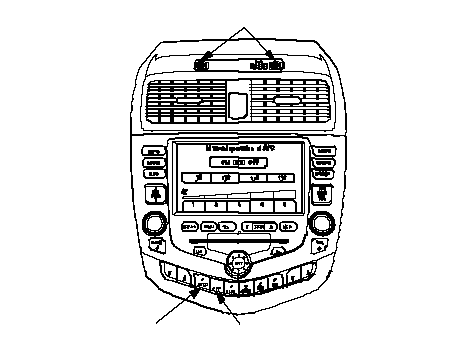 TEMPERATURE INDICATOROFF BUTTONAUTO BUTTON TEMPERATURE INDICATOROFF BUTTONAUTO BUTTON |
If there is any problems in the system, the temperature indicator will light up the segment (A through Q) corresponding to the error. The temperature indicator will then alternate every second between displaying ‘‘88'' (all segments lit) and the error code segment (A through Q).
NOTE: The system will only display the DTC when the AUTO and OFF buttons are pressed. If you release the buttons, the display will go blank. To return the display, simply press the AUTO then the OFF buttons again.
To determine the meaning of the DTC, refer to the DTC Troubleshooting Index. If no segments light up, but the system is still not operating properly, check the sensor inputs to the climate control unit, or refer to symptom troubleshooting.
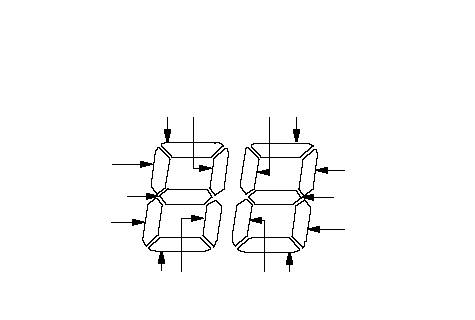 NHLEFT SIDE TEMPERATURE INDICATORCEBDFMJIKGLA
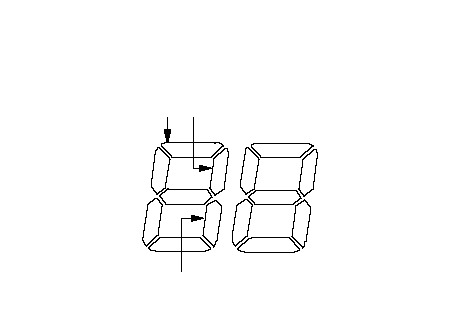 RIGHT SIDE TEMPERATURE INDICATOROPQ
Resetting the Self-diagnosis Function
Turn the ignition switch OFF to cancel the self-diagnosis function. After completing repair work, run the self-diagnosis function again to make sure that there are no other malfunctions.
Displaying Sensor Inputs at the Climate Control Unit
The climate control unit has a mode that displays sensor inputs it receives. This mode shows you what the climate control unit is receiving from each of the sensors, one at a time, and it can help you determine if a sensor is faulty.
Check these items before using the display mode:
| 1. | Turn the ignition switch ON (II), and check the recirculation door function; press the recirculation button to switch from FRESH to RECIRC. The air volume and sound should change slightly.
|
| 2. | Set the temperature control knob to the desired test temperature. When selecting the test temperatures, note these items:
- ‘‘Lo'' temperature setting will default to MAX COOL, VENT, and RECIRC.
- ‘‘Hi'' temperature setting will default to MAX HOT, FLOOR, and FRESH.
- 61° through 89°F settings will use the automatic climate control logic.
|
| 3. | Turn the ignition switch OFF.
|
To run the sensor input display mode, follow these steps:
| 1. | Press and hold both the AUTO and DUAL buttons, then start the engine.
|
| 2. | After the engine starts, release the buttons. The front panel display will flash the sensor number and then the value for that sensor. Record the valve displayed.
| Sensor | Item | Displayed Value |
|---|
| Sensor 1 | In-car Temperature Sensor | °C | | Sensor 2 | Ambient Temperature | °C | | Sensor 3 | Solar Radiation Sensor Value: Dark = 00, Flashlight = 04, Cloudy =10, Sunny =65 | Kcal/m2·h | | Sensor 4 | Engine coolant Temperature | °C | | Sensor 5 | Evaporator Outlet Air Temperature | °C | | Sensor 6 | Air Mix Opening (Low value indicates cooler air distribution, higher value indicates warmer air distribution.) | % of opening | | Sensor 7 | Passenger's Air Mix Opening (Low value indicates cooler air distribution, higher value indicates warmer air distribution.) | % of opening | | Sensor 8 | Vehicle Speed (Vehicle must be driven to display speed) | Km/h | | Sensor 9 | Vent Temperature Air Out (TAO) | °C |
NOTE:
- The sensor values will be displayed in degrees Celsius (°C) or an alphanumeric code. Use the chart to convert the value to degrees Fahrenheit (°F).
- If the sensor value displays ‘‘Er'' this indicates there is an open or short in the circuit or sensor. Check for DTCs using the Honda PGM Tester or the HDS, or run the self-diagnosis function to check for DTCs.
- If necessary, compare the sensor input display in alike, known-good vehicle under the same test conditions.
- If the sensor is out of the normal range, refer to the sensor test, or substitute the sensor with a known-good, and recheck.
|
| 3. | To advance to the next sensor, press the rear window defogger button.
|
| 4. | To cancel the sensor input display mode, press the AUTO button, or turn the ignition off.
Celsius to Fahrenheit Conversion Table
| °C | °F | °C | °F | °C | °F | °C | °F | °C | °F |
|---|
| 0 | 32 | 10 | 50 | 20 | 68 | 30 | 86 | 40 | 104 | | 1 | 34 | 11 | 52 | 21 | 70 | 31 | 88 | 41 | 106 | | 2 | 36 | 12 | 54 | 22 | 72 | 32 | 90 | 42 | 108 | | 3 | 37 | 13 | 55 | 23 | 73 | 33 | 91 | 43 | 109 | | 4 | 39 | 14 | 57 | 24 | 75 | 34 | 93 | 44 | 111 | | 5 | 41 | 15 | 59 | 25 | 77 | 35 | 95 | 45 | 113 | | 6 | 43 | 16 | 61 | 26 | 79 | 36 | 97 | 46 | 115 | | 7 | 45 | 17 | 63 | 27 | 81 | 37 | 99 | 47 | 117 | | 8 | 46 | 18 | 64 | 28 | 82 | 38 | 100 | 48 | 118 | | 9 | 48 | 19 | 66 | 29 | 84 | 39 | 102 | 49 | 120 |
| °C | °F | °C | °F | °C | °F | °C | °F | °C | °F |
|---|
| 50 | 122 | 60 | 140 | 70 | 158 | 80 | 176 | 90 | 194 | | 51 | 124 | 61 | 142 | 71 | 160 | 81 | 178 | 91 | 196 | | 52 | 126 | 62 | 144 | 72 | 162 | 82 | 180 | 92 | 198 | | 53 | 127 | 63 | 145 | 73 | 163 | 83 | 181 | 93 | 199 | | 54 | 128 | 64 | 147 | 74 | 165 | 84 | 183 | 94 | 201 | | 55 | 131 | 65 | 149 | 75 | 167 | 85 | 185 | 95 | 203 | | 56 | 133 | 66 | 151 | 76 | 169 | 86 | 187 | 96 | 205 | | 57 | 135 | 67 | 152 | 77 | 170 | 87 | 188 | 97 | 207 | | 58 | 136 | 68 | 154 | 78 | 172 | 88 | 190 | 98 | 208 | | 59 | 139 | 69 | 158 | 79 | 174 | 89 | 192 | 99 | 210 |
Alphanumeric Conversion Table
Display Reading
(Alphanumeric) | °C | °F |
|---|
| A1 thru A9 | -1 thru -9 | 30 thru 16 | | B0 thru B9 | -10 thru -19 | 14 thru -2 | | C0 thru C9 | -20 thru -29 | -4 thru -20 | | D0 thru D9 | -30 thru -39 | -22 thru -38 | | E0 thru E9 | -40 thru -49 | -40 thru -58 | |