Steering Column Removal and Installation
SRS components are located in this area.
Review the SRS component locations, precautions and procedures in the SRS section before performing repairs or service.
Removal
| 1. | Disconnect the negaticve cable form the battery.
|
| 3. | Remove the column covers (A).
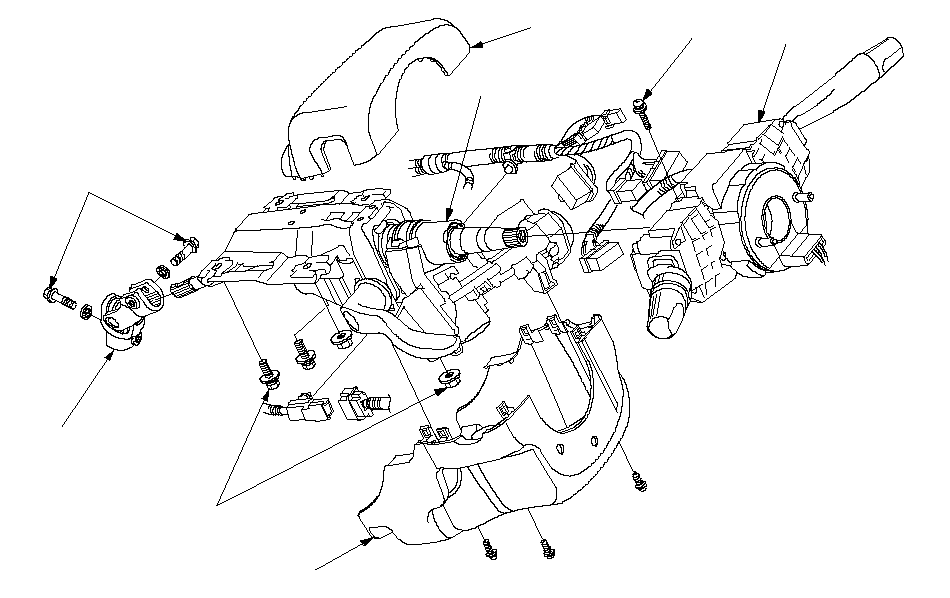 BCAD8 x 1.25 mm
29 N·m
(3.0 kgf·m, 22 lbf·ft)8 x 1.25 mm
16 N·m
(1.6 kgf·m, 12 lbf·ft)AE |
| 4. | Remove the combination switch assembly (B) from the steering column shaft by loosening a screw (C) on the top of the combination switch.
|
| 5. | Disconnect the 2P, 6P, and 7P connectors from the ignition switch.
|
| 6. | Disconnect the steering joint (D), and remove it from the column shaft.
|
| 7. | Remove the steering column (E) by removing the attaching nuts and bolts.
|
Installation
| 1. | Install the steering column, and make sure the wires are not caught or pinched by any parts.
|
| 2. | Insert the upper end of the steering joint onto the steering shaft (A) (line up the bolt hole (B) with the flat portion (C) on the shaft).
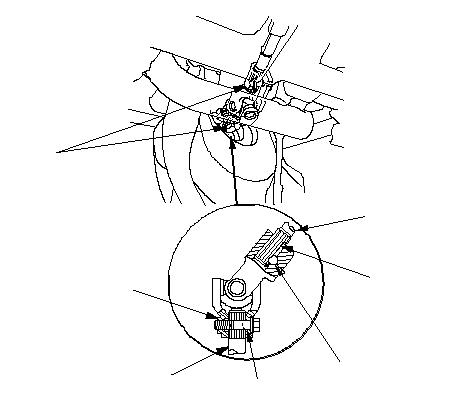 8 x 1.25 mm
29 N·m
(3.0 kgf·m,
22 lbf·ft)ACBGEF |
| 3. | Slip the lower end of the steering joint onto the pinion shaft (E) (line up the bolt hole (F) with the groove (G) around the shaft), and loosely install the lower joint bolt. Be sure that the lower joint bolt is securely in the groove in the pinion shaft.
|
| 4. | Pull on the steering joint to make sure that the steering joint is fully seated. Then install the upper joint bolt and tighten it.
|
| 5. | Finish the installation, and note these items:
|