Carpet Replacement
Carpet Replacement
SRS components are located in this area. Review the SRS component locations, and the precautions and procedures in the SRS section before performing repairs or service.NOTE:
- Put on gloves to protect your hands.
- Take care not to damage, wrinkle or twist the carpet.
- Be careful not to damage the dashboard or other interior trim pieces.
| 2. | LHD: Using a hex wrench, release the clips, then remove the footrest (A).
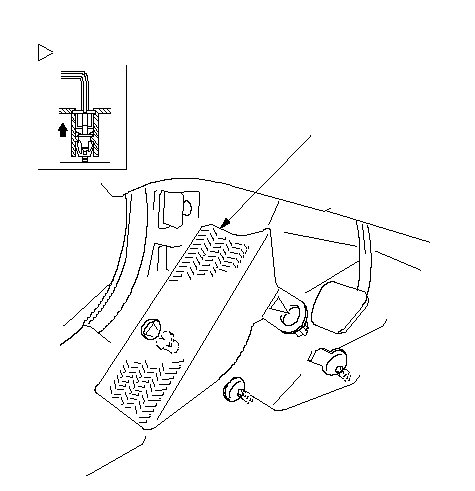 Fastener Locations: Clip, 2A |
| 3. | RHD: Detach the clips, then remove the footrest (A).
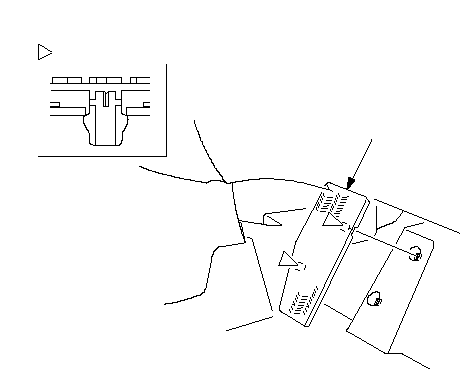 AFastener Locations: Clip, 2 |
| 4. | Remove the kick panels from both sides. |
| 5. | Remove the parking brake cover (A).
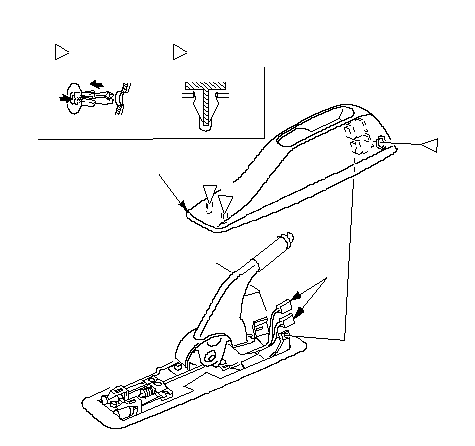 Fastener Locations: Clip, 1B(1)(2)ACBD: Clip, 2CC |
| 6. | From rear edge of the carpet, remove the clips (A), and release the fasteners (B). Pull the trunk floor mat (C) out from both rear side trim panels, then pull back the trunk floor mat.
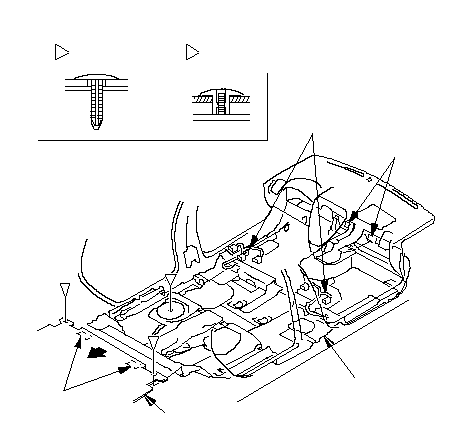 Fastener Locations: Clip, 2A: Clip, 1DGEADAFCB |
| 7. | Remove the clip (D) from the fuel fill maintenance lid portion. |
| 8. | Release the fasteners (E) under the dashboard. Pull the carpet (F) out from both rear side trim panels, then remove it. |
| 9. | Install the carpet in the reverse order of removal, and note these items:
|