A/T Shift Cable Adjustment (5AT)
A/T Shift Cable Adjustment
| 1. | Remove the ash tray, then remove the center console lower cover. |
| 2. | Remove the shift lever console panel. |
| 3. | Shift the shift lever to [R] position. |
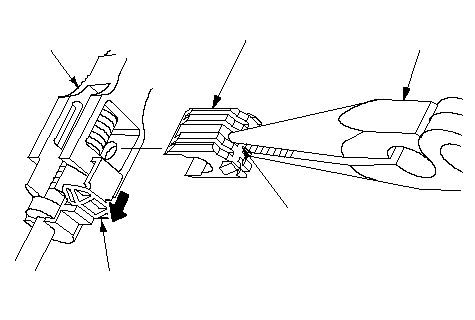
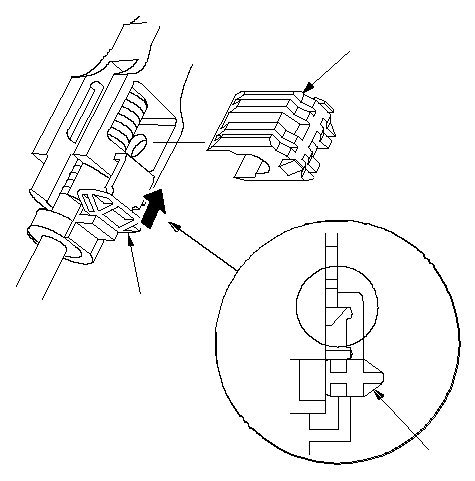
| 4. | Slide the lock tab (A) down on the shift cable end holder (B).
 BC Replace.EAD |
| 5. | Remove the shift cable lock (C) holding its middle (D) with needle-nose pliers (E) from the shift cable end and shift cable end holder. NOTE: Do not pry the shift cable lock with a screwdriver, it may damage the shift cable end holder. |
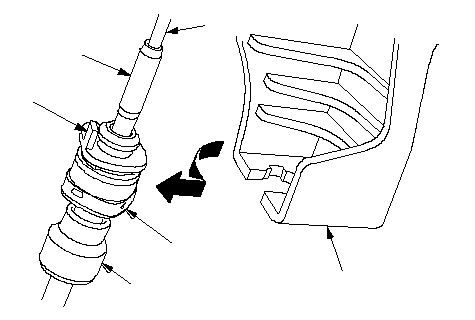
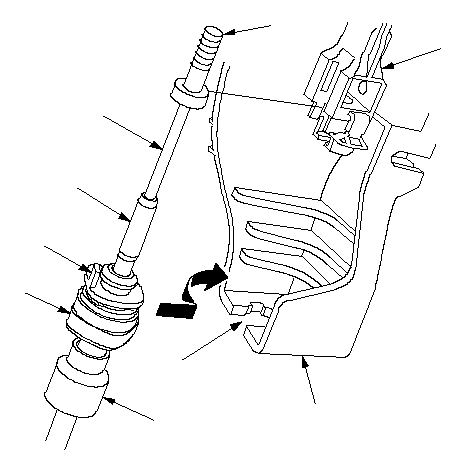
| 6. | Rotate the socket holder (A) on the shift cable (B) counterclockwise a quarter turn; the projection (C) on the socket holder faces direction to remove. Then slide the holder to remove the shift cable from the shift cable bracket base (D). NOTE: Do not remove the shift cable by twisting the shift cable guide (E) and damper (F).
 BECAFD |
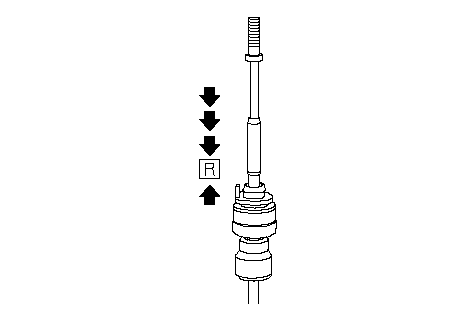
| 7. | Push down the shift cable until it stops, then release it. Pull the shift cable back one step so that the shift cable is in [R] position.
 |
| 8. | Turn the ignition switch ON (II), and verify that the [R] position indicator light comes on. |
| 9. | Turn the ignition switch OFF. |
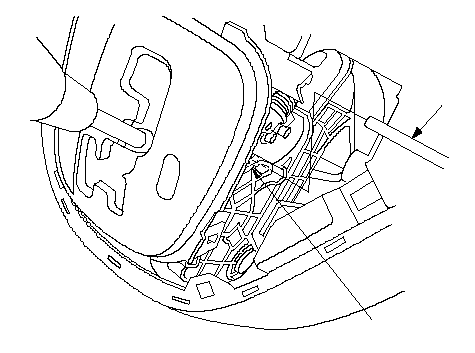
| 10. | Insert a 6.0 mm (0.24 in.) pin (A) into the positioning hole (B) on the shift lever bracket base through the positioning hole on the shift lever assembly. The shift lever is secured in [R] position.
 AB |
| 11. | Rotate the socket holder (A) on the shift cable (B) counterclockwise a quarter turn; the projection (C) on the socket holder is directed opposite the opening (D) of the shift lever bracket base (E). Slide the holder to install into the shift cable bracket base with installing the shift cable end (F) into the shift cable end holder (G). Keep the shift cable end free of grease. NOTE: Do not install the shift cable by twisting the shift cable guide (H) and damper (I).
 GFBHCAIDE |
| 12. | Verify that the shift cable end is properly installed into the shift cable end holder. If improperly installed, remove the shift cable from the shift lever bracket base, and reinstall the shift cable end and shift cable. Do not install the shift cable end into the shift cable end holder while the shift cable is on the shift lever bracket base. |
| 13. | Rotate the holder clockwise a quarter turn to secure the shift cable. |
| 14. | Install the new shift cable lock (A) to secure the shift cable end and shift cable end holder, then push the lock tab (B) up until it stops to lock the joint.
 BBA Replace. |
| 15. | Remove the 6.0 mm (0.24 in.) pin that was installed to hold the shift lever. |
| 16. | Move the shift lever to each gear, and verify that the A/T gear position indicator follows the transmission range switch. |
| 17. | Push the shift lock release, and verify that the shift lever release. |
| 18. | Reinstall the console panel and related parts. |