How to Troubleshoot the SRS
How to Troubleshoot the SRS
DTC (Diagnostic Trouble Codes)
The self-diagnostic function of the SRS system allows it to locate the causes of system problems and then store this information in memory. For easier troubleshooting, this data can be retrieved via a data link circuit.
- When you turn the ignition switch ON (II), the SRS indicator will come on. If it goes off after 6 seconds, the system is normal.
- If there is an abnormality, the system locates and defines the problem, stores this information in memory, and turns the SRS indicator light on. The data will remain in the memory even when the ignition switch is turned off or if the battery is disconnected.
- When you connect the SCS short connector (or DLC terminal box) to the service check connector (2P) or 16P data link connector (DLC), and turn the ignition switch ON (II), the SRS indicator light will indicate the diagnostic trouble code (DTC) by the number of blinks.
- After reading and recording the DTC, proceed with the troubleshooting procedure for this code.
Precautions
- Use only a digital multimeter to check the system. If it¢s not a Honda multimeter, make sure it's output is 10 mA ( 0.01A) or less when switched to the smallest value in the ohmmeter range. A tester with a higher output could damage the airbag circuit or cause accidental airbag deployment and possible injury.
- Whenever the ignition switch is ON (II), or has been turned OFF for less than 3 minutes, be careful not to bump the SRS unit; the airbags could accidentally deploy and cause damage or injuries.
- Before you remove the SRS wire harness from the SRS unit, disconnect the driver's airbag connector, the front passenger's airbag connector, both side airbag connectors, both seat belt buckle tensioner connectors and both seat belt tensioner connectors.
- Make sure the battery is sufficiently charged. If the battery is dead or low, measuring values won't be correct.
- Do not touch a tester probe to the terminals in the SRS unit or harness connectors, and do not connect the terminals with a jumper wire. Use only the backprobe set and the special tools.
Reading the DTC
When the SRS indicator light is on, read the DTC using either of the following methods:
PGM Tester Method
Connect the Honda PGM Tester (A) to the 16P Data Link Connector (DLC)(B), and follow the tester's prompts in the ‘‘SRS'' menu. If the tester indicates no DTC, DTC 9-1 or DTC 9-2, read by SRS indicator light method.
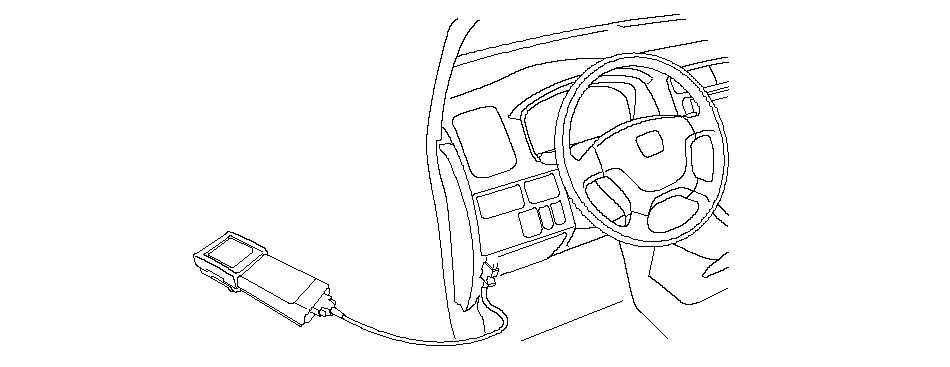
Reading the SRS Indicator Light Method (with service check connector (2P) models):
The SRS indicator light indicates the DTC by the number of blinks when the SCS short connector is connected to the service check connector (2P).
| 1. | Make sure the ignition switch is OFF, and wait for 10 seconds. Then connect the SCS short connector (A) to the service check connector (2P) (B). If you don't wait 10 seconds, the SRS unit won't be completely reset or output DTCs.
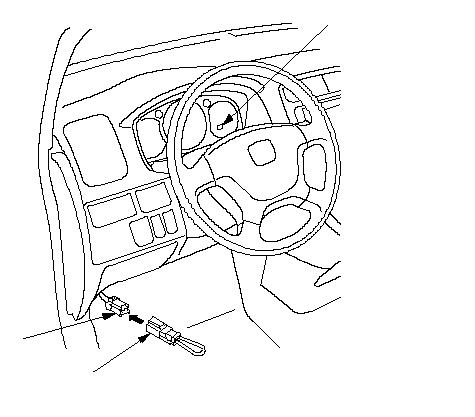 SRS INDICATOR LIGHTBA 07PAZ-0010100 |
| 2. | Turn the ignition switch ON (II). The SRS indicator light comes on for about 6 seconds, and then goes off. Then it will indicate the DTC. |
| 3. | Read the DTC. |
| 4. | Turn the ignition switch OFF, and wait for 10 seconds. Then disconnect the SCS short connector from the service check connector (2P). |
Reading the SRS Indicator Light Method (without service check connector (2P) models):
The SRS indicator light indicates the DTC by the number of blinks when the DLC terminal box is connected to the Data Link Connector (DLC) 16P.
| 1. | Make sure the ignition switch is OFF, and wait for 10 seconds. Then connect the DLC terminal box (A) to the Data Link Connector (DLC) 16P (B). If you don't wait 10 seconds, the SRS unit won't be completely reset or output DTCs.
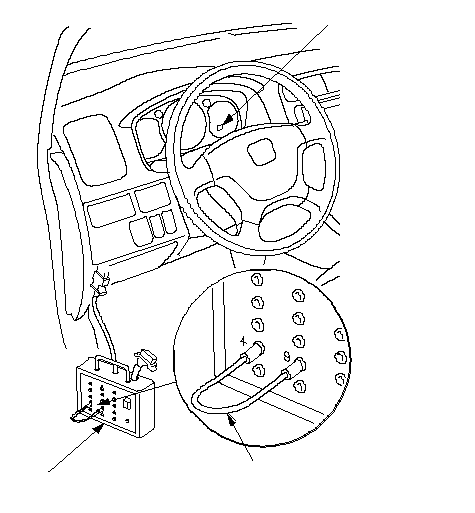 SRS INDICATOR LIGHTA 07WAJ-0010100JUMPER WIRE |
| 2. | Connect the DLC terminal box terminals No.4 and No. 9 with a jumper wire, and push the operation switch. |
| 3. | Turn the ignition switch ON (II). The SRS indicator light comes on for about 6 seconds, and then goes off. Then it will indicate the DTC. |
| 4. | Read the DTC. |
| 5. | Turn the ignition switch OFF, and wait for 10 seconds. Then disconnect the DLC terminal box from the Data Link Connector (DLC) 16P. |
Patterns of DTC Indications:
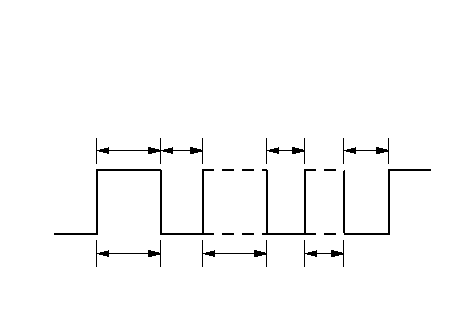 The DTC consists of a main code and sub-code.First emittingMain codeSub-codeS: SecondONOFF6 S3 S2 S3 S
Reading the main code:
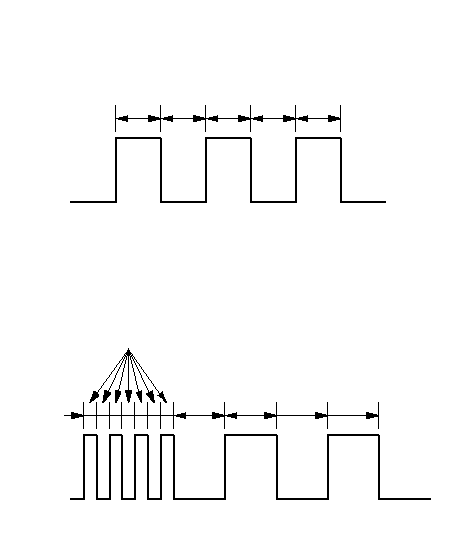 In case of 11~15Four continuous blinks count as ten.Add any further blinks together as shown.Count the number of the blinks.In case of 1~10Example:Example:Main code=1+= 311+Main code== 12+101ONOFF0.1 S1.2 S1.2 S1.2 S1.2 S1.2 S1.2 S1.2 S1.2 SONOFF+11.2 S
Reading the sub code:
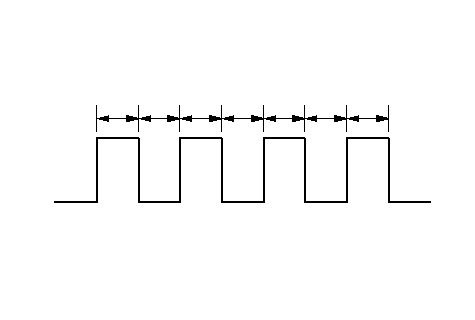 If the main code is '3', and the sub code is '4', record aDTC 3-4.Example:Sub code=+= 4+11+11ONOFF0.3 SCount the number of the blinks.0.3 S0.3 S0.3 S0.3 S0.3 S0.3 S
- Including the most recent problem, up to three different malfunctions can be indicated (see example 1 below).
- In case of a continuous failure, the DTC will be indicated repeatedly (see example 1 below).
- In case of an intermittent failure, the SRS indicator light will indicate the DTC one time, then it will stay on (see example 2 below).
- If both a continuous and an intermittent failure occur, both DTCs will be indicated as continuous failures.
- When the system is normal (no DTC), the SRS indicator light will stay on (see example 3).
- If the SRS indicator light comes on continuously without a DTC, there may be a problem with the system.
- If the SRS indicator light does not come on as indicated above, always check for an open or a short to ground in the SCS circuit before troubleshooting the system.
Example of the DTC Indications:
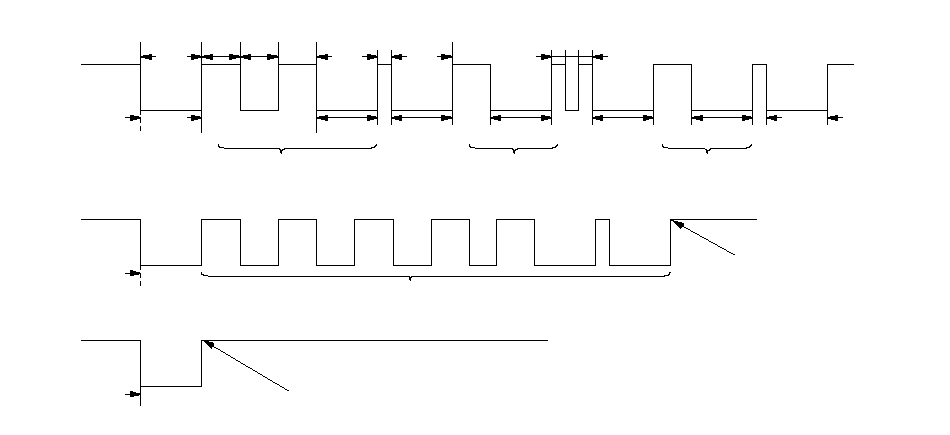 1. Continuous failure, SRS Indicator Light blinks like this:2. Intermittent failure, SRS Indicator Light blinks like this:ONOFFBulb check
periodMain code (2)DTC 2-1
Most recent problemSub-code (1)Main code (1)Sub-code (2)DTC 1-2
Second-most recent
problemDTC 1-1
Third-most recent
problemMain code (1)Sub-code (1)Indications
are repeated
in case of
continuous
failure.Indicator light stays on in case of
intermittent failure.S: Second3 S1.2 S1.2 S2 S0.3 S3 S0.3 S0.3 S0.3 S3. Normal (no failure), SRS Indicator Light blinks like this:Bulb check
periodBulb check
periodNo DTC, system is normal, the
light stays on.DTC 5-1ONOFFONOFF
Erasing the DTC Memory
Special Tools Required
SCS short connector ( 07PAZ-0010100)
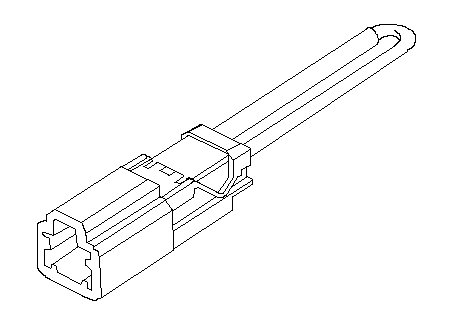
To erase the DTC(s) from the SRS unit, use a Honda PGM Tester (see the Honda PGM Tester SRS vehicle System Supplement) or the following procedure.
| 1. | Make sure the ignition switch is OFF. |
| 2. | Connect the SCS short connector (A) to the MES connector (2P) (B). Do not use a jumper wire.
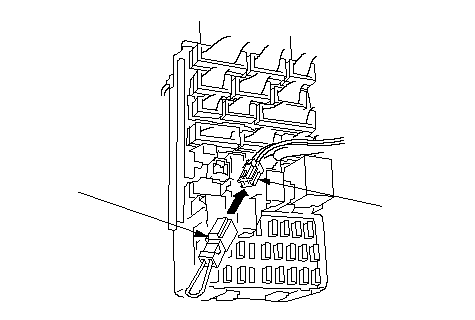 BA 07PAZ-0010100 |
| 3. | Turn the ignition switch ON (II). |
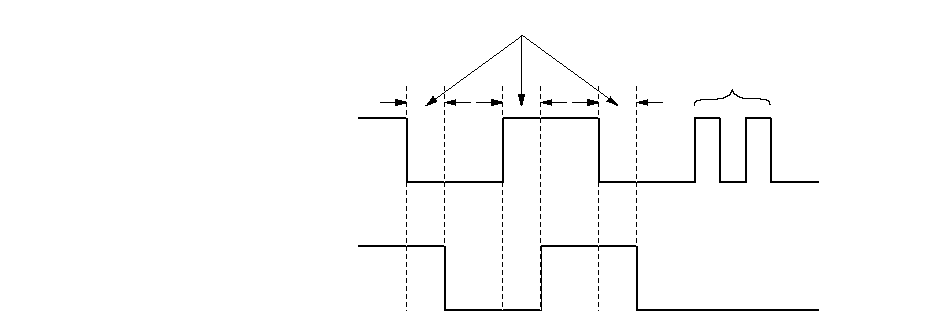
| 4. | The SRS indicator light will come on for about 6 seconds, and then go off. Remove the SCS short connector from the MES connector (2P) within 4 seconds after the light goes off. |
| 5. | The SRS indicator light will come on again. Reconnect the SCS short connector to the MES connector (2P) within 4 seconds after the light comes on. |
| 6. | When the SRS indicator light goes off, remove the SCS short connector from the MES connector ( 2P) within 4 seconds. |
| 7. | The SRS indicator light will blink 2 times indicating that the memory has been erased. |
| 8. | Turn the ignition switch OFF, and wait for 10 seconds. Turn the ignition switch ON (II) again after the procedure. The SRS system is OK if the SRS indicator light comes on for 6 seconds, and then goes off. |
Troubleshooting Intermittent Failures
If there was a malfunction, but it doesn't recur, it will be stored in the memory as an intermittent failure, and the SRS indicator light will come on.
After checking the DTC, troubleshoot as follows:
| 1. | Read the DTC (see ‘‘Reading DTCs''). |
| 2. | Erase the DTC memory (see ‘‘Erasing the DTC Memory''). |
| 3. | With the shift lever in Park or neutral, start the engine, and let the engine idle. |
| 4. | The SRS indicator light will come on for about 6 seconds and then go off. |
| 5. | Shake the wire harness and the connectors, take a test drive (quick acceleration, quick braking, cornering), turn the steering wheel fully left and right, and hold it there for 5 to 10 seconds. If the problem recurs, the SRS indicator light will come on. |
| 6. | If you can't duplicate the intermittent failure, the system is OK at this time. |
Initializing the OPDS (Occupant Position Detection System) Unit
When the seat-back cover, seat-back cushion, or (and) OPDS unit assembly are replaced with a new one, initialize the OPDS unit links with the OPDS sensor by following the procedure below.
NOTE: Make sure the passenger's seat is dry, set the seat-back in the normal position, and make sure there is nothing sitting on the front passenger's seat.
| 1. | Make sure the ignition switch is OFF. |
| 2. | With service check connector (2P)models: connect the SCS short connector to the service check connector (2P). Without service check connector (2P) models: connect the DLC terminal box to the DLC (16P), and connect the DLC terminal box terminals No. 4 and No. 9 with a jumper wire, and push the operation switch. |
| 3. | Connect the SCS short connector (A) to the MES connector (2P) (B). Do not use a jumper wire.
 BA 07PAZ-0010100 |
| 4. | Turn the ignition switch ON (II). |
| 5. | The SRS indicator light comes on for about 6 seconds and goes off. Remove the SCS short connector from the MES connector within 4 seconds after the SRS indicator light went off. |
| 6. | The SRS indicator light comes on again. Reconnect the SCS short connector to the MES connector within 4 seconds after the SRS indicator light comes on. |
| 7. | The SRS indicator light goes off. Remove the SCS short connector from the MES connector within 4 seconds. |
| 8. | The SRS indicator light indicates that the OPDS unit is initialized by blinking 2 times, then goes off. If the light doesn't blink 2 times and stay on, repeat this procedure beginning with step 1. If the light stays on after blinking 2 times, go to 9 and erase the DTC(s). |
| 9. | Turn the ignition switch OFF, and wait for 10 seconds. Disconnect the DLC terminal box from the DLC (16P), or disconnect the SCS short connector from the service check connector (2P). Turn the ignition switch ON (II) again after the procedure. The SRS indicator light comes on for about 6 seconds and goes off. If the SRS indicator light doesn't come on again after 30 seconds, the initialization of the OPDS unit is complete and the system is OK.
 SRS indicator lightMES connector terminalsONOFFCONNECTEDDISCONNECTED4 sec or lessBlinking |