AUDIO AND VISUAL SYSTEM (w/o Navigation System) > CD Sound Skips

for Preparation Click here


INSPECTION PROCEDURE

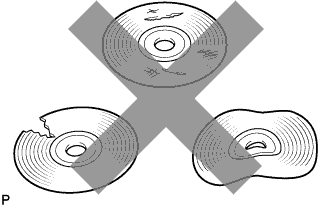
1.CHECK CD


    I100152
  1. Check that the CD is not deformed or cracked.

    OK:
    No deformation or cracks on the CD


NG
CHANGE DISC
OK


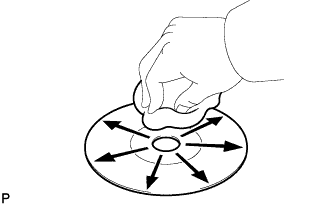
2.CHECK CD


    I100151
  1. Check the CD.

    OK:
    The CD is clean.

    HINT:
    If dirt is on the CD surface, wipe it clean with a soft cloth from the inside to the outside in a radial direction.

    NOTICE:
    Do not use a conventional record cleaner or anti-static preservative.


NG
CLEAN CD
OK


3.CHECK OPERATION
  1. Check if the problem recurs using a known good CD.

    OK:
    Malfunction disappears.


NG
Go to step 4
OK

END 

4.CHECK RADIO RECEIVER ASSEMBLY
  1. Check the radio receiver assembly installation condition.

    1. Check that the radio receiver assembly is properly installed.

      OK:
      Radio receiver assembly is properly installed.


NG
REINSTALL RADIO RECEIVER ASSEMBLY PROPERLY
OK

REPLACE RADIO RECEIVER ASSEMBLY (Click here)