DTC P0016 Crankshaft Position - Camshaft Position Correlation (Bank 1 Sensor A) |
| DTC No. | Detection Condition | Trouble Area |
| P0016 | Deviation in crankshaft position sensor signal and camshaft position sensor signal (2 trip detection logic). |
|
| Required Sensors/Components (Main) | Camshaft timing gear assembly |
| Required Sensors/Components (Related) | Camshaft position sensor Crankshaft position sensor |
| Frequency of Operation | Continuous |
| Engine speed | 900 to 1100 rpm |
| Tester Display | Description |
| NORMAL |
|
| ABNORMAL |
|
| INCOMPLETE |
|
| UNKNOWN |
|
| 1.CHECK ANY OTHER DTCS OUTPUT (IN ADDITION TO DTC P0016) |
Connect the intelligent tester to the DLC3.
Turn the power switch on (IG).
Turn the tester on.
Enter the following menus: Powertrain / Engine and ECT / DTC.
Read the DTCs.
| Result | Proceed to |
| DTC P0016 is output | A |
| DTC P0016 and other DTCs are output | B |
|
| ||||
| A | |
 |
| 2.PERFORM ACTIVE TEST USING INTELLIGENT TESTER (OPERATE CAMSHAFT TIMING OIL CONTROL VALVE ASSEMBLY) |
Connect the intelligent tester to the DLC3.
Turn the power switch on (IG).
Turn the tester on.
Put the engine in inspection mode (maintenance mode) (Click here).
Start the engine.
Enter the following menus: Powertrain / Engine and ECT / Active Test / Control the VVT Linear (Bank 1).
Check the engine speed while operating the camshaft timing oil control valve assembly using the tester.
| Tester Operation | Specified Condition |
| 0% | Normal engine speed |
| 100% | Engine idles roughly or stalls |
|
| ||||
| OK | |
|
| 3.CHECK WHETHER DTC OUTPUT RECURS (DTC P0016) |
Connect the intelligent tester to the DLC3.
Turn the power switch on (IG).
Turn the tester on.
Clear the DTCs (Click here).
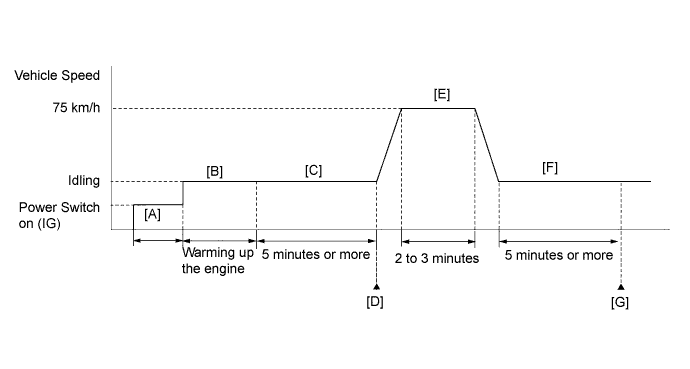
Drive the vehicle in accordance with the driving pattern described in the Confirmation Driving Pattern.
Enter the following menus: Powertrain / Engine and ECT / DTC.
Read the DTCs.
| Result | Proceed to |
| DTC is not output | A |
| DTC P0016 is output | B |
|
| ||||
| A | ||
 | ||
| ||
| 4.INSPECT CAMSHAFT TIMING OIL CONTROL VALVE ASSEMBLY |
Inspect the camshaft timing oil control valve assembly (Click here).
|
| ||||
| OK | |
|
| 5.INSPECT CAMSHAFT TIMING GEAR ASSEMBLY |
Inspect the camshaft timing gear assembly (Click here).
|
| ||||
| OK | |
|
| 6.INSPECT OIL CONTROL VALVE FILTER |
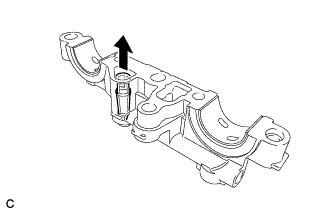 |
Remove the oil control valve filter (Click here).
Check that the filter is not clogged.
|
| ||||
| OK | |
|
| 7.ADJUST VALVE TIMING |
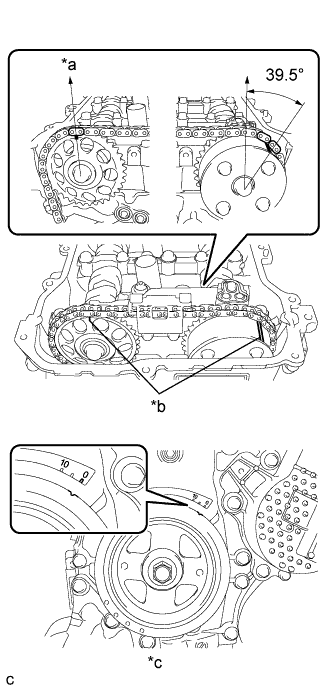 |
| *a | Top |
| *b | Alignment Mark |
| *c | No. 1 Cylinder at TDC Compression |
| NEXT | |
|
| 8.CHECK WHETHER DTC OUTPUT RECURS (DTC P0016) |
Connect the intelligent tester to the DLC3.
Turn the power switch on (IG).
Turn the tester on.
Clear the DTCs (Click here).
Drive the vehicle in accordance with the driving pattern described in the Confirmation Driving Pattern.
Enter the following menus: Powertrain / Engine and ECT / DTC / Pending.
Read the pending DTCs.
| Result | Proceed to |
| DTC is not output | A |
| DTC P0016 is output | B |
|
| ||||
| A | ||
| ||
| ||


