NAVIGATION SYSTEM (for HDD) > Voice Recognition Difficulty |
| 1.CHECK CONDITION |
Refer to the owner's manual and follow its instructions to check that the voice recognition level of the system is not too low for a particular voice.
| Result | Proceed to |
| System voice recognition level is low with any voice. | A |
| System voice recognition level is low only for a particular voice. | B |
|
| ||||
| A | |
 |
| 2.CHECK MICROPHONE (OPERATION CHECK) |
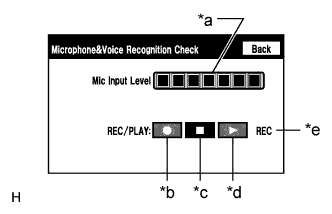 |
Enter the "Microphone & Voice Recognition Check" screen. Refer to Check Mic & Voice Recognition in Operation Check (Click here).
When voice is input into the microphone, check that the microphone input level meter changes according to the input voice.
Select the recording switch and perform voice recording.
Check that the recording indicator remains on while recording and that the recorded voice is played normally without noise or distortion.
| *a | Microphone Input Level Meter |
| *b | Recording Switch |
| *c | Stop Switch |
| *d | Play Switch |
| *e | Recording Indicator |
|
| ||||
| OK | |
|
| 3.REPLACE HARD DISK DRIVE |
Replace the hard disk drive (Click here).
Check that voice recognition is normal.
|
| ||||
| OK | ||
 | ||
| ||

