NAVIGATION SYSTEM (for DVD) > Cannot Call in a Certain Place |
| 1.CHECK SURROUNDING CONDITIONS |
Check if the cellular phone can make calls in a certain place.
|
| ||||
| OK | |
 |
| 2.CHECK RECEPTION |
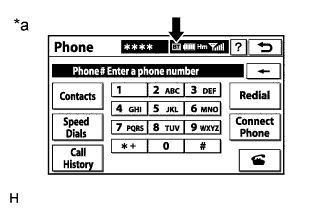 |
Display the "Phone" screen and check the "Bluetooth" connection indicator ("BT" indicator).
| Result | Proceed to |
| "BT" indicator color is yellow. | A |
| "BT" indicator color is blue. | B |
| No connection mark is displayed. | C |
| *a | Example |
|
| ||||
|
| ||||
| A | ||
 | ||
| ||

