DTC P0560 System Voltage |
| DTC No. | DTC Detection Condition | Trouble Area |
| P0560 | Open in ECM back up power source circuit (1 trip detection logic). |
|
| Required Sensors/Components (Main) | ECM |
| Frequency of Operation | Continuous |
| Stand-by RAM | Initialized |
| ECM power source | Less than 3.5 V |
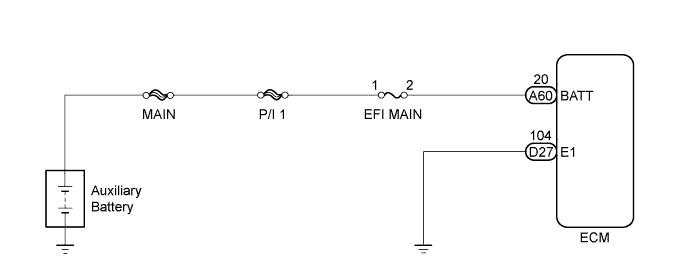
| 1.CHECK HARNESS AND CONNECTOR (ECM - AUXILIARY BATTERY) |
Disconnect the negative (-) auxiliary battery terminal.
Disconnect the positive (+) auxiliary battery terminal.
Disconnect the ECM connector.
Measure the resistance according to the value(s) in the table below.
| Tester Connection | Condition | Specified Condition |
| Positive (+) auxiliary battery terminal - A60-20 (BATT) | Always | Below 1 Ω |
| Positive (+) auxiliary battery terminal or A60-20 (BATT) - Body ground | Always | 10 kΩ or higher |
|
| ||||
| OK | |
 |
| 2.INSPECT AUXILIARY BATTERY |
Check that the auxiliary battery is not discharged or weak.
|
| ||||
| OK | |
|
| 3.CHECK AUXILIARY BATTERY TERMINAL |
Check that the auxiliary battery terminals are not loose or corroded.
|
| ||||
| OK | |
|
| 4.CHECK WHETHER DTC OUTPUT RECURS |
Connect the intelligent tester to the DLC3.
Turn the power switch on (IG).
Turn the tester on.
Clear the DTCs (Click here).
Turn the power switch off and turn the tester off.
Turn the power switch on (IG) and turn the tester on.
Wait for 5 seconds or more.
Enter the following menus: Powertrain / Engine and ECT / DTC.
Read the DTCs.
| Result | Proceed to |
| DTC P0560 is output | A |
| DTC is not output | B |
|
| ||||
| A | ||
 | ||
| ||

