DYNAMIC RADAR CRUISE CONTROL SYSTEM > OPERATION CHECK |
| INPUT SIGNAL CHECK |
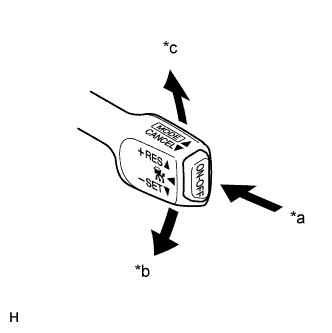 |
Connect the intelligent tester to the DLC3.
Check the cruise control switch using the Data List function of the intelligent tester (ON-OFF, -/SET and +/RES).
| *a | ON/OFF |
| *b | -/SET |
| *c | +/RES |
| INSPECT MODE SWITCH |
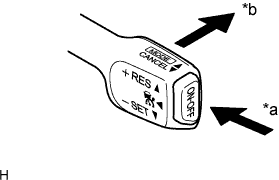 |
Turn the power switch on (IG).
| *a | ON/OFF |
| *b | MODE |
Turn the cruise control switch (ON-OFF button) on. Then push the cruise control switch to MODE for 1 second or more to change to the constant speed control mode. Check that "RADAR READY" goes off from the display.
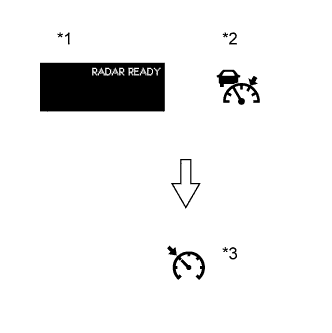 |
Check that the cruise control indicator light (vehicle-to-vehicle distance control mode) goes off and the cruise control indicator light (constant speed control mode) illuminates.
| *1 | Multi-information Display |
| *2 | Cruise Control Indicator Light (Vehicle-to-vehicle distance control mode) |
| *3 | Cruise Control Indicator Light (Constant speed control mode) |
| INSPECT STEERING PAD SWITCH ASSEMBLY |
Turn the power switch on (IG).
Turn the cruise control switch (ON-OFF button) on.
Turn on the vehicle-to-vehicle distance control switch of the steering pad switch.
Check that the indication of the vehicle-to-vehicle distance, which is shown on the multi-information display on the combination meter, changes from long to middle to short in that order.
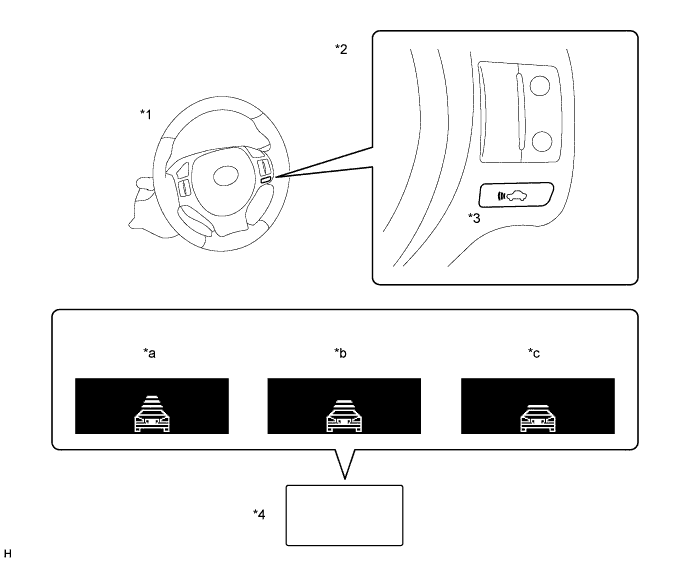
| *1 | Steering Wheel | *2 | Steering Pad Switch |
| *3 | Distance Control Switch | *4 | Multi-information Display |
| *a | Long | *b | Middle |
| *c | Short | - | - |
