ENTRY AND START SYSTEM (for Entry Function) > DATA LIST / ACTIVE TEST |
| DATA LIST |
Connect the intelligent tester to the DLC3.
Turn the power switch on (IG).
Turn the intelligent tester on.
Enter the following menus: Body / (desired system) / Data List.
According to the display on the intelligent tester, read the Data List.
| Tester Display | Measurement Item/Range | Normal Condition | Diagnostic Note |
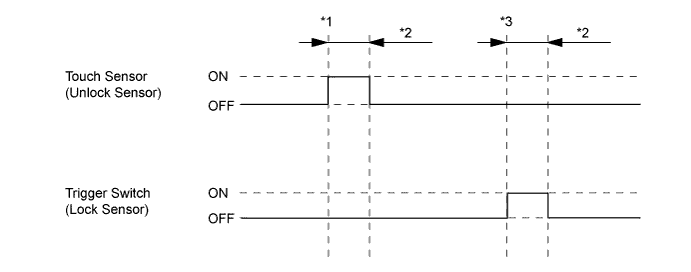
| D-Door Touch Sensor* | Driver door touch sensor (unlock sensor) / ON or OFF | ON: Driver door touch sensor (unlock sensor) touched OFF: Driver door touch sensor (unlock sensor) not touched |
|
| P-Door Touch Sensor* | Front passenger door touch sensor (unlock sensor) / ON or OFF | ON: Front passenger door touch sensor (unlock sensor) touched OFF: Front passenger door touch sensor (unlock sensor) not touched |
|
| D-Door Trigger Switch* | Driver door touch sensor (lock sensor) / ON or OFF | ON: Driver door touch sensor (lock sensor) touched OFF: Driver door touch sensor (lock sensor) not touched |
|
| P-Door Trigger Switch* | Front passenger door touch sensor (lock sensor) / ON or OFF | ON: Front passenger door touch sensor (lock sensor) touched OFF: Front passenger door touch sensor (lock sensor) not touched |
|
| Tr/B-Door Lock SW | Back door opener switch (lock switch) / ON or OFF | ON: Back door opener switch (lock switch) pushed OFF: Back door opener switch (lock switch) not pushed |
|
| Tr/B-Door Unlock SW | Back door opener switch (unlock switch) / ON or OFF | ON: Back door opener switch (unlock switch) pushed OFF: Back door opener switch (unlock switch) not pushed |
|
| Ignition Switch | Power switch on (IG) / ON or OFF | ON: Power switch on (IG) OFF: Power switch off |
|
| Unmatched Vehicle-ID | Key No. (incorrect or correct) / Yes or No | Yes: Communication malfunction No: Communication normal | The vehicle ID registered in the vehicle and the vehicle ID registered in the key are different (if a key from another vehicle is brought into the vehicle exterior detection area while the doors are locked, "Yes" is displayed for "Unmatched Vehicle-ID" in the Data List). Other potential causes:
|
| No Response | Communication response / Yes or No | Yes: Communication malfunction No: Communication normal | The vehicle IDs registered in the vehicle and key match, but there is no response from the key. (If the key is not in the detection area or the key battery is depleted resulting in a matching code not being detected when a lock switch or the power switch is pressed, etc., "Yes" is displayed for "No Response" in the Data List. Also, if there is electric wave interference in the 134 kHz band (RF) that the vehicle uses for transmission or the 312 MHz band (RF) that the key uses for transmission, "Yes" may be displayed for "No Response" in the Data List.) Other potential causes:
|
| Unmatch Code or Form | Code format (incorrect or correct) / Yes or No | Yes: Communication malfunction No: Communication normal | There is an error in the data sent from the key (if there is electric wave interference in the 312 MHz band (RF) that the key uses for transmission, "Yes" may be displayed for "Unmatch Code or Form", "No Response", "ID Code Difference(Resp)" and "C Code Difference" in the Data List). Other potential causes:
|
| Key Low Battery | Key battery depleted / Yes or No | Yes: Key battery depleted No: Key battery not depleted | The key sends voltage information to the certification ECU (smart key ECU assembly) when it is transmitting. The certification ECU (smart key ECU assembly) displays "Yes" for the "Key Low Battery" item of the Data List when this voltage information indicates 2.1 V or less. This Data List item should be checked when the key is at room temperature (example: at -20°C (-4°F), "Yes" may be displayed even if the key battery is new). |
| Power Save Cnt 10 Min | Number of times power saving control is activated due to key being in detection area for 10 minutes or more / 0 to 255 | Within range of 0 to 255 | If the key is in the vehicle exterior detection area, communication is frequently performed between the vehicle and key, resulting in an increase in key battery power consumption. To prevent the battery from becoming fully depleted, if the key is in left in the detection area for 10 minutes or more, the system stops operating. If the doors are locked/unlocked with a wireless operation or by the mechanical key, the system resumes operation. |
| Power Save Cnt 5 Days | Number of times power saving control 1 (vehicle exterior periodic signal transmission stop) is activated due to hybrid control system not being started for 5 days or more / 0 to 255 | Within range of 0 to 255 | - |
| Power Save Cnt 14 Days | Number of times power saving control 2 (lock/unlock sensor of front door outside handle assembly of front passenger door disabled) is activated due to hybrid control system not being started for 14 days or more / 0 to 255 | Within range of 0 to 255 | - |
| ID Code Difference(Resp) | ID code (incorrect or correct) / Yes or No | Yes: Communication malfunction No: Communication normal | The ID code registered in the vehicle and the ID code registered in the key are different (if there is electric wave interference in the 312 MHz band (RF) that the key uses for transmission, "Yes" may be displayed for "Unmatch Code or Form", "No Response", "ID Code Difference(Resp)" and "C Code Difference" in the Data List). Other potential causes:
|
| C Code Difference | Challenge code (incorrect or correct) / Yes or No | Yes: Communication malfunction No: Communication normal | The key sends a response code in response to the challenge code from the vehicle, but the response code is incorrect (if there is electric wave interference in the 312 MHz band (RF) that the key uses for transmission, "Yes" may be displayed for "Unmatch Code or Form", "No Response", "ID Code Difference(Resp)" and "C Code Difference" in the Data List). Other potential causes:
|
| ID Code Difference | Wireless ID code (incorrect or correct) / Yes or No | Yes: Communication malfunction No: Communication normal | The ID code registered in the vehicle and the ID code registered in the key are different. (If a wireless ID other than those for any of the registered keys is detected, "Yes" is displayed for "ID Code Difference" in the Data List. If a wireless signal from the key of another vehicle is detected, "Yes" is displayed for "ID Code Difference(Resp)" in the Data List.) Other potential causes:
|
| Different Rolling Code | Rolling code (incorrect or correct) / Yes or No | Yes: Communication malfunction No: Communication normal | The rolling code registered in the vehicle and the rolling code registered in the key are different Other potential causes:
|
| Auto Entry Cancel SW | Entry cancel function setting / OFF or ON | Mode status displayed ON: Entry and start system canceled OFF: Entry and start system not canceled | The default setting for the entry cancel function is OFF. If the customer requests that the entry and start system functions (locking and unlocking the doors while carrying the key, etc.) be canceled, the setting can be changed through the customize function (Click here). |
| Door Unlock Mode2 | Door unlock mode / All or Driver | Mode status displayed | - |
| Tester Display | Measurement Item/Range | Normal Condition | Diagnostic Note |
| RR Door Courtesy SW | Rear RH door courtesy light switch / ON or OFF | ON: Rear RH door open OFF: Rear RH door closed | - |
| RL Door Courtesy SW | Rear LH door courtesy light switch / ON or OFF | ON: Rear LH door open OFF: Rear LH door closed | - |
| Back Door Courtesy SW | Back door courtesy light switch / ON or OFF | ON: Back door open OFF: Back door closed | - |
| FR Door Lock Pos | Front RH door lock position switch signal / UNLOCK or LOCK | UNLOCK: Front RH door unlocked LOCK: Front RH door locked | - |
| FR Door Courtesy | Front RH door courtesy light switch signal / ON or OFF | ON: Front RH door closed OFF: Front RH door open | - |
| FL Door Lock Pos | Front LH door lock position switch signal / UNLOCK or LOCK | UNLOCK: Front LH door unlocked LOCK: Front LH door locked | - |
| FL Door Courtesy | Front LH door courtesy light switch signal / ON or OFF | ON: Front LH door closed OFF: Front LH door open | - |
| RR-Door Lock Pos SW | Rear RH door lock position switch signal / ON or OFF | ON: Rear RH door unlocked OFF: Rear RH door locked | - |
| RL-Door Lock Pos SW | Rear LH door lock position switch signal / ON or OFF | ON: Rear LH door unlocked OFF: Rear LH door locked | - |
| Wireless Buzzer Resp* | Answer-back buzzer operation / ON or OFF | Customized value displayed | - |
| ACTIVE TEST |
Connect the intelligent tester to the DLC3.
Turn the power switch on (IG).
Turn the intelligent tester on.
Enter the following menus: Body / (desired system) / Active Test.
According to the display on the intelligent tester, perform the Active Test.
| Tester Display | Test Part | Control Range | Diagnostic Note |
| Overhead Tuner Power Supply ON | Door control receiver | ON/OFF | - |
| Power for P-Seat Sens | Front door outside handle (for front passenger door) | ON/OFF | - |
| Tester Display | Test Part | Control Range | Diagnostic Note |
| Hazard | Turn signal flasher relay | ON/OFF | - |
| Door Lock | Door lock motor | Unlock/Lock/OFF | - |
| Trunk and Back-Door Open | Operate back door lock motor | ON or OFF | - |
| Wireless Buzzer | Wireless door lock buzzer | ON/OFF | - |
