AUDIO AND VISUAL SYSTEM (w/o Navigation System) > DTC CHECK / CLEAR |
| STARTING DIAGNOSTIC MODE |
Turn the power switch on (ACC).
Turn off the audio system.
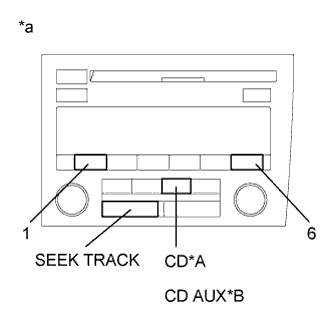 |
While pressing preset switches "1" and "6" at the same time, press the "CD"*1 or "CD AUX"*2 switch 3 times.
| *A | for 10 Speakers (w/o "AM DAB" Switch) |
| *B | for 10 Speakers (w/ "AM DAB" Switch) |
| *a | Example |
| ALL ELEMENT ILLUMINATION MODE AND SWITCH CHECK MODE |
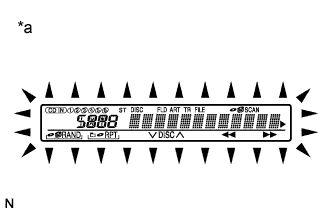 |
Check that all elements illuminate.
| *a | Example | ||
When pressing each panel switch, check that a beep is emitted.
| STEREO JACK ADAPTER CONNECTION CHECK MODE |
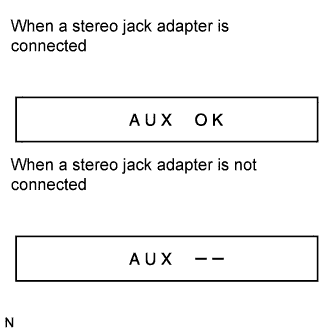 |
Press the "SEEK TRACK UP" switch.
Check if the stereo jack adapter is recognized.
| SERVICE CHECK MODE |
Press the "SEEK TRACK UP" switch.
| FINISHING DIAGNOSTIC MODE |
Press the "CD"*1 or "CD AUX"*2 switch for 2 seconds or more, or turn the power switch off.
| CHECK DTC |
Reference
In the system check mode, the system check and diagnostic memory check are performed, and the check results are displayed in ascending order of the component codes (physical address).
| Term | Meaning |
| Component code (Physical address) | Three-digit code (in hexadecimal) is given to each device comprising AVC-LAN. Corresponding to its function, an individual symbol is provided. |
| Logical address | Two-digit code (in hexadecimal) is given to each function and device unit in each device comprising AVC-LAN. |
Service check result display
| Display | Previous Term | Meaning | Action to be Taken |
| good | Good (normal) | No DTCs are detected in both "System Check Mode" and "Diagnostic Memory Mode". | - |
| nCon | No connection | The system recognized the component when it was registered, but the component gives no response to "Diagnostic Mode ON Request". | Check the power source circuit and the communication circuit of the component indicated by the component code (physical address). |
| ECHn | Exchange | One or more DTCs for "Exchange" are detected in either "System Check Mode" or "Diagnostic Memory Mode". | Go to the detailed information mode to check the trouble area referring to the DTC chart. |
| CHEC | Check | When no DTCs are detected for "Exchange", one or more DTCs for "Check" are detected in either "System Check Mode" or "Diagnostic Memory Mode". | Go to the detailed information mode to check the trouble area referring to the DTC chart. |
| OLd | Old version | Old DTC application is identified and DTC is detected in either "System Check Mode" or "Diagnostic Memory Mode". | - |
| nrES | No response | The device gives no response to any one of "System Check Mode ON Request", "System Check Result Request" and "Diagnostic Memory Request". | Check the power source circuit and the communication circuit of the component indicated by the component code (physical address). |
Device name and physical address
| Physical Address No. | Name |
| 190 | Radio receiver assembly |
| 440 | Stereo component amplifier assembly |
| 388 | Multi-media interface ECU assembly |
Service check mode
Press the "SEEK TRACK" switch to see the check result of each component.
The component code (physical address) is displayed first, and then the check result follows.
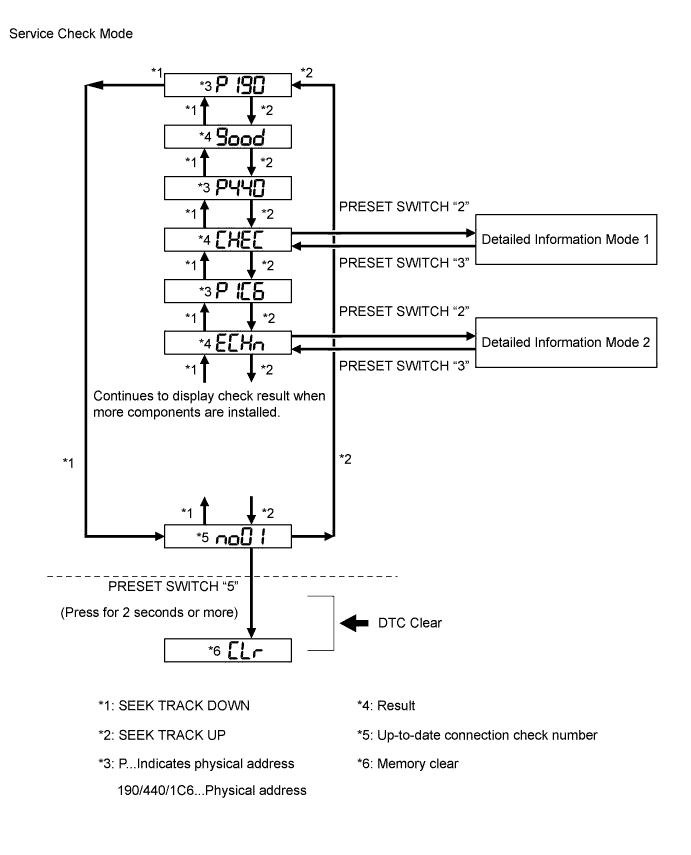
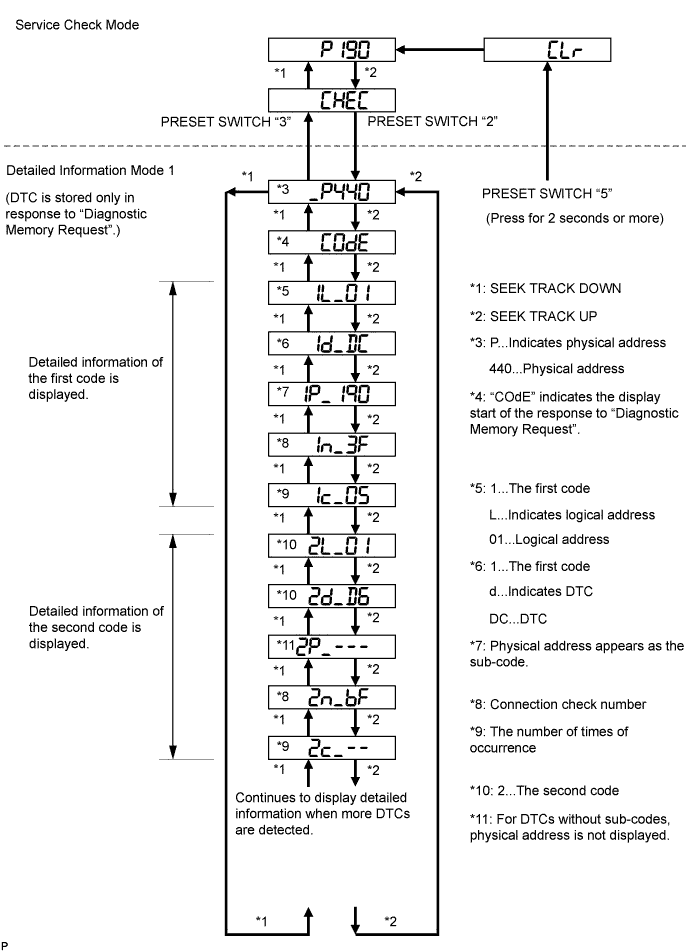
Detailed information mode 1
Press preset switch "2" to go to "Detailed Information Mode 1".
Press the "SEEK TRACK" switch to display the physical address and DTC of the component.
Press preset switch "3" to go to "Service Check Mode".
Select between the displays of the responses to "System Check Result Request" and "Diagnostic Memory Request". In order to distinguish the information detected in "System Check Mode" and "Diagnostic Memory Mode" in "ECHn", "CHEC", and "OLd" in "Detailed Information Mode 1", refer to the following:
Detailed information mode 2
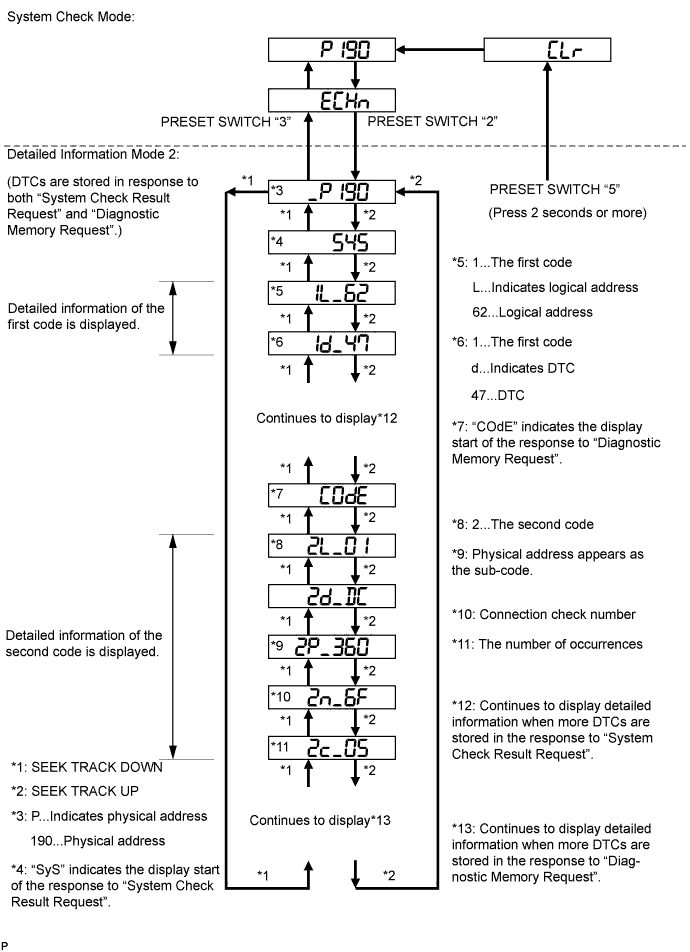
Press preset switch "2" to go to "Detailed Information Mode 2".
Press the "SEEK TRACK" switch to display the physical address and DTC of the component.
Press preset switch "3" to go to "Service Check Mode".
Select between the displays of the responses to "System Check Result Request" and "Diagnostic Memory Request". In order to distinguish the information detected in "System Check Mode" and "Diagnostic Memory Mode" in "ECHn", "CHEC", and "OLd" in "Detailed Information Mode 2", refer to the following:
| DTC CLEAR/RECHECK |
 |
Clearing All DTC Memory (when clearing all the memory of the previously detected DTCs)
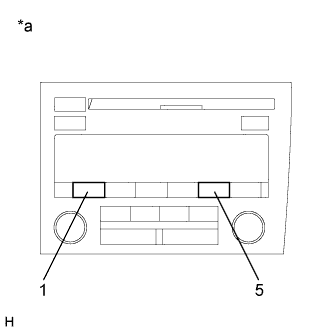
When preset switch "5" is pressed for 2 seconds or more during "Service Check Mode", the DTCs for all components are cleared ("CLr" is displayed at this time.).
| *a | Example |
Clearing the specified DTC Memory (when clearing the specified memory of the previously detected DTC)
When preset switch "5" is pressed for 2 seconds or more during "Detailed Information Mode 1" or "Detailed Information Mode 2", the DTCs for the target component are cleared.
Press preset switch "1" to perform the service check again, and check that no DTCs are displayed for all the component codes (physical address).
