NAVIGATION SYSTEM (for DVD) > The Other Caller's Voice cannot be Heard, is too Quiet, or Distorted

for Preparation Click here


INSPECTION PROCEDURE

1.CHECK CELLULAR PHONE
  1. Check if the other caller's voice can be heard properly.

    OK:
    Voice can be heard properly.

    HINT:
    The purpose of this step is to inspect the cellular phone when it is not connected to the vehicle.


NG
REPAIR OR REPLACE CELLULAR PHONE
OK


2.CHECK NAVIGATION SYSTEM
  1. Check that navigation system sound can be heard from the front speaker.

    OK:
    Sound from the audio system can be heard.


NG
GO TO "VOICE GUIDANCE DOES NOT FUNCTION" IN PROBLEM SYMPTOMS TABLE (Click here)
OK


3.CHECK SETTINGS


    E181038E02
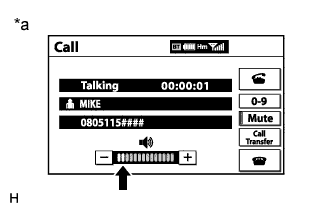
  1. Check if the volume level is set to low on the "Call" screen.

    OK:
    The level is not set to low.

    Text in Illustration 
    *a
    Example


NG
SET VOLUME TO HIGH
OK


4.CHECK SETTINGS (OPERATION CHECK)


    E176560
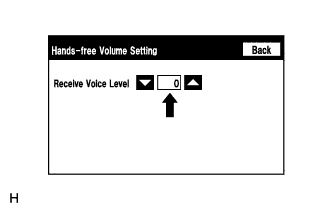
  1. Enter the "Hands-free Volume Setting" screen. Refer to Check Hands-free Volume Setting in Operation Check (Click here).

  1. Check if the Receive Voice Level is set to "0".

    HINT:
    The Receive Voice Level can be set to 11 different levels, -5 to +5, with a 3 dB difference.

  1. Check if the Receive Voice Level is set to the minimum or maximum level.

    HINT:
    When the Receive Voice Level is set to the minimum or maximum level, the sound may be distorted.

    OK:
    The Receive Voice Level is set to "0".


NG
SET RECEIVE VOICE LEVEL TO "0"
OK

PROCEED TO NEXT SUSPECTED AREA SHOWN IN PROBLEM SYMPTOMS TABLE (Click here)