NAVIGATION SYSTEM (for HDD) > The Other Caller cannot Hear Your Voice, or Your Voice is too Quiet or Distorted |
| 1.CHECK CELLULAR PHONE |
Check if the other caller can hear your voice properly.
|
| ||||
| OK | |
 |
| 2.CHECK SETTINGS |
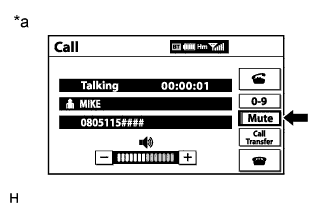 |
Check if the "Mute" switch is set to on.
| *a | Example |
|
| ||||
| OK | |
|
| 3.CHECK MICROPHONE (OPERATION CHECK) |
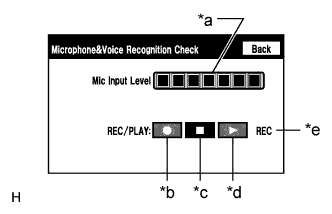 |
Enter the "Microphone & Voice Recognition Check" screen. Refer to Check Mic & Voice Recognition in Operation Check (Click here).
When voice is input into the microphone, check that the microphone input level meter changes according to the input voice.
Select the recording switch and perform voice recording.
Check that the recording indicator remains on while recording and that the recorded voice is played normally without noise or distortion.
| *a | Microphone Input Level Meter |
| *b | Recording Switch |
| *c | Stop Switch |
| *d | Play Switch |
| *e | Recording Indicator |
|
| ||||
| OK | |
|
| 4.REPLACE RADIO RECEIVER ASSEMBLY |
Replace the radio receiver assembly (Click here).
Check for symptoms again.
|
| ||||
| OK | ||
 | ||
| ||

