DTC    B1582    Map Disk Reading Malfunction

for Preparation Click here


DESCRIPTION

This DTC is stored when the navigation module board cannot read the map disc.

DTC No.
DTC Detection Condition
Trouble Area
B1582
  1. Player error
  2. Scratches or dirt on the disc
  3. Access to an invalid address due to software error
  1. Map disc
  2. Navigation module board

INSPECTION PROCEDURE

1.CHECK MAP DISC


    I100152
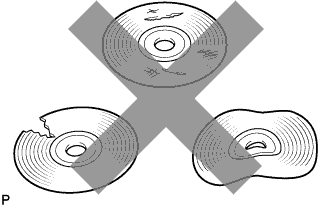
  1. Check that the map disc is not deformed or cracked.

    OK:
    No deformations or cracks on the map disc


NG
REPLACE MAP DISC
OK


2.DISC CLEANING


    I100201E04
  1. Disc cleaning

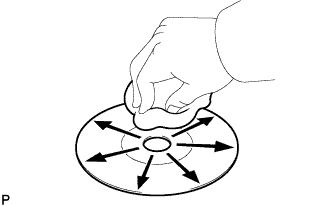
    1. If dirt is on the disc surface, wipe it clean with a soft cloth from the inside to the outside in a radial direction.

      NOTICE:
      Do not use a conventional record cleaner or anti-static preservative.


NEXT


3.CHECK DTC
  1. Clear the DTCs (Click here).

  1. Recheck for DTCs and check if the same DTC is output again.

    OK:
    No DTCs are output.


NG
REPLACE NAVIGATION MODULE BOARD (Click here)
OK

USE SIMULATION METHOD TO CHECK (Click here)