DTC 01-DC Transmission Error |
| DTC No. | DTC Detection Condition | Trouble Area |
| 01-DC *1 | Transmission to component shown by sub-code failed (Detecting this DTC does not always mean actual failure). | If the same sub-code is stored in other components, check power source circuit and communication system of all components shown by sub-code |
| 1.CHECK FOR DTC OF OTHER COMPONENTS |
Check if the component shown by the sub-code is displayed in the check result of the other components.
Check if DTC 01-DC is output for the other components.
| Result | Proceed to |
| DTC 01-DC is output and the same physical address is displayed | A |
| DTC 01-DC is not output or the same physical address is not displayed | B |
|
| ||||
| A | |
 |
| 2.IDENTIFY COMPONENT WHICH HAS STORED THIS CODE |
Enter diagnostic mode.
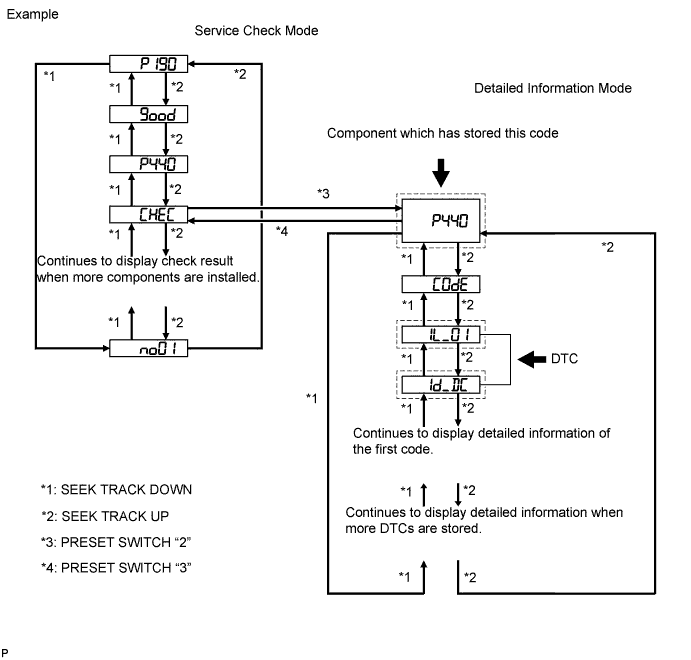
Press preset switch "2" to change the mode to "Detailed Information Mode".
Identify the component which has stored this code.
| Component | Physical Address |
| Stereo component amplifier assembly | 440 |
| Radio receiver assembly | 190 |
| Multi-media interface ECU assembly | 388 |
| NEXT | |
|
| 3.CHECK COMPONENT WHICH HAS STORED THIS CODE |
Select the component which has stored this code.
| Component | Proceed to |
| Stereo component amplifier assembly | Stereo component amplifier communication error (Click here) |
| Radio receiver assembly | Radio receiver communication error (Click here) |
| Multi-media interface ECU assembly | Multi-media interface ECU communication error (Click here) |
| NEXT | ||
 | ||
| ||
| 4.CLEAR DTC |
Clear the DTCs (Click here).
| NEXT | |
|
| 5.RECHECK FOR DTC |
Recheck for DTCs and check if the same DTC is output again.
|
| ||||
| OK | ||
| ||
| ||
| 6.CHECK COMPONENT WHICH HAS STORED THIS CODE |
Select the component which has stored this code.
| Component | Proceed to |
| Stereo component amplifier assembly | Stereo component amplifier communication error (Click here) |
| Radio receiver assembly | Radio receiver communication error (Click here) |
| Multi-media interface ECU assembly | Multi-media interface ECU communication error (Click here) |
| NEXT | ||
| ||
| ||

