NAVIGATION SYSTEM (for DVD) > Black Screen |
| 1.CHECK DISPLAY SETTING |
Check that the display is not in "Screen Off" mode.
|
| ||||
| OK | |
 |
| 2.CHECK IMAGE QUALITY SETTING |
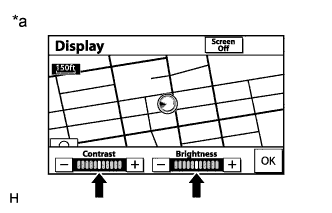 |
Press the "DISP" switch on the remote touch.
Check that the screen color quality can be set.
| *a | Example |
|
| ||||
| OK | ||
 | ||
| ||
| 3.CHECK CABIN |
Check that condensation is not likely to occur in the cabin, and that the temperature is not high or extremely low in the cabin.
|
| ||||
| OK | ||
| ||
| ||


