WIRELESS DOOR LOCK CONTROL SYSTEM > No Answer-Back |
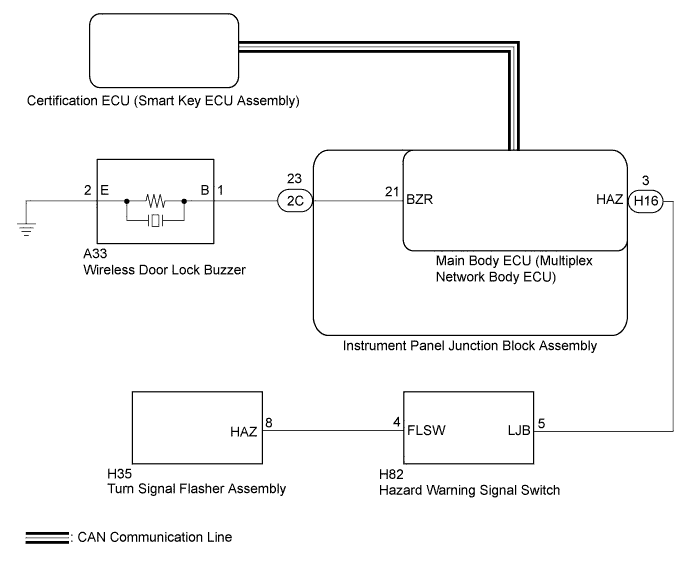
| 1.READ VALUE USING INTELLIGENT TESTER (ANSWER-BACK OPERATION) |
Connect the intelligent tester to the DLC3.
Turn the power switch on (IG).
Turn the intelligent tester on.
Enter the following menus: Body / Main Body / Utility / Customize / Wireless Door Lock.
Select the setting by referring to the table below.
| Display | Default | Content | Setting | Relevant ECU |
| Hazard Answer Back | ON | When the doors are locked by wireless operation, the hazard warning lights flash once. When the doors are unlocked by wireless operation, the hazard warning lights flash twice. | ON or OFF | Main body ECU (Multiplex network body ECU) |
| Wireless Buzzer Resp*1 | ON | Wireless door lock buzzer response/ON or OFF | ON or OFF | Main body ECU (Multiplex network body ECU) |
| Result | Proceed to |
| Both items are ON. | A |
| Either item is OFF. | B |
|
| ||||
| A | |
 |
| 2.CHECK WIRELESS DOOR LOCK CONTROL FUNCTIONS |
Check the wireless door lock control function using the electrical key transmitter.
| Result | Proceed to |
| Wireless door lock/unlock operates normally. | A |
| Wireless door lock/unlock does not operate normally. | B |
|
| ||||
| A | |
|
| 3.READ VALUE USING INTELLIGENT TESTER (DOOR UNLOCK DETECTION SWITCH) |
Connect the intelligent tester to the DLC3.
Turn the power switch on (IG).
Turn the intelligent tester on.
Enter the following menus: Body / Main Body / Data List.
Read the Data List according to the display on the intelligent tester.
| Tester Display | Measurement Item/Range | Normal Condition | Diagnostic Note |
| FR Door Lock Pos | Front door RH unlock detection switch signal/LOCK or UNLOCK | LOCK: Front door RH locked UNLOCK: Front door RH unlocked | - |
| FL Door Lock Pos | Front door LH unlock detection switch signal/LOCK or UNLOCK | LOCK: Front door LH locked UNLOCK: Front door LH unlocked | - |
| RR-Door Lock Pos SW | Rear door RH unlock detection switch signal/ON or OFF | ON: Rear door RH unlocked OFF: Rear door RH locked | - |
| RL-Door Lock Pos SW | Rear door LH unlock detection switch signal/ON or OFF | ON: Rear door LH unlocked OFF: Rear door LH locked | - |
| Result | Proceed to |
| OK | A |
| NG (for Driver Door) | B |
| NG (for Front Passenger Door) | C |
| NG (for Rear LH Door) | D |
| NG (for Rear RH Door) | E |
|
| ||||
|
| ||||
|
| ||||
|
| ||||
| A | |
|
| 4.CHECK WIRELESS ANSWER-BACK OPERATION |
Check the wireless answer-back operation using the electrical key transmitter.
| Result | Proceed to |
| Only hazard warning light answer-back does not occur. | A |
| Only wireless door lock buzzer answer-back does not occur. | B |
|
| ||||
| A | ||
 | ||
| ||
| 5.PERFORM ACTIVE TEST USING INTELLIGENT TESTER (WIRELESS DOOR LOCK BUZZER) |
Connect the intelligent tester to the DLC3.
Turn the power switch on (IG).
Turn the intelligent tester on.
Enter the following menus: Body / Main Body / Active Test.
Perform the Active Test according to the display on the intelligent tester.
| Tester Display | Test Part | Control Range | Diagnostic Note |
| Wireless Buzzer | Turns the wireless door lock buzzer | ON/OFF | - |
| Result | Proceed to |
| Wireless door lock buzzer does not turn on/off. | A |
| Wireless door lock buzzer turns on/off. | B |
|
| ||||
| A | |
|
| 6.CHECK HARNESS AND CONNECTOR (WIRELESS DOOR LOCK BUZZER - INSTRUMENT PANEL JUNCTION BLOCK) |
Disconnect the A33 wireless door lock buzzer and 2C instrument panel junction block assembly connectors.
Measure the resistance according to the value(s) in the table below.
| Tester Connection | Condition | Specified Condition |
| A33-1 (B) - 2C-23 (BZR) | Always | Below 1 Ω |
| A33-2 (E) - Body ground | Always | Below 1 Ω |
| A33-1 (B) - Body ground | Always | 10 kΩ or higher |
|
| ||||
| OK | |
|
| 7.CHECK INSTRUMENT PANEL JUNCTION BLOCK ASSEMBLY |
Remove the instrument panel junction block assembly (Click here).
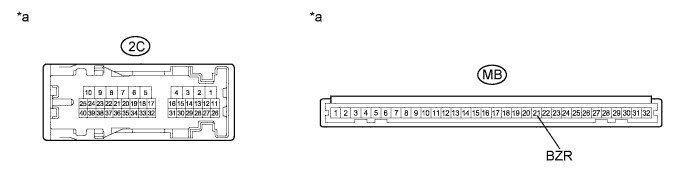
| *a | Component without harness connected (Instrument Panel Junction Block Assembly) | - | - |
Measure the resistance according to the value(s) in the table below.
| Tester Connection | Condition | Specified Condition |
| 2C-23 (BZR) - MB-21 (BZR) | Always | Below 1 Ω |
|
| ||||
| OK | |
|
| 8.REPLACE WIRELESS DOOR LOCK BUZZER |
Temporarily replace the wireless door lock buzzer with a new one (Click here).
| NEXT | |
|
| 9.CHECK WIRELESS DOOR LOCK BUZZER OPERATION |
Check the operation of the wireless answer-back function.
|
| ||||
| OK | ||
| ||
| ||
| 10.REPLACE MAIN BODY ECU (MULTIPLEX NETWORK BODY ECU) |
Temporarily replace the main body ECU (multiplex network body ECU) with a new one (Click here).
| NEXT | |
|
| 11.CHECK WIRELESS DOOR LOCK BUZZER OPERATION |
Check the operation of the wireless answer-back function.
|
| ||||
| OK | ||
| ||
| ||


