DOOR CONTROL TRANSMITTER > REMOVAL

for Preparation Click here


1. REMOVE TRANSMITTER BATTERY (for Standard)

NOTICE:
Take extra care when handling these precision electronic components.


    B271010
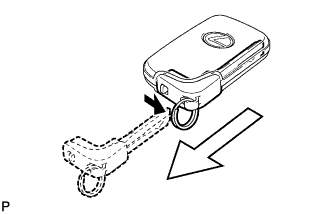
  1. Push and hold the release knob in the direction indicated by the arrow shown in the illustration. Then take the mechanical key out of the case.


  1. for Type A:


      B271011E01
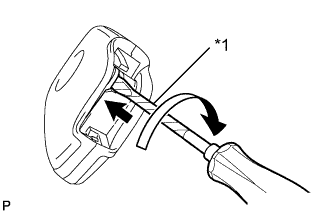
    1. Insert a precision screwdriver into the gap, and turn the screwdriver to detach the cover.
      Text in Illustration 
      *1
      Protective Tape

      HINT:
      Tape the screwdriver tip before use.


    2. B268132E01
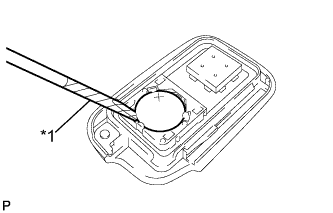
    3. Insert a screwdriver into the gap and remove the battery (lithium battery: CR1632).
      Text in Illustration 
      *1
      Protective Tape

      NOTICE:
      1. Do not push the terminals with your finger.
      2. Do not forcibly pry up the battery. The terminals may be damaged.
      3. Do not touch the battery with wet hands. Water may cause rust.
      4. Do not touch or move any components inside the transmitter. It may interfere with proper operation.
      5. To prevent the transmitter from being damaged, be sure to touch a grounded metal surface with your bare hands to discharge any static electricity before replacing the transmitter battery.

      HINT:
      Tape the screwdriver tip before use.


  1. for Type B:


      B233774
    1. Disengage the claw and remove the slide transmitter housing cover as shown in the illustration.
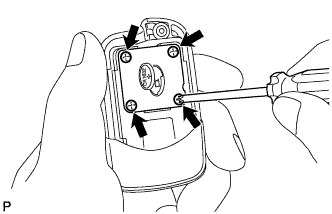


    2. B233775
    3. Remove the battery cover with 4 screws.
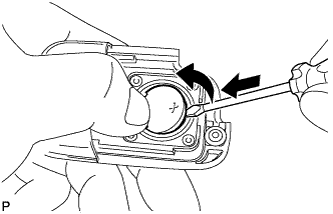


    4. B233776
    5. Insert a screwdriver into the gap and remove the battery (lithium battery: CR1632).

      NOTICE:
      1. Do not push the terminals with your finger.
      2. Do not forcibly pry up the battery. The terminals may be damaged.
      3. Do not touch the battery with wet hands. Water may cause rust.
      4. Do not touch or move any components inside the transmitter. It may interfere with proper operation.
      5. To prevent the transmitter from being damaged, be sure to touch a grounded metal surface with your bare hands to discharge any static electricity before replacing the transmitter battery.


2. REMOVE TRANSMITTER (CARD KEY) BATTERY (for Card Type)


E138164
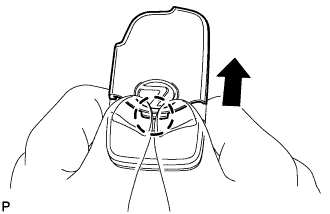
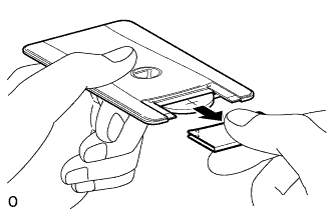
  1. Lightly hold and pull the transmitter cover out in the direction shown by the arrow in the illustration.
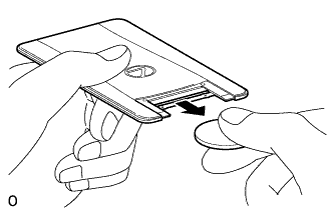
    NOTICE:
    Do not insert a screwdriver etc. between the case and transmitter cover and forcefully bend the transmitter cover. This will deform the transmitter cover.

    HINT:
    1. If the transmitter cover is held too firmly, it becomes harder to pull out.
    2. If the transmitter cover is slippery and it is difficult to pull out, use non-slip gloves to pull the cover out.


    E138165
  1. Remove the transmitter (card key) battery (lithium battery: CR2412).