POWER WINDOW MASTER SWITCH > INSPECTION |
| 1. INSPECT MULTIPLEX NETWORK MASTER SWITCH ASSEMBLY |
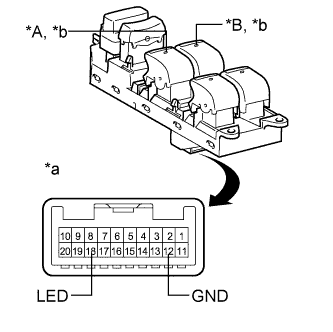 |
Check that the LED illuminates.
Apply battery voltage to the multiplex network master switch assembly and check that the LED illuminates.
| Measurement Condition | Specified Condition |
| Battery positive (+) → 18 (LED) Battery negative (-) → 12 (GND) | LED illuminates |
| *A | for LHD |
| *B | for RHD |
| *a | Component without harness connected (Multiplex Network Master Switch Assembly) |
| *b | LED |
