NAVIGATION SYSTEM (for HDD) > PRECAUTION |
| 1.PRECAUTION FOR DISCONNECTING CABLE FROM NEGATIVE AUXILIARY BATTERY TERMINAL |
| System Name | See Procedure |
| Parking Assist Monitor System |
Click here
|
| Power Door Lock Control System |
| 2.PRECAUTIONS FOR NAVIGATION COMPUTER SUB-ASSEMBLY |
An HDD is built into the navigation computer sub-assembly to store map and other data, and is used for the navigation system. Therefore, care must be taken for the following points when handling:
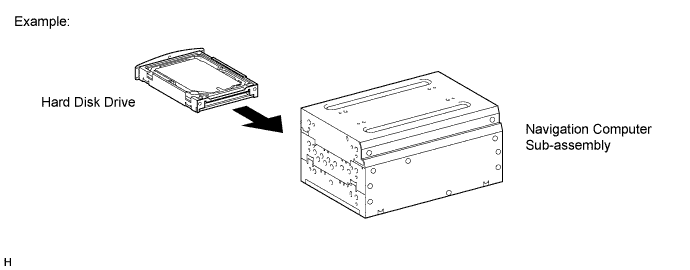
When it is necessary to replace the navigation computer sub-assembly, be sure to replace it with a new one.
Do not apply any vibration or shock to the navigation computer sub-assembly.
Do not remove the navigation computer sub-assembly if there is a risk that condensation may occur.
Take measures to prevent static electricity.
Keep the navigation computer sub-assembly away from magnets or magnetized items.
| 3.PRECAUTIONS FOR HARD DISK DRIVE (HDD) |
Map and other data for the navigation system is stored on the Hard Disk Drive (HDD). Make sure to follow the following instructions when replacing the HDD:
The HDD must only be replaced with a new one. Do not attempt to install a used HDD from another vehicle.
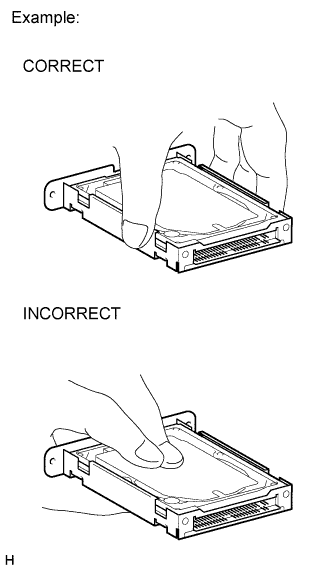 |
Do not touch the HDD cover.
Do not apply any vibration or shock to the HDD.
Do not remove the HDD if there is a risk that condensation may occur.
Take measures to prevent static electricity.
Keep the HDD away from magnets or magnetized items.
Inspect after HDD replacement.
| 4.PRECAUTIONS FOR CENTER INSTRUMENT CLUSTER FINISH PANEL ASSEMBLY |
When disassembling the center instrument cluster finish panel assembly, remove it without damaging the driving parts or catching foreign objects, and store it.
When assembling the center instrument cluster finish panel assembly, install it without damaging the driving parts or catching foreign objects.
