CENTER AIRBAG SENSOR ASSEMBLY > INSTALLATION |
| 1. INSTALL AIRBAG SENSOR ASSEMBLY |
Check that the power switch is off.
Check that the cable is disconnected from the negative (-) auxiliary battery terminal.
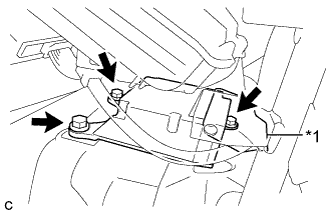 |
Install the airbag sensor assembly with the 3 bolts.
| *1 | Waterproof Sheet |
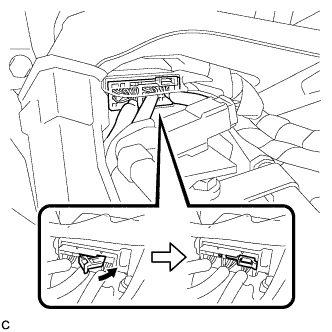 |
Connect the connectors to the airbag sensor assembly as shown in the illustration.
Check that the waterproof sheet is properly set.
Check that there is no looseness in the installation parts of the airbag sensor assembly.
| 2. INSTALL NO. 5 DISC PLAYER BRACKET (w/ Navigation System for DVD) |
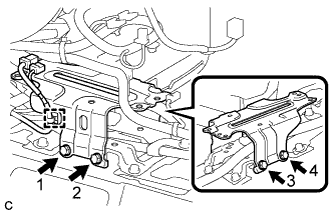 |
Install the No. 5 disc player bracket with the 4 bolts.
Engage the clamp.
| 3. INSTALL MULTI-MEDIA MODULE ASSEMBLY (w/ Navigation System for DVD) |
Install the multi-media module assembly with the 4 bolts.
Connect the 2 connectors.
| 4. INSTALL NO. 3 CONSOLE BOX MOUNTING BRACKET (w/ Navigation System for DVD) |
Engage the 3 guides.
Install the No. 3 console box mounting bracket with the 4 bolts <A>.
Engage the clamp.
| 5. INSTALL CONSOLE BOX LH |
Engage the guide and 2 claws.
Engage the 3 clips.
Install the console box LH with the bolt <A> and clip.
| 6. INSTALL CONSOLE BOX INSERT |
Engage the 2 claws and 2 clips to install the console box insert.
| 7. INSTALL CONSOLE BOX RH |
Engage the guide and 2 claws.
Engage the 3 clips.
Install the console box RH with the bolt <A> and clip.
| 8. INSTALL FRONT NO. 2 CONSOLE BOX INSERT |
Engage the 5 claws to install the front No. 2 console box insert.
| 9. INSTALL INTEGRATION CONTROL AND PANEL ASSEMBLY |
Connect each connector.
Engage the clamp.
Engage the 2 guides and 6 claws to install the integration control and panel assembly.
| 10. INSTALL SHIFT LEVER KNOB SUB-ASSEMBLY |
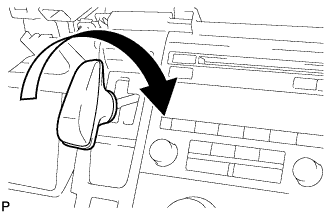 |
Turn the shift lever knob clockwise and install the shift lever knob sub-assembly.
| 11. INSTALL LOWER NO. 2 INSTRUMENT PANEL AIRBAG ASSEMBLY |
| 12. INSTALL REAR CONSOLE BOX ASSEMBLY |
