MULTI-DISPLAY > REMOVAL |
| 1. REMOVE CENTER INSTRUMENT PANEL REGISTER ASSEMBLY |
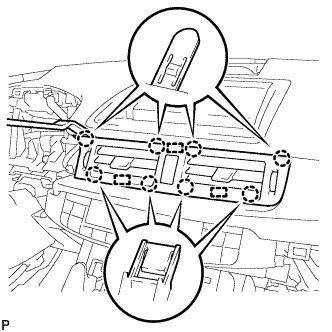 |
Using a moulding remover, disengage the 8 claws and 3 guides.
Disconnect the connector and remove the center instrument panel register assembly.
| 2. REMOVE INSTRUMENT CLUSTER FINISH PANEL SUB-ASSEMBLY |
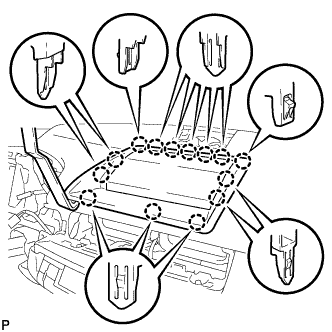 |
Using a moulding remover, disengage the 14 claws.
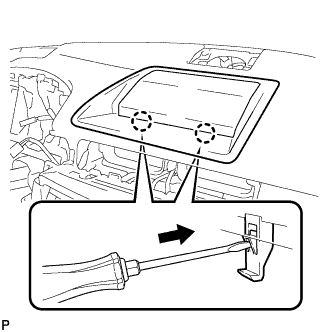 |
Using a screwdriver, disengage the 2 claws and remove the instrument cluster finish panel sub-assembly as shown in the illustration.
| 3. REMOVE MULTI-DISPLAY SUB-ASSEMBLY |
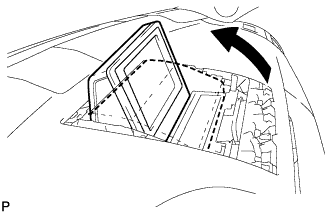 |
Push the outside part of the multi-display and tilt it as shown in the illustration.
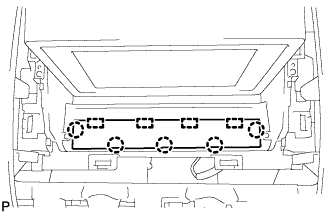 |
Disconnect the 5 claws.
Disengage the 4 guides and remove the instrument panel finish panel end.
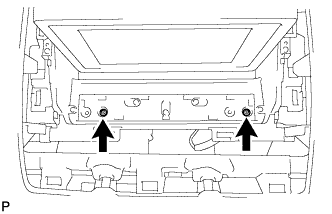 |
Remove the 2 screws.
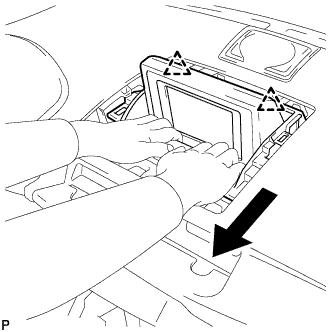 |
Disengage the 2 clips as shown in the illustration.
Disengage the clamp.
Disconnect earth connector and remove the multi-display sub-assembly.
