TELEVISION CAMERA > INSTALLATION |
| 1. INSTALL REAR TELEVISION CAMERA ASSEMBLY |
Install the rear television camera assembly with the screw.
Install the bolt.
Connect the connector.
| 2. INSTALL BACK DOOR TRIM BOARD ASSEMBLY |
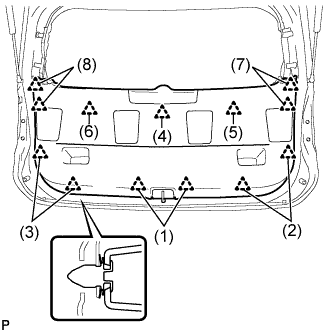 |
Engage the 13 clips to install the back door trim board assembly.
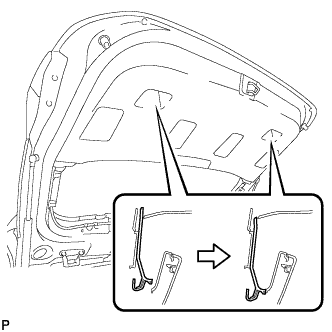 |
Slide the handle plate of the back door trim board to engage it.
| 3. INSTALL BACK DOOR SIDE GARNISH LH |
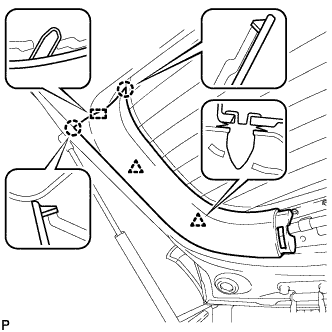 |
Engage the 2 clips, 2 claws and guide to install the back door side garnish LH.
| 4. INSTALL BACK DOOR SIDE GARNISH RH |
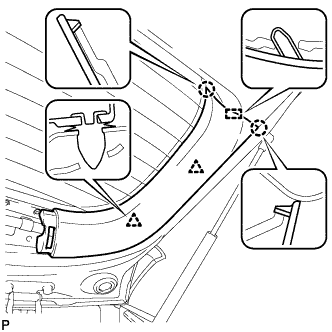 |
Engage the 2 clips, 2 claws and guide to install the back door side garnish RH.
| 5. INSTALL UPPER BACK DOOR TRIM PANEL ASSEMBLY |
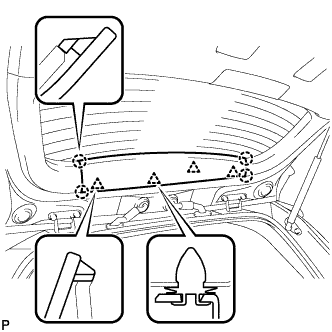 |
Engage the 4 clips and 4 claws to install the upper back door trim panel assembly.
| 6. ADJUST REAR TELEVISION CAMERA OPTICAL AXIS |
