DTC    B15B8    Harddisk Malfunction

for Preparation Click here


DESCRIPTION

This DTC is stored when the hard disk drive which is built into the navigation computer sub-assembly has an initialization malfunction or read/write errors occur more than a specified number of times.

DTC No.
DTC Detection Condition
Trouble Area
B15B8
Hard Disk Drive (HDD) malfunction
Hard disk drive

INSPECTION PROCEDURE

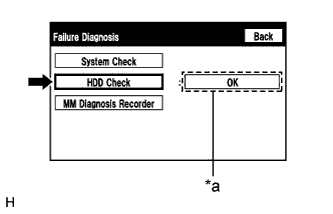
1.CHECK HARD DISK DRIVE (OPERATION CHECK)


    E210212E03
  1. Enter the "Failure Diagnosis" screen. Refer to Check Hard Disk Drive in Operation Check (Click here).

  1. Select "HDD Check" and check the result.

    OK:
    "OK" is displayed.

    HINT:
    1. After selecting "HDD Check", it may take a while until the result is displayed.
    2. If the cabin temperature is -20°C (-4°F) or lower, or 65°C (149°F) or higher, the HDD may not operate normally, and "NG" may be shown on the display. Make sure to perform the inspection with the cabin at an appropriate temperature.

Text in Illustration 
*a
Result


NG
REPLACE HARD DISK DRIVE (Click here)
OK


2.CHECK DTC
  1. Clear the DTCs (Click here).

  1. Recheck for DTCs and check if the same DTCs are output again.

    OK:
    No DTCs are output.

    HINT:
    The hard disk drive may be malfunctioning even if DTC B15B8 is not output.


NG
REPLACE HARD DISK DRIVE (Click here)
OK

USE SIMULATION METHOD TO CHECK (Click here)