NAVIGATION SYSTEM (for DVD) > No Feedback Force Provided by Knob of Remote Touch |
| 1.REMOTE TOUCH SELF CHECK (REMOTE TOUCH SWITCH KNOB FEEDBACK FORCE GENERATION CHECK) |
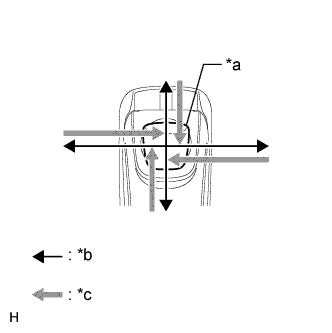 |
Check the remote touch switch knob feedback force generated.
Move the remote touch switch knob up, down, right and left to check that feedback force is generated.
| *a | Switch Knob |
| *b | Control Direction |
| *c | Feedback Force |
|
| ||||
| OK | |
 |
| 2.REMOTE TOUCH SELF CHECK (FEEDBACK FORCE FUNCTION) |
Check feedback force function
Move the pointer on the screen by operating the remote touch switch knob and check that the feedback force of the knob changes according to the screen being displayed and the pointer position.
| Result | Proceed to |
| Feedback force of the remote touch switch knob does not change according to the screen being displayed and the pointer position. | A |
| Feedback force of the remote touch switch knob changes according to the screen being displayed and the pointer position. | B |
|
| ||||
| A | ||
 | ||
| ||

