NAVIGATION SYSTEM (for DVD) > Knob of Remote Touch Moves Spontaneously |
| 1.CONFIRM SYMPTOMS |
Recheck the situation in which the malfunction occurs.
| Result | Proceed to |
| Symptom occurs in any situation. | A |
| Remote touch switch knob moves to the center when the power switch is turned on (ACC). | B |
| Symptom occurs when driving on a rough road causes the vehicle to lurch or shake around. | B |
|
| ||||
| A | |
 |
| 2.CHECK FOR FOREIGN OBJECT |
Check if there are any foreign objects around the remote touch switch knob that interfere with knob operation.
|
| ||||
| OK | |
|
| 3.REMOTE TOUCH SELF CHECK (REMOTE TOUCH SWITCH KNOB FEEDBACK FORCE GENERATION CHECK) |
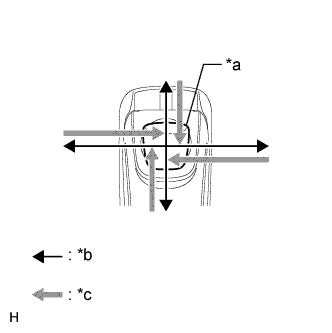 |
Check the remote touch switch knob feedback force.
Move the remote touch switch knob up, down, right and left to check that feedback force is generated.
| *a | Switch Knob |
| *b | Control Direction |
| *c | Feedback Force |
|
| ||||
| OK | ||
 | ||
| ||

