NAVIGATION SYSTEM / MULTI INFORMATION SYSTEM > GENERAL |
| OUTLINE |
A pop-up type multi display, located in the top part of the instrument panel, is used to help ensure visibility by reducing the need for the driver to take their eyes off the road while driving. The display consists of a wide 7.0-inch Liquid Crystal Display (LCD).
Multi display can be opened or closed by pushing the OPEN/CLOSE switch located in center console. Moreover, the angle of the display can be adjusted to 4 positions by pushing the TILT switch.
Light Emitting Diodes (LEDs) are used to provide mercury-free backlighting for the multi display. This reduces the burden on the environment and ensures brightness.
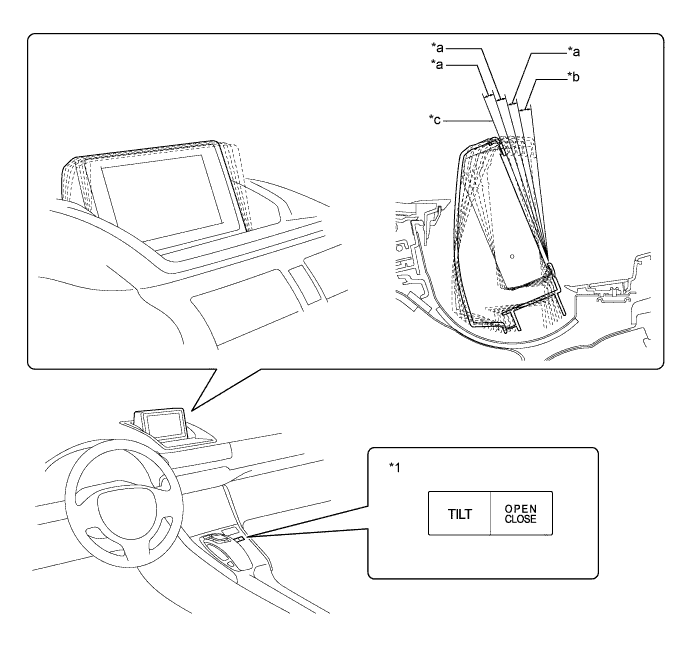
| *1 | Multi-display Switch | - | - |
| *a | 4 ° | *b | 5 ° |
| *c | Open | - | - |
Due to the optimally positioned multi-display assembly screen, the Remote Touch has been adopted, ensuring operability while driving.
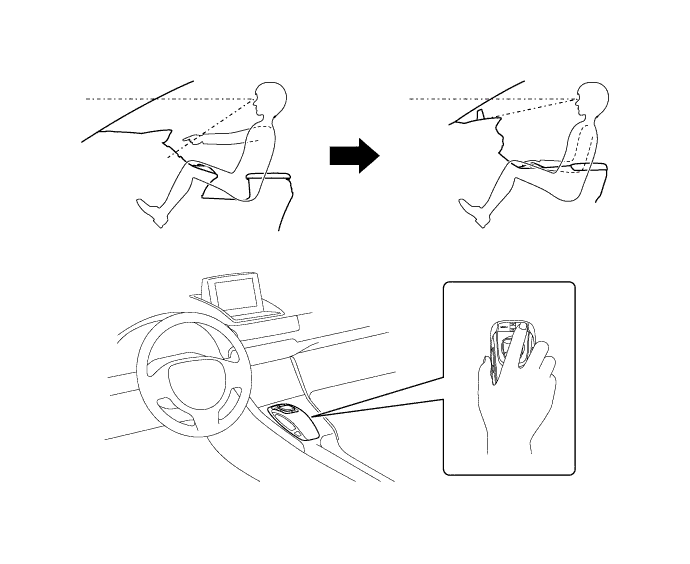
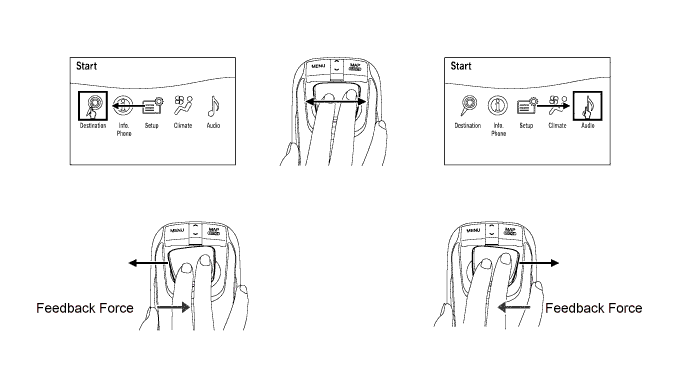
A 2-axis mechanism is adopted for the Remote Touch. Motors in the remote operation board portion of the device provide feedback (feedback force) which is similar to a click. This feedback is transmitted to the users hand according to the operation of the cursor on the screen to facilitate selecting buttons or icons and ensure operability while driving.
A Hard Disk Drive (HDD) is provided as standard on the display and navigation module display on models for Europe.
The HDD for the display and navigation module display can be supplied separately, enhancing serviceability.
For details, refer to the Repair Manual.

| *1 | Hard Disk Drive | *2 | Navigation Computer Sub-assembly |
The language of the screen buttons, pop-up messages and voice guidance can be selected from the list below.
| Support | Destination | |||
| Europe | G.C.C. Countries | Australia | Thailand | |
| English, German, French, Italian, Dutch, Spanish, Swedish, Danish, Norwegian, Portuguese, Polish, Russian, Greek, Finnish | English | English | English, Thai |
| Voice guidance | English, German, French, Italian, Dutch, Spanish, Swedish, Danish, Norwegian, Portuguese, Polish, Russian, Greek, Finnish | English, Arabic | English | English, Thai |
| SPECIFICATION |
| Component | Destination | ||||
| Europe | G.C.C. Countries | Australia | Thailand | ||
| Multi Display | 7.0-inch wide LCD | ||||
| Navigation ECU | Aisin AW (Separate from Multi Display) | DENSO (Separate from Multi Display) | Aisin AW (Separate from Multi Display) | ||
| Gyro Sensor | Piezoelectric Ceramic Piece | ||||
| HDD (Hard Disc Drive) | Capacity 40GB | - | - | - | |
| Map Data Media | HDD | DVD | |||
| Language Supported | Voice Guidance | English, German, French, Italian, Dutch, Spanish, Swedish, Danish, Norwegian, Portuguese, Polish, Russian, Greek, Finnish | English, Arabic | English | English, Thai |
| Voice Recognition | English, German, French, Italian, Dutch, Spanish, Russian | - | - | - | |
| MAIN FEATURES |
Multi-display Assembly
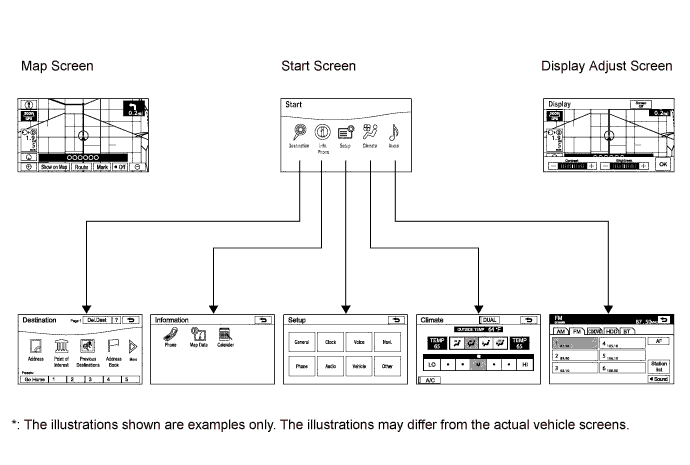
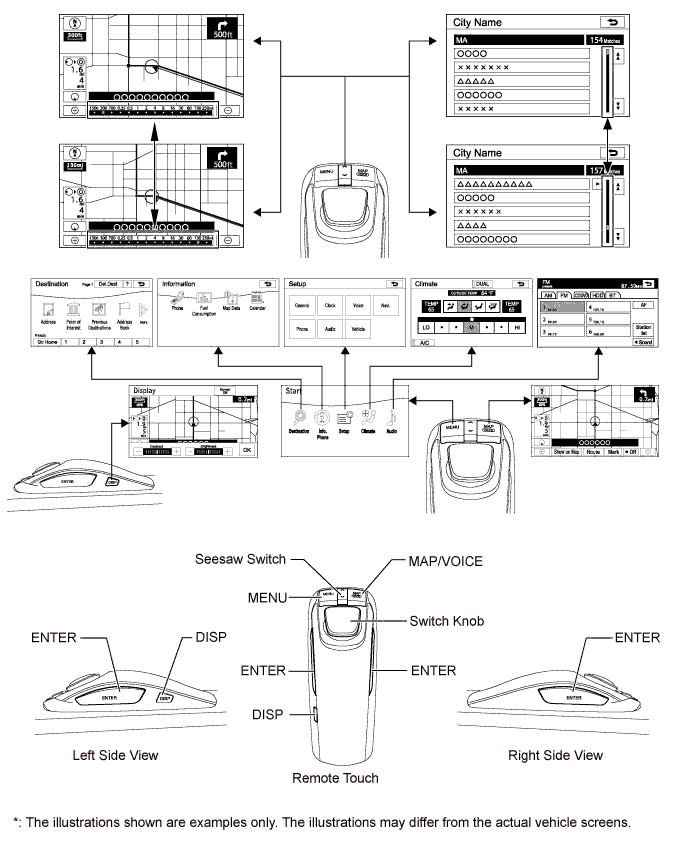
An exclusive hierarchical structure is used for each screen displayed on the multi-display assembly in consideration of the Remote Touch.

All panel buttons that were previously provided on the touch panel are brought together on the Remote Touch. In addition, a seesaw switch is provided to make it easier to change the map scale and scroll the screen.
To operate the Remote Touch, the MENU button is pressed to display the start screen. From this screen, Destination, Info./Phone, Setup, Climate or Audio, can be selected to operate each function.

| Switch | Function |
| MENU | Displays the start screen. |
| Seesaw Switch | Changes the map scale and scrolls the screen. |
| MAP/VOICE |
|
| Switch Knob | Moves the pointer displayed on the screen. |
| ENTER | Selects the icon in the cursor highlighted by the pointer. |
| DISP | Transits to the display adjust screen. |
The main functions of the multi-display assembly are listed below.
| Function | Outline | |
| Navigation System | Through the use of the Global Positioning System (GPS) and map data which is stored on a HDD or DVD, the navigation system analyzes the position of the vehicle and indicates the position on the map that is displayed on the screen. In addition, it is possible to use the system to register memory points and navigate to a destination. | |
| Audio/Video System | Serves as the display and controls for the following:
| |
| Air Conditioning System | The operation and control of the air conditioning system can be performed through the use of the automatic air conditioning switches displayed on the multi-display assembly. | |
| Hands-free System | When a Bluetooth-compatible cellular telephone is registered to the multi-display assembly, the driver can make and receive calls or talk hands-free on the cellular telephone by operating the switches on the screen/switch and volume control panel. | |
| Speech Command System | Operates the navigation, audio, and air conditioning systems based on voice commands. | |
| Parking Assist Monitor System | Displays a view of the area behind the vehicle that is captured by the television camera when the reverse (R) is selected. | |
| LEXUS Parking Assist-sensor System*3 | Detects obstacles and displays information on the multi display to inform the driver. | |
| Others | Maintenance Information | Can be used to inform the driver of the inspection or replacement timing for the following items based on the calendar function and distance driven.
|
| Calendar*4 | The calendar screen is displayed using time information from the GPS. | |
| Calendar with Memo*5 |
| |
| Language Select | The language of the screen buttons, pop-up messages and the voice guidance can be changed. | |
| Beep Setting | The beep sound can be turned off. | |
| Screen Setting | This enables automatic return to the navigation screen from the audio screen. | |
| Keyboard Layout | The keyboard layout can be changed. | |
| Delete Personal Data | The following personal data can be deleted or returned to their default settings:
| |
| Screen Adjustment | The brightness or contrast of the screen can be adjusted to suit the brightness of the surroundings. | |
| Diagnosis | This menu contains the following items:
| |