Do not rely entirely on the monitor system. Use caution, just as you would when backing up any vehicle.
Never back up while looking only at the screen. The image on the screen may differ from actual conditions. If you back up while looking only at the screen, you may hit an object or have an accident. When backing up, be sure to check by looking behind and all around the vehicle, both directly and using the mirrors, before proceeding.
Depending on the number of occupants, the load conditions, the slope of the road, and bumps in the road, a disparity may occur between the display indication and the actual distance to the road surface. Operate the vehicle carefully.
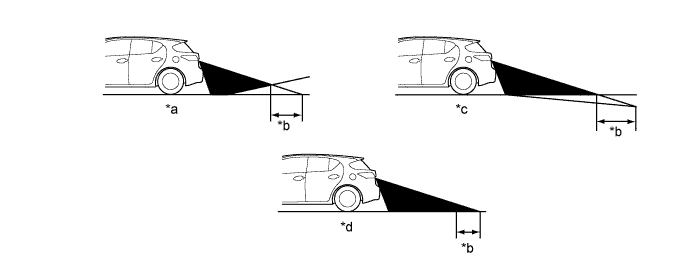
Text in Illustration *a Steep Uphill Incline behind Vehicle *b Disparity *c Steep Downhill Incline behind Vehicle *d Vehicle Posture Changed by Passengers and Load If a steep uphill incline is behind the vehicle, an obstacle appears to be further away than it actually is, as shown in the illustration below.
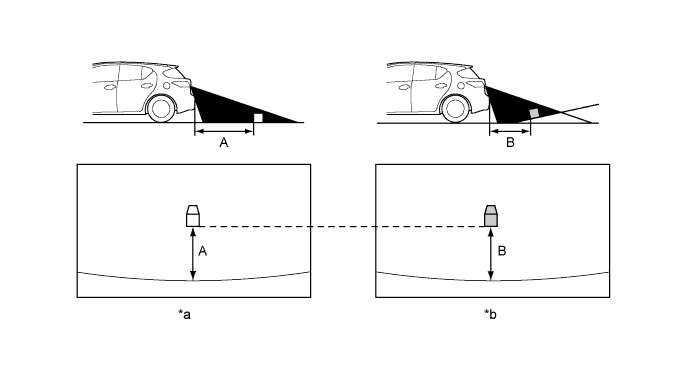
Text in Illustration *a Screen Image in Case A *b Screen Image in Case B Drive carefully when any 3-dimensional objects such as walls or vehicles are behind the vehicle as the distance and estimated guide lines are provided based on the road surface.
- The distance indication as shown on the screen varies between 3-dimensional objects, such as a vehicle, and objects on a flat plane, such as the road surface. As shown in the following illustrations, points A and B are actually vertically in the same position and point C is a bit away from them, however, the points are displayed in order of distance from the vehicle, B, C and A. Therefore, the vehicle will come into contact with the 3-dimensional object if is backed to point B on the screen.
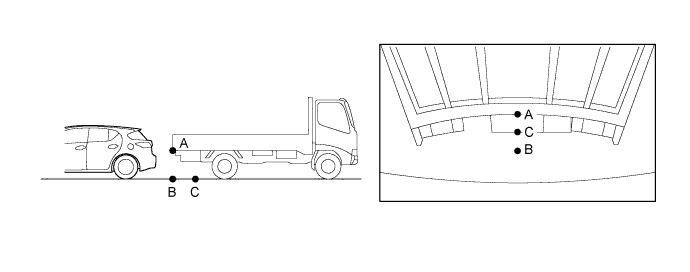
- The distance indication as shown on the screen varies between 3-dimensional objects, such as a vehicle, and objects on a flat plane, such as the road surface. As shown in the following illustrations, points A and B are actually vertically in the same position and point C is a bit away from them, however, the points are displayed in order of distance from the vehicle, B, C and A. Therefore, the vehicle will come into contact with the 3-dimensional object if is backed to point B on the screen.
In the following cases, it may become difficult to see items in the image on the screen, but this does not indicate a malfunction.
In the dark (for example, at night).
When the temperature near the lens is very high or low.
When the rear television camera assembly has scratches or dirt on it.
When water droplets are present on the rear television camera assembly, or when humidity is high (for example, when it rains).
When foreign matter (for example, mud or salt) is present on the rear television camera assembly lens.
When the sun or the beam of headlights shines directly into the rear television camera assembly lens.
When the camera is used under fluorescent lights, sodium lights, or mercury lights etc., the lights and the illuminated area may appear to flicker.
When a bright object such as the white wall of a building is reflected in the mirror surface over the monitor.
If a bright light (for example, sunlight reflected off the vehicle body) is picked up by the rear television camera assembly, the smear effect*, peculiar to a CCD camera, may occur.
- HINT:
- *: A phenomenon that occurs when a bright light is received by the rear television camera assembly, and transmitted to the screen, the light source will appear to have a vertical streak above and below it.

| *1 | Bright Light | *2 | Vertical Streak |