 |
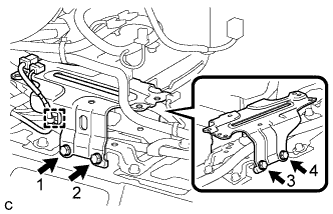
Install the No. 5 disc player bracket with the 4 bolts.
- NOTICE:
- Tighten the 4 bolts in the order shown in the illustration.
YAW RATE AND ACCELERATION SENSOR > INSTALLATION |
| 1. INSTALL YAW RATE AND ACCELERATION SENSOR |
Connect the yaw rate and acceleration sensor connector.
Install the yaw rate and acceleration sensor with the 2 bolts.
| 2. INSTALL NO. 5 DISC PLAYER BRACKET (w/ Navigation System for DVD) |
|
Install the No. 5 disc player bracket with the 4 bolts.
Engage the clamp.
| 3. INSTALL MULTI-MEDIA MODULE ASSEMBLY (w/ Navigation System for DVD) |
Install the multi-media module assembly with the 4 bolts.
Connect the 2 connectors.
| 4. INSTALL NO. 3 CONSOLE BOX MOUNTING BRACKET (w/ Navigation System for DVD) |
Engage the 3 guides.
Install the No. 3 console box mounting bracket with the 4 bolts <A>.
Engage the clamp.
| 5. INSTALL CONSOLE BOX RH (w/ Navigation System for DVD) |
Engage the guide and 2 claws.
Engage the 3 clips.
Install the console box RH with the bolt <A> and clip.
| 6. INSTALL FRONT NO. 2 CONSOLE BOX INSERT (w/ Navigation System for DVD) |
Engage the 5 claws to install the front No. 2 console box insert.
| 7. INSTALL CONSOLE BOX LH |
Engage the guide and 2 claws.
Engage the 3 clips.
Install the console box LH with the bolt <A> and clip.
| 8. INSTALL CONSOLE BOX INSERT |
Engage the 2 claws and 2 clips to install the console box insert.
| 9. INSTALL INTEGRATION CONTROL AND PANEL ASSEMBLY |
Connect each connector.
Engage the clamp.
Engage the 2 guides and 6 claws to install the integration control and panel assembly.
| 10. INSTALL SHIFT LEVER KNOB SUB-ASSEMBLY |
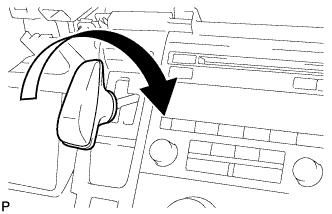 |
Turn the shift lever knob clockwise and install the shift lever knob sub-assembly.
| 11. INSTALL REAR CONSOLE BOX ASSEMBLY |
| 12. CONNECT CABLE TO NEGATIVE AUXILIARY BATTERY TERMINAL |
| 13. PERFORM YAW RATE AND ACCELERATION SENSOR ZERO POINT CALIBRATION |