LUGGAGE COMPARTMENT DOOR GARNISH > INSTALLATION |
| 1. INSTALL LUGGAGE COMPARTMENT DOOR GARNISH SUB-ASSEMBLY OUTSIDE |
 |
Attach the 7 clips to install the garnish.
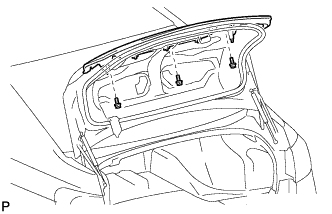 |
Install the garnish with the 3 nuts.
| 2. INSTALL REAR COMBINATION LIGHT ASSEMBLY |
 |
Install the gasket to the combination light.
Install the combination light bulb to the combination light socket and wire.
Install the combination light bulb socket and wire to the combination light.
 |
Install the combination light with the 3 nuts.
| 3. INSTALL TELEVISION CAMERA ASSEMBLY (w/ Rear View Monitor System) |
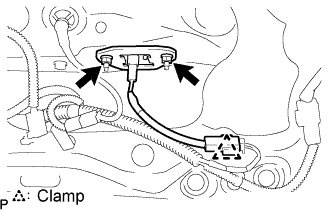 |
Install the television camera with the 2 nuts.
Attach the television camera connector clamp.
Connect the television camera connector.
| 4. INSTALL LUGGAGE COMPARTMENT DOOR COVER |
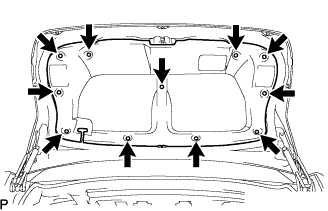 |
Install the door cover with the 11 clips.
| 5. INSTALL LUGGAGE COMPARTMENT DOOR ASSIST GRIP |
 |
Install the assist grip with the 2 screws.
 |
Attach the 4 claws to install the assist grip cover.
| 6. CONNECT CABLE TO NEGATIVE BATTERY TERMINAL |
| 7. PERFORM INITIALIZATION |
Perform initialization (Click here).
| 8. CHECK SRS WARNING LIGHT |
Check the SRS warning light (Click here).
