NAVIGATION SYSTEM > Voice Guidance does not Function |
| 1.CHECK NAVIGATION SYSTEM SETTING |
 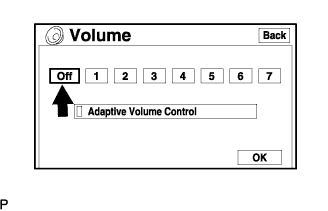 |
Enter the menu screen by pressing the "MENU" switch.
Select "Volume".
Check that "OFF" is not selected.
|
| ||||
| OK | |
 |
| 2.CHECK NAVIGATION SETTING |
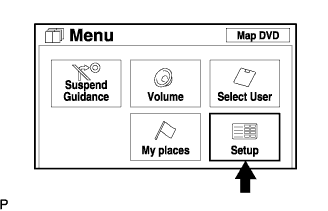  |
Check the "MENU" screen by pressing the "MENU" switch.
Select "Setup".
Check that "Auto Voice Guidance" is not OFF.
Check that "Voice Guidance in All Modes" is ON.
|
| ||||
| OK | |
|
| 3.CHECK MAP DISC |
 |
Check that the map disc is not deformed or cracked.
|
| ||||
| OK | |
|
| 4.CHECK RADIO RECEIVER ASSEMBLY |
Check that audio sound can be heard from the driver side speaker.
|
| ||||
| OK | ||
 | ||
| ||

