NAVIGATION SYSTEM > Voice Recognition Difficulty |
| 1.CHECK CONDITION |
Check if the system's voice recognition ability is low with one person's voice.
|
| ||||
| OK | |
 |
| 2.CHECK MAP DISC |
 |
Check that the map disc is not deformed or cracked.
|
| ||||
| OK | |
|
| 3.CHECK MAP DISC |
 |
Check for dirt on the map disc surface.
|
| ||||
| OK | |
|
| 4.CHECK MICROPHONE (NAVIGATION CHECK MODE) |
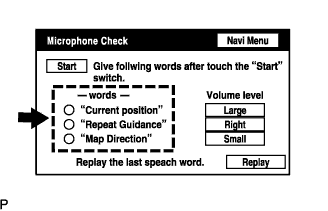 |
Enter the "Navigation Check" mode (Click here).
Follow the directions on the screen. Check that the word recognition indicator is displayed in green for each item.
|
| ||||
| OK | ||
 | ||
| ||

