REAR VIEW MONITOR SYSTEM > DTC CHECK / CLEAR |
| DIAGNOSTIC START-UP/FINISH |
There are 2 methods to start diagnostic mode.
 |
Method 1
Start the engine.
While pressing and holding the "INFO" switch, turn the light control switch as follows: TAIL → OFF → TAIL → OFF → TAIL → OFF.
The diagnostic mode starts and the "System Check Mode" screen will be displayed. Service inspection starts automatically and the result will be displayed.
 |
Method 2
Start the engine.
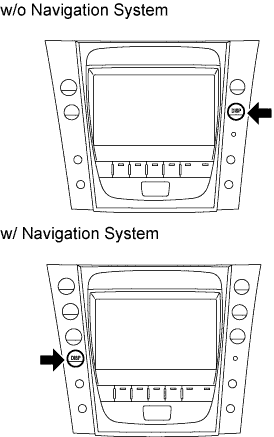
Press the "DISP" switch.
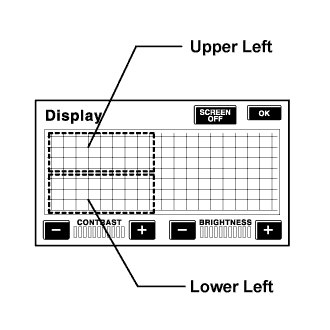 |
Touch the corners of the screen in the following order: upper left → lower left → upper left → lower left→ upper left → lower left.
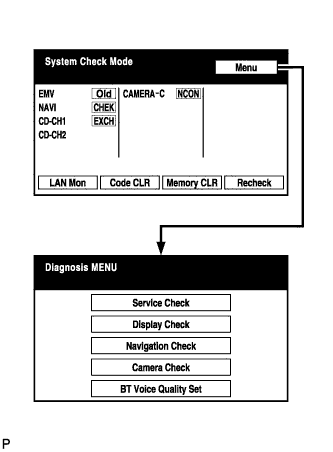
The diagnostic mode starts and the "System Check Mode" screen will be displayed. Service inspection starts automatically and the result will be displayed.
 |
Diagnosis MENU
The "Diagnosis MENU" screen will be displayed by pressing Menu on the "System Check Mode" screen.
| FINISH DIAGNOSTIC MODE |
There are 2 methods to end diagnostic mode.
Turn the engine switch off.
Press and hold the "DISP" switch for 3 seconds.
| CHECK DTC |
Start diagnostic mode.
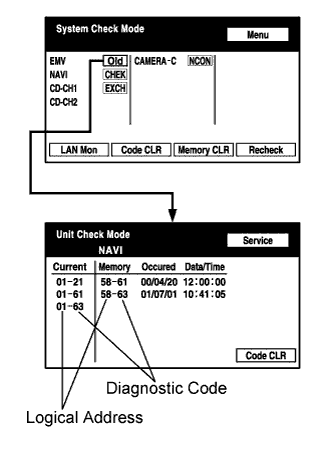 |
Read the system check result.
If the check result is "EXCH", "CHEK" or "Old", touch the display to check its contents.
 |
Read the communication diagnostic check result.
Return to the "System Check Mode" screen, and press LAN Mon to enter the "LAN monitor" screen.
 |
If the check result is "CHEK" or "Old", touch the display to check its contents.
| CLEAR/RECHECK DTC |
 |
Start diagnostic mode.
Clear DTC
Press Code CLR for 3 seconds.
DTC is cleared.
 |
Recheck
Press Recheck.
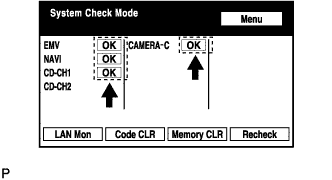 |
Confirm that all diagnostic codes are "OK" when the check results are displayed.
If a code other than "OK" is displayed, perform troubleshooting again.
 |
Press LAN Mon to change to the "LAN Monitor" screen.
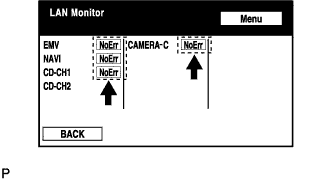 |
Confirm that all diagnostic codes are "No Err".
If a code other than "No Err" is displayed, perform troubleshooting again.
