REPAIR INSTRUCTION > CUSTOMIZE PARAMETERS |
| AIR CONDITIONING SYSTEM |
| Display (Item) | Default | Contents | Setting |
| Set Temperature Shift | NORMAL | To control with the shifted temperature against the display temperature | +2 C / +1 C / NORMAL / -1 C / -2 C |
| Air Inlet Mode | AUTO | In case of turning the A/C ON when you desire to make the compartment cool down quickly, this is the function to change the mode automatically to RECIRCULATION mode | MANUAL / AUTO |
| Compressor Mode | AUTO | Function to turn the A/C ON automatically by pressing the AUTO button when the blower is ON and the A/C is OFF | MANUAL / AUTO |
| Compressor / Air Inlet DEF Operation | LINK | Function to turn the A/C ON automatically linked with the FRONT DEF button when A/C OFF | MANUAL / LINK |
| Evaporator Control | AUTO | Function to set the evaporator control to the AUTOMATIC position (AUTO) to save power, or to the coldest position (MANUAL) to dehumidify the air and to prevent the windows from fogging up | MANUAL / AUTO |
| Emission Gas Sensor Shift | NORMAL | Function to change the sensitivity of the exhaust gas sensor | MU MORE / MORE / LI MORE / NORMAL / LI LESS / LESS / MU LESS |
| Button Press Buzzer | ON | Function to sound a buzzer when button is pressed | OFF / ON |
| Foot / DEF Auto Mode | ON | Function to turn the airflow from FOOT / DEF ON automatically when AUTO MODE is ON | OFF / ON |
| Foot / DEF Automatic Blow Up Function | ON | Function to change the blower level automatically when the defroster is ON | OFF / ON |
| Ambient Temperature Shift | NORMAL | Function to control the shifted ambient temperature in relation to the displayed ambient temperature | +3 C / +2 C / +1 C / NORMAL / -1 C / -2 C / -3 C |
| Foot Air Leak | ON | Function to cut off the airstream felt underfoot while the vehicle is moving | OFF / ON |
| LIGHTING SYSTEM |
| Display (Item) | Default | Contents | Setting |
| I/L when ACC OFF | ON | Function to light interior light when engine switch is operated from" on (IG)" to "off " | ON / OFF |
| Lighting Time | 15s | To change lighting time after closing the door (It will quickly fade out in case of turning engine switch on (IG)) | 7.5s / 15s / 30s |
| Light Control | ON | Function to light up step light and door inside handle light when engine switch is on (IG) and shift position is not P | ON / OFF |
| I/L ON W / UNLOCK | ON | Function to light interior light, etc. when the door is unlocked with a transmitter, door key or door lock control switch | ON / OFF |
| Seat Light Control | AVAIL | Function to light up seat light when unlocking with door key cylinder | NOT AVL / AVAIL |
| Steering Light Control | AVAIL | Function to light up steering light when unlocking with door key cylinder | NOT AVL / AVAIL |
| Shift Light Control | AVAIL | Function to light up shift light when unlocking with door key cylinder. | NOT AVL / AVAIL |
| DISPLAY (ITEM) | DEFAULT | CONTENTS | SETTING |
| Sensitivity | NORMAL | To adjust sensitivity of lighting illumination *2 | LIGHT2 / LIGHT1 / NORMAL / DARK1 / DARK2 |
| Disp Ex ON Sen | NORMAL | To change brightness of lowering lights such as indicator light of the combination meter, A/C indicator light clock *3 | LIGHT2 / LIGHT1 / NORMAL / DARK1 / DARK2 |
| Disp Ex OFF Sen | NORMAL | To change brightness of canceling lowering lights such as indicator light of combination meter, A/C indicator light clock*4 | LIGHT2 / LIGHT1 / NORMAL / DARK1 / DARK2 |
| Foot Light Time (Driver's Side) | 15s | Function to set how long foot light stays on (driver's side) | OFF / 7.5s / 15s / 30s |
| Foot Light Time (Passenger's Side) | 15s | Function to set how long foot light stays on (passenger's side) | OFF / 7.5s / 15s / 30s |
| Foot Light Set Up | ON | ON / OFF of light for the foot lights | ON / OFF |
| Response Time *1 | 0.15s | To change delay timing of lighting taillight when going into a tunnel in case light control switch is at AUTO position | 1.0s / 0.15s |
| CLEARANCE SONAR SYSTEM (INTELLIGENT TESTER) |
| Display (Item) | Default | Contents | Setting |
| Front Buzzer Onset Range | Wide | Function to set front buzzer activation range | Narrow / Wide |
| Rear Buzzer Onset Range | Wide | Function to set rear buzzer activation range range | Narrow / Wide |
| Keep Sense Status Buzzer | ON | Function to make buzzer sound when distance between vehicle and obstacle does not change for more than 3 seconds. | ON / OFF |
| Fr & Rr Buzzer Volume | M2 | Function to change volume of buzzer | L / M1 / M2 / M3 / H |
| DISPLAY | DEFAULT | CONTENTS | SETTING |
| Sensor Condition N Range | OFF | Function to make sensors available when shift position is N | OFF / ON |
| Sonar Mode | Steering | Function to change sonar mode | Normal / Steering |
| DISPLAY | DEFAULT | CONTENTS | SETTING |
| Sonar Display OFF Time | 3 s | Function to change time until multi-information display turns off after sensors stop detecting obstacle | 1 s / 2 s / 3 s / 4 s |
| Display Mode | Guide | Function to change display mode | All / Guide / Undisp |
| CLEARANCE SONAR SYSTEM (MANUAL OPERATION METHOD) |
The settings shown below can be changed using customize mode. Enter customize mode by pressing and holding the clearance sonar main switch, and setting the light control switch from TAIL to OFF 3 times.
| CUSTOMIZE PARAMETERS | DEFAULT | CONTENTS | SETTING |
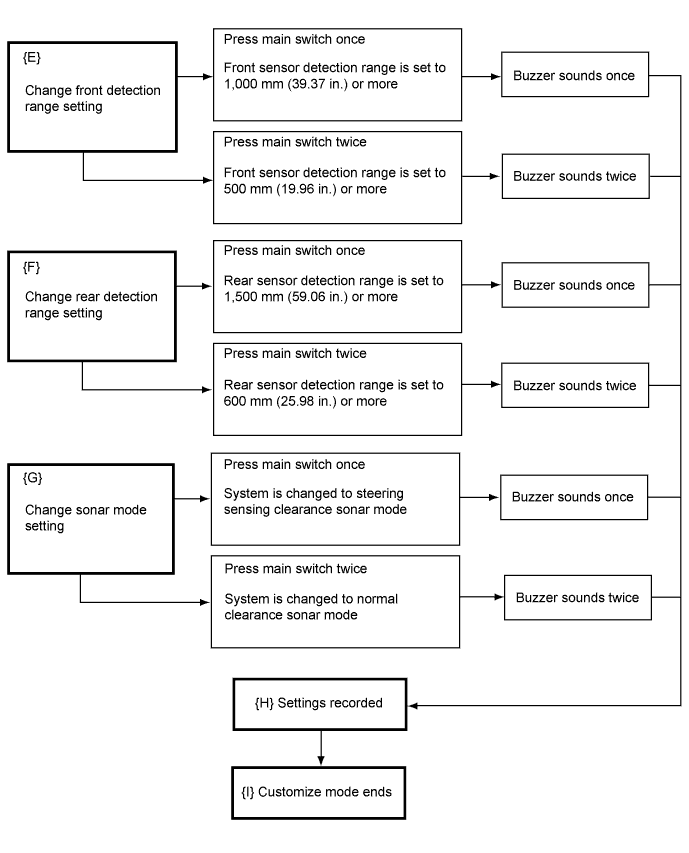
| Front detection range | 1,000 mm (39.37 in.) | Function to set a front detection range | 500 mm (19.69 in.) / 1,000 mm (39.37 in.) |
| Rear detection range | 1,500 mm (59.06 in.) | Function to set a rear detection range | 600 mm (23.62 in.) / 1,500 mm (59.06 in.) |
| CUSTOMIZE PARAMETERS | DEFAULT | CONTENTS | SETTING |
| Sonar mode | Steering sensing mode | Function to change sonar mode | Normal clearance sonar mode / Steering sensing mode |
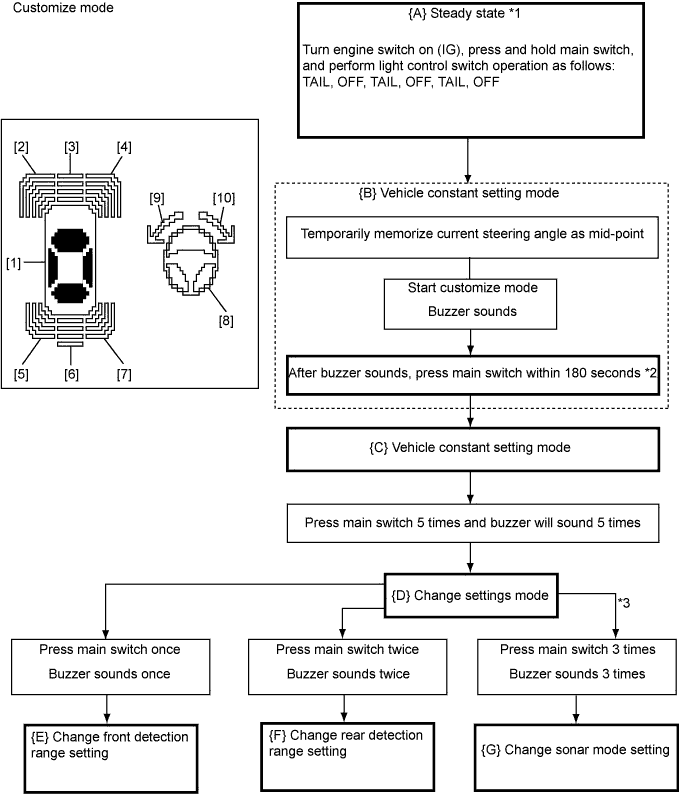
| [1] | [2] | [3] | [4] | [5] | [6] | [7] | [8] | [9] | [10] | Note | |
| {A} | ● | X | X | X | X | - | X | ▲ | ▲ | ▲ | [8], [9], [10] will illuminate if steering wheel mid-point is not set |
| {B} | ● ↓ ○ | X ↓ ○ | X | X ↓ ○ | X | - | X | ● ↓ ○ | ● ↓ ○ | ● ↓ ○ | [1], [8] to [10] will illuminate for 2 seconds, then [1], [2], [4], [8] to [10] will flash |
| {C} | ○ | ○ | X | ○ | X | - | X | X | X | X | [1], [2], [4] will flash |
| {D} | ○ | X | X | X | X | - | X | X | X | X | [1] will flash |
| {E} | ○ | ○ | X | X | ▲ | - | ▲ | X | X | X | [1], [2] will flash At the same time: If the front sensor detection area is set to 500 mm (19.69 in.), [5] will flash If the front sensor detection area is set to 1,000 mm (39.37 in.), [7] will flash |
| {F} | ○ | X | ○ | X | ▲ | - | ▲ | X | X | X | [1], [3] will flash At the same time: If the rear sensor detection area is set to 600 mm (23.62 in.), [5] will flash If the rear sensor detection area is set to 1,500 mm (59.06 in.), [7] will flash |
| {G} | ○ | X | X | ○ | ▲ | - | ▲ | X | X | X | [1], [4] will flash At the same time, if the steering sensing mode is set, [5] will flash If the normal mode is set, [7] will flash |
| {H} | ○ | ▲ | ▲ | ▲ | ▲ | - | ▲ | X | X | X | {E}, {F} and {G} will flash their changed settings for 5 seconds |
| {I} | ● | ● | ● | ● | ● | - | ● | ● | ● | ● | All except [6] will illuminate for 2 seconds |
| POWER WINDOW CONTROL SYSTEM |
| Display (Item) | Default | Contents | Setting |
| Door Key Linked P/W Up | AVAIL | Function that raises all power windows when, with engine switch off, key is used to hold driver door key cylinder to lock position for more than 1.5 seconds | AVAIL / NOT AVL |
| Door Key Linked P/W | AVAIL | Function that lowers all power windows when, with engine switch off, key is used to hold driver door key cylinder to unlock position for more than 1.5 seconds | AVAIL / NOT AVL |
| P/W Up W/ Transmitter* | AVAIL | Function that raises all power windows when, with engine switch off, lock switch is pressed and held on key for more than 1.5 seconds | AVAIL / NOT AVL |
| P/W Down W/ Transmitter | AVAIL | Function that lowers all power windows when, with engine switch off, lock switch is pressed and held on key for more than 1.5 seconds | AVAIL |
| P/W Up W/ Smart* | AVAIL | Function that raises all power windows when, with engine switch off, press and hold entry lock switch on driver side door outer handle for more than 3 seconds | AVAIL |
| POWER DOOR LOCK CONTROL SYSTEM |
| Display (Item) | Default | Contents | Setting |
| Unlock Key Twice | ON | Function that unlocks only driver side door when driver side door key cylinder is turned to unlock once, and unlock all doors when it is turned to unlock twice. For OFF setting, turning it once unlocks all doors | ON / OFF |
| WIRELESS DOOR LOCK CONTROL SYSTEM |
| Display (Item) | Default | Contents | Setting |
| Hazard Answer Back | ON | When wireless lock switch on transmitter is pressed, this function illuminates all hazard waning lights once. When unlock switch is pressed, all hazard warning lights illuminate twice | ON / OFF |
| Wireless Control | ON | ON /OFF of the wireless door lock function | ON / OFF |
| Open Door Warning | ON | If door is not completely closed and transmitter LOCK switch is pressed, this function makes buzzer sound for 10 seconds | ON / OFF |
| Trunk Lid Operation | 0.8s PR | This function changes transmitter operation method for opening luggage compartment door | 1 time / 2 times / 0.8 s PR / OFF |
| Unlock 2 Operation | All door | Pressing UNLOCK switch unlocks all doors. If setting is D door, pressing UNLOCK switch once unlocks driver side door | All door / D door |
| Auto Lock Time | 30 s | To change time until relocking after unlocking with wireless door lock function | 60 s / 30 s |
| Wireless Buzzer Resp | ON | ON / OFF on wireless buzzer response function | ON / OFF |
| ENTRY AND START SYSTEM |
| Display (Item) | Default | Contents | Setting |
| Park Wait Time (Waiting time to permit opening door after locking) | 3.0s | Function that sets waiting time to permit opening door after door is locked with entry lock function | 1.0s / 2.0s / 3.0s / 5.5s |
| Trunk Open Mode (Trunk open mode with entry when vehicle is locked) | ON | Function to permit opening a luggage compartment door with entry | ON / OFF |
| Key Lo-Batt Wrn (Warn when key battery becomes weak) | ON | Function that warns driver that key's battery power is low | ON / OFF |
| Door Unlock Mode (entry door unlock mode) | All | Function that makes entry unlock operation available | All / EACH / D-DOOR / SIDE |
| SLIDING ROOF SYSTEM |
| Display (Item) | Default | Contents | Setting |
| Door Key Related (Open) | AVAIL | Function to manually open sliding roof linked with power window if holding driver side door key for 1.5 seconds or more to unlock position when engine switch is off. | AVAIL / NOT AVL |
| Door Key Related (Close) | AVAIL | Function to manually close sliding roof linked with power window if holding driver side door key for 1.5 seconds or more to lock position when engine switch is off. | AVAIL / NOT AVL |
| Wireless Key Rel (Open) | AVAIL | Function to manually open sliding roof linked with power window if pressing transmitter UNLOCK switch for 1.5 seconds or more when engine switch is off. | AVAIL / NOT AVL |
| Door Key Rel Operation | SLIDE | Function to select tilt up or slide open of manual sliding roof operation linked with power window Activates by holding driver side door key for 1.5 seconds or more to unlock position when engine switch is off. | TILT / SLIDE |
| Wireless Key Rel Operation | SLIDE | Function to select tilt up or slide open of manual sliding roof operation linked with power window. Activates by pressing transmitter UNLOCK switch for 1.5 seconds or more when engine switch is off. | TILT / SLIDE |
| THEFT DETERRENT SYSTEM |
| Display (Item) | Default | Contents | Setting |
| Warn by Horn (Warning by horn) | ON | Function that allows vehicle horns and theft deterrent horn to be used as warning device. | ON / OFF |
| PASSIVE MODE (Passive arming mode) | OFF | Passive mode is a function that switches theft deterrent system from arming preparation state to armed state 30 seconds after key is not inside vehicle and driver side door is closed. In passive mode, theft deterrent system will judge that a theft is taking place and switch to alarm sounding state if one of the following operations are not performed within14 seconds (see entry delay below) after door is opened:
| ON / OFF |
| ENTRY DELAY (Entry delay time) | 14s | Function that changes entry delay time (time before warning starts) for PASSIVE MODE | 0 s / 14 s / 30 s |
