RADIO RECEIVER > REMOVAL |
| 1. SET RADIO RECEIVER ASSEMBLY TO SHIPMENT MODE |
Remove all discs and tapes.
Turn the engine switch off.
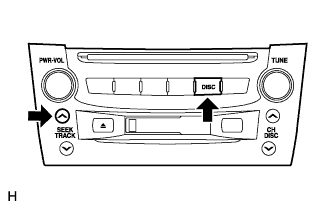 |
While simultaneously pressing the "SEEK UP" and "DISC" switches, turn the engine switch on (ACC).
 |
Turn the engine switch off.
| 2. DISCONNECT CABLE FROM NEGATIVE BATTERY TERMINAL |
| 3. REMOVE FRONT CONSOLE UPPER PANEL GARNISH |
 |
Using a clip remover, detach the claws and remove the garnish.
| 4. REMOVE CONSOLE UPPER PANEL ASSEMBLY |
 |
Twist the shift lever knob in the direction indicated by the arrow and remove it.
 |
Using a screwdriver, detach the 9 clips.
Remove the ash receptacle and then disconnect the connector.
| 5. REMOVE INSTRUMENT PANEL FINISH PANEL END LH |
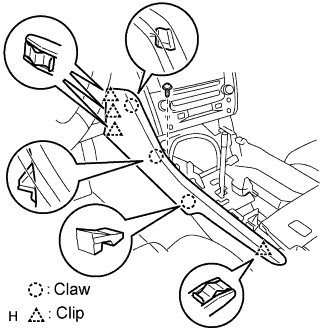 |
Remove the screw.
Using a screwdriver, detach the 4 clips and 3 claws.
Remove the finish panel end.
| 6. REMOVE INSTRUMENT PANEL FINISH PANEL END RH |
 |
Remove the screw.
Using a screwdriver, detach the 3 clips and 3 claws.
Remove the finish panel end.
| 7. REMOVE MULTI-DISPLAY WITH RADIO RECEIVER ASSEMBLY |
 |
Remove the 4 bolts.
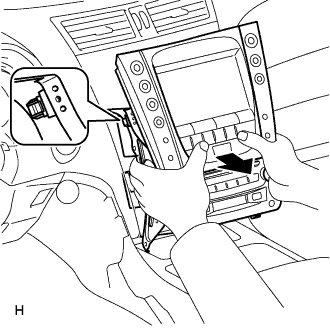 |
Pull the multi-display with radio receiver to detach the 2 clips on the backside of the multi-display.
Disconnect the connectors and remove the multi-display with radio receiver.
| 8. CONFIRM RADIO RECEIVER ASSEMBLY SHIPMENT MODE SETTING |
 |
Look at the backside of the radio receiver and check that a metal plate can be seen through the hole near the "SHIP" mark.
| 9. REMOVE NO. 2 RADIO BRACKET |
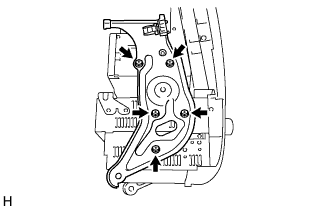 |
Remove the 5 bolts and bracket.
| 10. REMOVE NO. 1 RADIO BRACKET |
 |
Remove the 5 bolts and bracket.
| 11. REMOVE MULTI-DISPLAY |
| 12. REMOVE RADIO RECEIVER ASSEMBLY |
