CENTER POWER OUTLET SOCKET > REMOVAL |
| 1. DISCONNECT CABLE FROM NEGATIVE BATTERY TERMINAL |
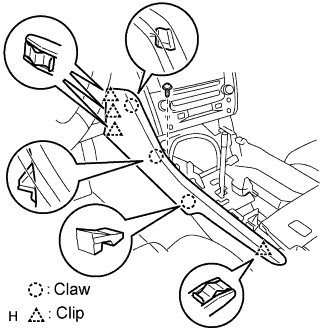
| 2. REMOVE FRONT CONSOLE UPPER PANEL GARNISH |
 |
Using a clip remover, detach the claws and remove the garnish.
| 3. REMOVE CONSOLE UPPER PANEL ASSEMBLY |
 |
Twist the shift lever knob in the direction indicated by the arrow and remove it.
 |
Using a screwdriver, detach the 9 clips.
Remove the ash receptacle and then disconnect the connector.
| 4. REMOVE INSTRUMENT PANEL FINISH PANEL END RH |
 |
Remove the screw.
Using a screwdriver, detach the 3 clips and 3 claws.
Remove the finish panel end.
| 5. REMOVE INSTRUMENT PANEL FINISH PANEL END LH |
 |
Remove the screw.
Using a screwdriver, detach the 4 clips and 3 claws.
Remove the finish panel end.
| 6. REMOVE CONSOLE BOX PLATE |
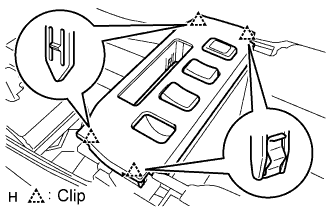 |
Using a screwdriver, detach the 4 clips.
Remove the console box plate and then disconnect the connector.
| 7. REMOVE CONSOLE BOX REGISTER ASSEMBLY |
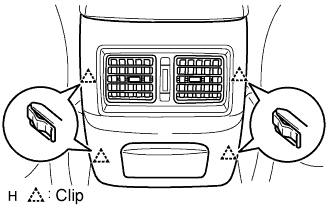 |
Using a screwdriver, detach the 4 clips and remove the register.
| 8. REMOVE CONSOLE BOX |
 |
Remove the 4 bolts and 2 screws.
Remove the console box and then disconnect the connector.
| 9. REMOVE REAR CONSOLE ARMREST ASSEMBLY |
 |
Remove the 4 screws.
Remove the rear console armrest, as shown in the illustration.
| 10. REMOVE CONSOLE BOX SUB-ASSEMBLY UPPER |
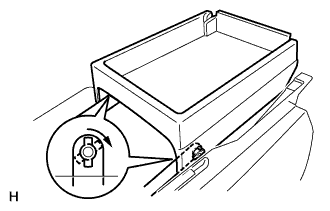 |
Remove the console box as shown in the illustration.
| 11. REMOVE POWER OUTLET SOCKET ASSEMBLY |
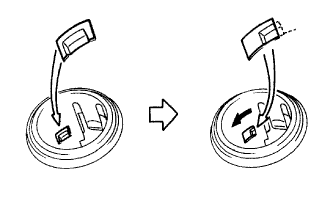 |
Rotate the socket to disengage the notch.
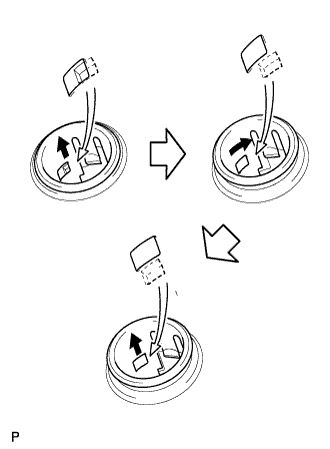 |
Pull out the socket halfway and rotate the socket until its protrusion is aligned with the groove of the cover.
Remove the socket from the cover.
