TIRE PRESSURE WARNING SYSTEM > TEST MODE PROCEDURE |
| ENTER TEST MODE |
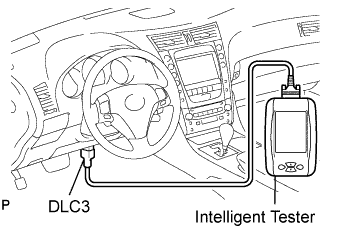 |
Make sure that the engine switch is off.
Connect the intelligent tester to DLC3.
Turn the engine switch on (IG).
Select the TEST MODE on intelligent tester.
Perform tire pressure warning reset switch test.
Press the tire pressure warning reset switch.
Check the tire pressure warning indicator light.
| Test Signal | Normal Condition |
| Tire Pressure Warning Reset Switch |
|
| PERFORM SIGNAL CHECK |
|
Make sure that the engine switch is off.
Connect the intelligent tester to DLC3.
Turn the engine switch on (IG).
Select the SIGNAL CHECK on intelligent tester.

Drive the vehicle at 12mph (20 km/h) or more for 10 seconds or more.
Loosen the valve core and rapidly reduce the pressure (20 kPa above/15 sec.).
Check that the tire pressure warning system test mode DTCs are erased.
| SIGNAL CHECK DTC | Test Signal | Signal Check DTC Clear Condition |
| C2181 to C2184 | Transmitter Data | Receive DATA from the transmitter which has a registered ID in TPWS ECU |
| C2191 | Vehicle Speed Signal | Vehicle speed of 12 mph (20 km/h) or more is detected for 3 seconds or more |
| C2192 | Tire Select Switch | Change the mode by pressing the tire select switch in the following order: MAIN→2nd→MAIN |
Result
| Condition | Procedure |
| SIGNAL CHECK DTC is output | Repair the faulty part and enter SIGNAL CHECK again |
| SIGNAL CHECK DTCs are cleared | No problem |
End of SIGNAL CHECK
| DTC No. | Detection Item | Trouble Area |
| C2181/81 (Click here) | Transmitter ID1 not received |
|
| C2182/82 (Click here) | Transmitter ID2 not received |
|
| C2183/83 (Click here) | Transmitter ID3 not received |
|
| C2184/84 (Click here) | Transmitter ID4 not received |
|
| C2191/91 (Click here) | Vehicle speed signal error |
|
| C2192/92 (Click here) | Tire select switch malfunctions |
|
