ENTRY AND START SYSTEM > Entry Unlock Function does not Operate on Rear Door RH |

| 1.CHECK MANUAL DOOR UNLOCK OPERATION |
Check that the manual door unlock function operates normally.
|
| ||||
| OK | |
 |
| 2.READ DATA LIST (DOOR COURTESY LIGHT SWITCH) |
Check the Data List for proper functioning of the rear RH side door courtesy light switch.
| Item | Measurement Item / Range (Display) | Normal Condition | Diagnostic Note |
| Courtesy SW | Courtesy switch / ON or OFF | ON: Courtesy light switch is pushed OFF: Courtesy light switch is not pushed | - |
|
| ||||
| OK | |
|
| 3.READ DATA LIST (LOCK POSITION SWITCH) |
Check the Data List for proper functioning of the door lock position switch.
| Item | Measurement Item / Range (Display) | Normal Condition | Diagnostic Note |
| Lock Pos SW | Door unlock detection switch signal/ ON or OFF | ON: Door is unlocked OFF: Door is locked | - |
|
| ||||
| OK | |
|
| 4.PERFORM ACTIVE TEST (REAR RH SIDE SELECT) |
Select the Active Test, use the intelligent tester to generate a control command, and then check that the oscillator operates.
| Item | Test Details | Diagnostic Note |
| PR Select Sig | Passenger side rear select ON / OFF | - |
| Item | Test Details | Diagnostic Note |
| DR Select Sig | Driver side rear select ON / OFF | - |
|
| ||||
| OK | |
|
| 5.READ DATA LIST (REAR RH SIDE TOUCH SENSOR) |
With "PR or DR Select Sig" ON, check the Data List for proper functioning of the touch sensor.
| Item | Measurement Item / Range (Display) | Normal Condition | Diagnostic Note |
| PR Touch Sensor | Passenger side rear door touch sensor / ON or OFF | ON: Sensor is touched OFF: Sensor is not touched | - |
| Item | Measurement Item / Range (Display) | Normal Condition | Diagnostic Note |
| DR Touch Sensor | Driver side rear door touch sensor / ON or OFF | ON: Sensor is touched OFF: Sensor is not touched | - |
|
| ||||
| OK | |
|
| 6.CHECK OPERATION OF MULTIPLEX NETWORK DOOR ECU REAR RH |
After replacing the multiplex network door ECU rear RH with a normal one, check that the entry unlock function operates normally.
|
| ||||
| OK | ||
 | ||
| ||
| 7.CHECK DOOR ELECTRICAL KEY OSCILLATOR REAR RH |
 |
Measure the voltage of the oscillator connector.
| Tester Connection | Condition | Specified Condition |
| 4 (SEL) - Body ground | During Active Test | Below 1 V |
| 6 (SENS) - Body ground | Touch sensor is touched during Active Test | Below 1 V |
|
| ||||
| NG | |
|
| 8.CHECK WIRE HARNESS (DOOR ELECTRICAL KEY OSCILLATOR REAR RH - DOOR ELECTRICAL KEY ANTENNA REAR RH) |
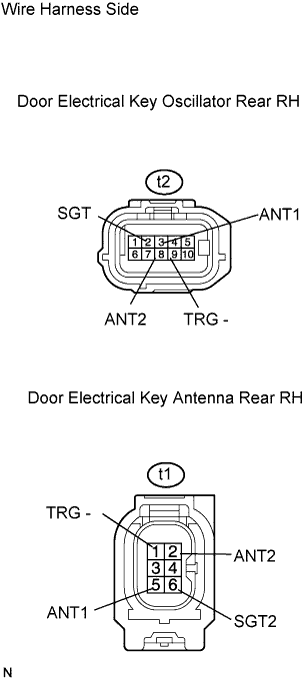 |
Disconnect the t2 oscillator connector.
Disconnect the t1 antenna connector.
Measure the resistance of the wire harness side connectors.
| Tester Connection | Specified Condition |
| t2-2 (SGT) - t1-6 (SGT2) | Below 1 Ω |
| t2-3 (ANT1) - t1-5 (ANT1) | Below 1 Ω |
| t2-8 (ANT2) - t1-2 (ANT2) | Below 1 Ω |
| t2-9 (TRG-) - t1-1 (TRG-) | Below 1 Ω |
|
| ||||
| OK | |
|
| 9.CHECK WIRE HARNESS (ECU - OSCILLATOR) |
 |
Disconnect the V33 ECU connector.
Disconnect the t2 oscillator connector.
Measure the resistance of the wire harness connectors.
| Tester Connection | Specified Condition |
| V33-1 (SEL3)*2 - t2-4 (SEL) V33-2 (SEL4)*1 - t2-4 (SEL) | Below 1 Ω |
| V33-28 (SEN3)*2 - t2-6 (SENS) V33-27 (SEN4)*1 - t2-6 (SENS) | Below 1 Ω |
| V33-8 (CLG3)*2 - t2-10 (CLG) V33-10 (CLG4)*1 - t2-10 (CLG) | Below 1 Ω |
| V33-9 (CG3B)*2 - t2-5 (CLGB) V33-11 (CG4B)*1- t2-5 (CLGB) | Below 1 Ω |
|
| ||||
| OK | ||
| ||
| ||


