WIRELESS DOOR LOCK CONTROL SYSTEM > No Answer-Back (Hazard Warning Light and Wireless Door Lock Buzzer) |

| 1.CHECK WIRELESS DOOR LOCK |
Check that the wireless door lock functions operate with the transmitter.
| Function | Proceed to |
| Wireless door lock functions operate normally but hazard warning light answer-back does not occur | A |
| Wireless door lock functions operate normally but wireless door lock buzzer answer-back does not occur | B |
| Wireless door lock functions do not operate | C |
|
| ||||
|
| ||||
| A | |
 |
| 2.CHECK HAZARD WARNING LIGHTS |
Check that the hazard warning lights flash continuously when hazard warning switch is pressed.
|
| ||||
| OK | |
|
| 3.PERFORM ACTIVE TEST (HAZARD WARNING LIGHT) |
Select the Active Test, use the intelligent tester to generate a control command, and then check that the hazard warning lights flash.
| Item | Test Details | Diagnostic Note |
| Hazard | Turn signal flasher relay ON / OFF | - |
|
| ||||
| OK | ||
 | ||
| ||
| 4.CHECK WIRE HARNESS (MULTIPLEX NETWORK BODY ECU - TURN SIGNAL FLASHER RELAY) |
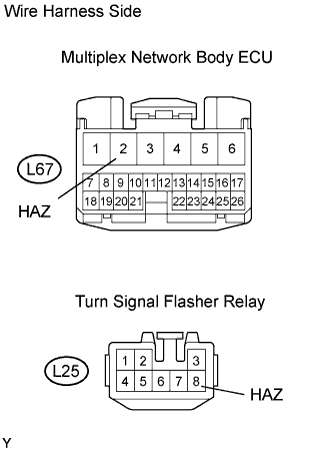 |
Disconnect the L67 ECU connector.
Disconnect the L25 relay connector.
Measure the resistance of the wire harness side connectors.
| Tester Connection | Specified Condition |
| L67-2 (HAZ) - L25-8 (HAZ) | Below 1 Ω |
|
| ||||
| OK | ||
| ||
| ||
| 5.PERFORM ACTIVE TEST (WIRELESS DOOR LOCK BUZZER) |
Select the Active Test, use the intelligent tester to generate a control command, and then check that the wireless door lock buzzer sounds.
| Item | Test Details | Diagnostic Note |
| Buzzer Resp Sound | Wireless door lock buzzer ON / OFF | - |
|
| ||||
| OK | ||
| ||
| ||
| 6.CHECK WIRE HARNESS (WIRELESS DOOR LOCK BUZZER - MULTIPLEX NETWORK BODY ECU AND BODY GROUND) |
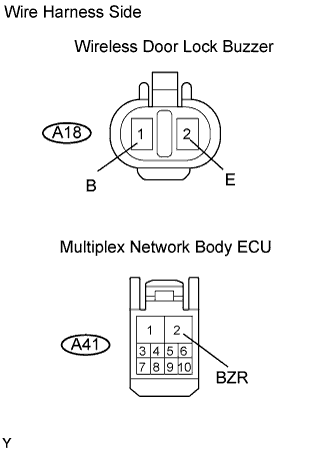 |
Disconnect the A18 buzzer connector.
Disconnect the A41 ECU connector.
Measure the resistance of the wire harness side connectors.
| Tester Connection | Specified Condition |
| A18-1 (B) - A41-2 (BZR) | Below 1 Ω |
| A18-2 (E) - Body ground | Below 1 Ω |
| A18-1 (B) - Body ground | 10 kΩ or higher |
|
| ||||
| OK | |
|
| 7.REPLACE WIRELESS DOOR LOCK BUZZER |
After replacing the wireless door lock buzzer with a normal one, check that the wireless door lock buzzer sounds by using the transmitter LOCK / UNLOCK switch.
|
| ||||
| OK | ||
| ||
| ||


