Voice Guidance does not Function
Circuit diagnosis
INSPECTION PROCEDURE
| 1. CHECK NAVIGATION SETTING |

Enter the "Menu" screen by pressing the "MENU" switch.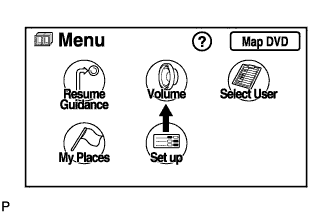

Select "Volume".
Check that "OFF" is not selected.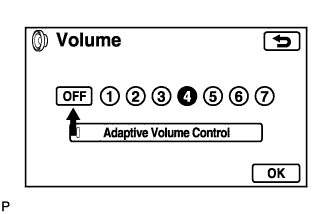
- OK:
- "OFF" is not selected.
|
|
||||

| OK | |
 |
| Go to step 3 |
| 2. CHECK NAVIGATION SETTING |
Enter the "Menu" screen by pressing the "MENU" switch.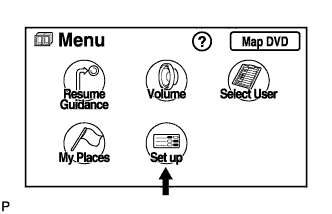
Select "Set up".
Check that "Voice Guidance in All Modes" is not OFF.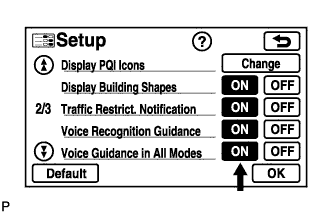
- OK:
- Voice guidance in all modes is not OFF.
|
|
||||
| OK | |
|
| 3. CHECK NAVIGATION SETTING |
Enter the "Menu" screen by pressing the "MENU" switch.
Select "Set up".
Check that "Auto Voice Guidance" is not OFF.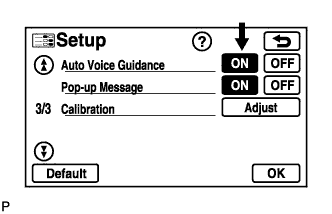
- OK:
- Auto voice guidance is not OFF.
|
|
||||
| OK | |
|
| 4. CHECK MAP DISC |
Check that the map disc is not deformed or cracked.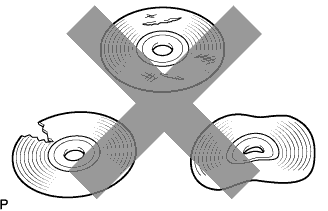
- OK:
- No deformations or cracks on map disc.
|
|
||||
| OK | |
|
| 5. CHECK AUDIO AND VISUAL SYSTEM |
Check that audio sound can be heard from the driver side speaker.
- OK:
- Audio sound can be heard.
|
|
||||
| NG | ||
 |
||
| ||