| Last Modified: 7-3-2017 | 6.8:8.0.40 | Doc ID: RM000001B5U003X |
| Model Year Start: 2007 | Model: LX470 | Prod Date Range: [08/2006 - ] |
| Title: NAVIGATION: NAVIGATION SYSTEM: Own Voice cannot be Heard, too Quiet or Distorted; 2007 MY LX470 [08/2006 - ] | ||
|
Own Voice cannot be Heard, too Quiet or Distorted |
INSPECTION PROCEDURE
PROCEDURE
|
1. |
CHECK CELLULAR PHONE |
(a) Check if the other end can hear your voice properly.
OK:
Own voice can be heard correctly.
| NG |

|
|

|
2. |
CHECK SETTINGS |
(a) Check if the mute switch is set to ON.
OK:
MUTE switch is not set to ON.
| NG |
|
|
|
3. |
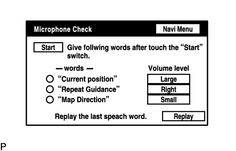
CHECK MICROPHONE (NAVIGATION CHECK MODE) |
|
(a)
Enter the "Microphone Check" mode
(b) Follow the directions on the screen. Check if the word recognition indicator is displayed in green for each item. |
|
![2007 MY LX470 [08/2006 - ]; NAVIGATION: NAVIGATION SYSTEM: DTC CHECK / CLEAR](../../../../stylegraphics/info.gif "2007 MY LX470 [08/2006 - ]; NAVIGATION: NAVIGATION SYSTEM: DTC CHECK / CLEAR")
| NG |
|
PROCEED TO NEXT CIRCUIT INSPECTION SHOWN IN PROBLEM SYMPTOMS TABLE |
| OK |
|

|

|