| Last Modified: 7-3-2017 | 6.8:8.0.40 | Doc ID: RM000001GC7003X |
| Model Year Start: 2007 | Model: LX470 | Prod Date Range: [08/2006 - ] |
| Title: CELLULAR COMMUNICATION: MAYDAY SWITCH: INSTALLATION; 2007 MY LX470 [08/2006 - ] | ||
INSTALLATION
1. INSTALL MAYDAY SWITCH ASSEMBLY
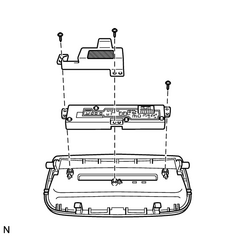
(a) Install the plate and switch with the 3 screws.
|
(b) Install the cover with the screw. |
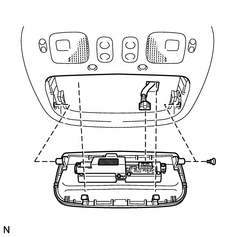
|
(c) Connect the connector.
2. INSTALL MAP LIGHT ASSEMBLY
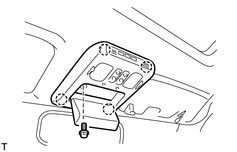
(a) Connect the connector.
(b) Attach the 4 clips to install the map light.
(c) Install the bolt.
|
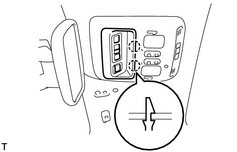
(d) Attach the 2 claws to close the cover. |
|
3. CONNECT CABLE TO NEGATIVE BATTERY TERMINAL
4. PERFORM INITIALIZATION
(a)
Perform initialization
![2007 MY LX470 [08/2006 - ]; INTRODUCTION: REPAIR INSTRUCTION: INITIALIZATION](../../../../stylegraphics/info.gif "2007 MY LX470 [08/2006 - ]; INTRODUCTION: REPAIR INSTRUCTION: INITIALIZATION") .
.
NOTICE:
Certain systems need to be initialized after disconnecting and reconnecting the cable from the negative (-) battery terminal.
5. CHECK SRS WARNING LIGHT
(a)
Check the SRS warning light
.

|

|