- Tire pressure warning valve and transmitter
- Tire pressure warning ECU and receiver
| Last Modified: 7-3-2017 | 6.8:8.0.40 | Doc ID: RM000002DZD00KX |
| Model Year Start: 2007 | Model: LX470 | Prod Date Range: [08/2006 - ] |
| Title: TIRE AND WHEEL: TIRE PRESSURE WARNING SYSTEM: C2111/11-C2115/15; Transmitter ID1 Operation Stop; 2007 MY LX470 [08/2006 - ] | ||
|
DTC |
C2111/11 |
Transmitter ID1 Operation Stop |
|
DTC |
C2112/12 |
Transmitter ID2 Operation Stop |
|
DTC |
C2113/13 |
Transmitter ID3 Operation Stop |
|
DTC |
C2114/14 |
Transmitter ID4 Operation Stop |
|
DTC |
C2115/15 |
Transmitter ID5 Operation Stop |
DESCRIPTION
The tire pressure warning valve and transmitters that are installed in the tire and wheel assemblies measure the air pressures of the tires. The measured values are transmitted to the tire pressure warning antenna on the body as radio waves and then sent to the tire pressure warning ECU and receiver. The ECU compares the measured air pressure values with the air pressure threshold. When the measured air pressure value is less than this threshold, the warning light in the combination meter comes on. The tire pressure warning ECU and receiver stores a DTC when the tire pressure warning valve and transmitter stops transmitting signals. At this time, forcibly transmit the signals by releasing the tire pressure rapidly. The stored DTC is cleared when the signal transmission is resumed.
|
DTC Code |
Detection Condition |
Trouble Area |
|---|---|---|
|
C2111/11 C2112/12 C2113/13 C2114/14 C2115/15 |
Tire pressure warning valve and transmitters stop transmitting signals |
|
HINT:
It is necessary to perform the procedure to identify the tire pressure warning valve and transmitter that is malfunctioning because it cannot be identified by the output DTC.
WIRING DIAGRAM
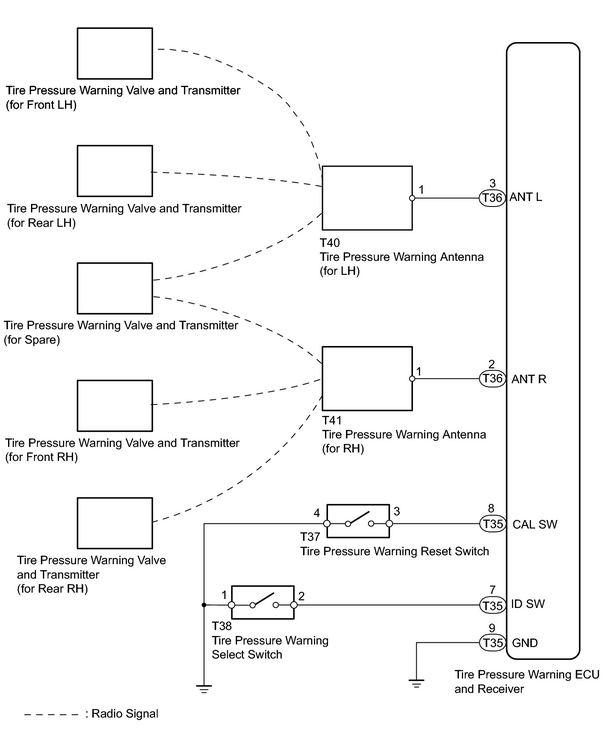
INSPECTION PROCEDURE
PROCEDURE
|
1. |
PERFORM FORCED TRANSMISSION OF TRANSMITTER ID OF ALL WHEELS |
(a)
Set the tire pressure to the specified value
![2007 MY LX470 [08/2006 - ]; TIRE AND WHEEL: TIRE AND WHEEL SYSTEM: INSPECTION](../../../../stylegraphics/info.gif "2007 MY LX470 [08/2006 - ]; TIRE AND WHEEL: TIRE AND WHEEL SYSTEM: INSPECTION") .
.
(b) Connect the intelligent tester to the DLC3.
(c) Turn the ignition switch ON and turn the tester on.
(d) Following the display on the intelligent tester, select the "DATA LIST".
(e) Check the values by referring to the table below.
Tire pressure warning ECU and receiver
|
Tester Display |
Measurement Item/Range |
Normal Condition |
Diagnostic Note |
|---|---|---|---|
|
TIREPRESS1 |
ID1 tire inflation pressure / min.: Absolute pressure / 0 kPa (0 kgf/cm 2 , 0 psi), Relative pressure / -100 kPa (-1 kgf/cm 2 , -14 psi) max.: Absolute pressure / 637.5 kPa (6.5 kgf/cm 2 , 92.5 psi), Relative pressure / 537.5 kPa (5.4 kgf/cm 2 , 78 psi) |
Actual tire inflation pressure |
If 0 kPa (0 kgf/cm 2 , 0 psi) is displayed for absolute pressure or -100 kPa (-1 kgf/cm 2 , -14 psi) is displayed for relative pressure, data has not been received.* |
|
TIREPRESS2 |
ID2 tire inflation pressure / min.: Absolute pressure / 0 kPa (0 kgf/cm 2 , 0 psi), Relative pressure / -100 kPa (-1 kgf/cm 2 , -14 psi) max.: Absolute pressure / 637.5 kPa (6.5 kgf/cm 2 , 92.5 psi), Relative pressure / 537.5 kPa (5.4 kgf/cm 2 , 78 psi) |
Actual tire inflation pressure |
If 0 kPa (0 kgf/cm 2 , 0 psi) is displayed for absolute pressure or -100 kPa (-1 kgf/cm 2 , -14 psi) is displayed for relative pressure, data has not been received.* |
|
TIREPRESS3 |
ID3 tire inflation pressure / min.: Absolute pressure / 0 kPa (0 kgf/cm 2 , 0 psi), Relative pressure / -100 kPa (-1 kgf/cm 2 , -14 psi) max.: Absolute pressure / 637.5 kPa (6.5 kgf/cm 2 , 92.5 psi), Relative pressure / 537.5 kPa (5.4 kgf/cm 2 , 78 psi) |
Actual tire inflation pressure |
If 0 kPa (0 kgf/cm 2 , 0 psi) is displayed for absolute pressure or -100 kPa (-1 kgf/cm 2 , -14 psi) is displayed for relative pressure, data has not been received.* |
|
TIREPRESS4 |
ID4 tire inflation pressure / min.: Absolute pressure / 0 kPa (0 kgf/cm 2 , 0 psi), Relative pressure / -100 kPa (-1 kgf/cm 2 , -14 psi) max.: Absolute pressure / 637.5 kPa (6.5 kgf/cm 2 , 92.5 psi), Relative pressure / 537.5 kPa (5.4 kgf/cm 2 , 78 psi) |
Actual tire inflation pressure |
If 0 kPa (0 kgf/cm 2 , 0 psi) is displayed for absolute pressure or -100 kPa (-1 kgf/cm 2 , -14 psi) is displayed for relative pressure, data has not been received.* |
|
TIREPRESS5 |
ID5 tire inflation pressure / min.: Absolute pressure / 0 kPa (0 kgf/cm 2 , 0 psi), Relative pressure / -100 kPa (-1 kgf/cm 2 , -14 psi) max.: Absolute pressure / 637.5 kPa (6.5 kgf/cm 2 , 92.5 psi), Relative pressure / 537.5 kPa (5.4 kgf/cm 2 , 78 psi) |
Actual tire inflation pressure |
If 0 kPa (0 kgf/cm 2 , 0 psi) is displayed for absolute pressure or -100 kPa (-1 kgf/cm 2 , -14 psi) is displayed for relative pressure, data has not been received.* |
HINT:
*: It may take about 2 or 3 minutes until the values are displayed. If the values are not displayed after a few minutes, perform troubleshooting according to the inspection procedure for DTCs C2121/21 to C2125/25
.
(f) Rapidly reduce the tire pressure for each wheel at least 40 kPa (0.4 kgf/cm 2 , 5.8 psi) within 30 seconds.
(1) Check that each tire pressure data displayed on the intelligent tester screen has changed.
NOTICE:
- It takes about 2 or 3 minutes to display the updated tire pressure data.
- When the "TIREPRESS" data has not changed, reset the tire pressure to the appropriate specified value and rotate the tire 90 to 270°(including the spare tire). Then rapidly release the tire pressure and recheck it.
(2) After confirming that all of the tire pressure data displayed on the intelligent tester screen has changed, set the tire pressure to the appropriate specified values.
HINT:
If the tire pressure data displayed on the intelligent tester screen has not changed after rechecking, inspect the other problem (malfunction in transmission or reception function)
.
|
Condition |
Proceed to |
|---|---|
|
All tire pressure readings are equal to specified values |
A |
|
Any of tire pressure valves are not displayed |
B |
|
All tire pressure values are not displayed |
C |
| A |

|
| B |
|
INSPECT OTHER PROBLEM (MALFUNCTION IN TRANSMISSION OR RECEPTION FUNCTION) |
|

|
2. |
SWITCH TIRE PRESSURE WARNING SELECT SWITCH |
(a) Switch the tire pressure warning select switch to the other position (MAIN to 2nd or 2nd to MAIN).
(b)
Set the tire pressure to the specified value
.
(c) Connect the intelligent tester to the DLC3.
(d) Turn the ignition switch ON and turn the tester on.
(e) Following the display on the intelligent tester, select the "DATA LIST".
(f) Check the values by referring to the table below.
Tire pressure warning ECU and receiver
|
Tester Display |
Measurement Item/Range |
Normal Condition |
Diagnostic Note |
|---|---|---|---|
|
TIREPRESS1 |
ID1 tire inflation pressure / min.: Absolute pressure / 0 kPa (0 kgf/cm 2 , 0 psi), Relative pressure / -100 kPa (-1 kgf/cm 2 , -14 psi) max.: Absolute pressure / 637.5 kPa (6.5 kgf/cm 2 , 92.5 psi), Relative pressure / 537.5 kPa (5.4 kgf/cm 2 , 78 psi) |
Actual tire inflation pressure |
If 0 kPa (0 kgf/cm 2 , 0 psi) is displayed for absolute pressure or -100 kPa (-1 kgf/cm 2 , -14 psi) is displayed for relative pressure, data has not been received.* |
|
TIREPRESS2 |
ID2 tire inflation pressure / min.: Absolute pressure / 0 kPa (0 kgf/cm 2 , 0 psi), Relative pressure / -100 kPa (-1 kgf/cm 2 , -14 psi) max.: Absolute pressure / 637.5 kPa (6.5 kgf/cm 2 , 92.5 psi), Relative pressure / 537.5 kPa (5.4 kgf/cm 2 , 78 psi) |
Actual tire inflation pressure |
If 0 kPa (0 kgf/cm 2 , 0 psi) is displayed for absolute pressure or -100 kPa (-1 kgf/cm 2 , -14 psi) is displayed for relative pressure, data has not been received.* |
|
TIREPRESS3 |
ID3 tire inflation pressure / min.: Absolute pressure / 0 kPa (0 kgf/cm 2 , 0 psi), Relative pressure / -100 kPa (-1 kgf/cm 2 , -14 psi) max.: Absolute pressure / 637.5 kPa (6.5 kgf/cm 2 , 92.5 psi), Relative pressure / 537.5 kPa (5.4 kgf/cm 2 , 78 psi) |
Actual tire inflation pressure |
If 0 kPa (0 kgf/cm 2 , 0 psi) is displayed for absolute pressure or -100 kPa (-1 kgf/cm 2 , -14 psi) is displayed for relative pressure, data has not been received.* |
|
TIREPRESS4 |
ID4 tire inflation pressure / min.: Absolute pressure / 0 kPa (0 kgf/cm 2 , 0 psi), Relative pressure / -100 kPa (-1 kgf/cm 2 , -14 psi) max.: Absolute pressure / 637.5 kPa (6.5 kgf/cm 2 , 92.5 psi), Relative pressure / 537.5 kPa (5.4 kgf/cm 2 , 78 psi) |
Actual tire inflation pressure |
If 0 kPa (0 kgf/cm 2 , 0 psi) is displayed for absolute pressure or -100 kPa (-1 kgf/cm 2 , -14 psi) is displayed for relative pressure, data has not been received.* |
|
TIREPRESS5 |
ID5 tire inflation pressure / min.: Absolute pressure / 0 kPa (0 kgf/cm 2 , 0 psi), Relative pressure / -100 kPa (-1 kgf/cm 2 , -14 psi) max.: Absolute pressure / 637.5 kPa (6.5 kgf/cm 2 , 92.5 psi), Relative pressure / 537.5 kPa (5.4 kgf/cm 2 , 78 psi) |
Actual tire inflation pressure |
If 0 kPa (0 kgf/cm 2 , 0 psi) is displayed for absolute pressure or -100 kPa (-1 kgf/cm 2 , -14 psi) is displayed for relative pressure, data has not been received.* |
HINT:
*: It may take about 2 or 3 minutes until the values are displayed. If the values are not displayed after a few minutes, perform troubleshooting according to the inspection procedure for DTCs C2121/21 to C2125/25
.
(g) Rapidly reduce the tire pressure for each wheel at least 40 kPa (0.4 kgf/cm 2 , 5.8 psi) within 30 seconds.
(1) Check that each tire pressure data displayed on the intelligent tester screen has changed.
NOTICE:
- It takes about 2 or 3 minutes to display the updated tire pressure data.
- When the "TIREPRESS" data has not changed, reset the tire pressure to the appropriate specified value and rotate the tire 90 to 270°(including the spare tire). Then rapidly release the tire pressure and recheck it.
(2) After confirming that all of the tire pressure data displayed on the intelligent tester screen has changed, set the tire pressure to the appropriate specified values.
|
Condition |
Proceed to |
|---|---|
|
All tire pressure readings are equal to specified values |
A |
|
Tire pressure values are not displayed |
B |
| A |
|
|
|
3. |
RETURN TIRE PRESSURE WARNING SELECT SWITCH TO ORIGINAL POSITION |
| NEXT |
|
INSPECT OTHER PROBLEM (MALFUNCTION IN TRANSMISSION OR RECEPTION FUNCTION) |

|

|