| Last Modified: 11-27-2007 | 1.6 J | |
| Service Category: Audio/Visual/Telematics | Section: Navigation/Multi Info Display | |
| Model Year: 2008 | Model: LX570 | Doc ID: RM000000OB500WX |
| Title: NAVIGATION / MULTI INFO DISPLAY: NAVIGATION SYSTEM: INSPECTION PROCEDURE (2008 LX570) | ||
|
Voice Guidance does not Function |
INSPECTION PROCEDURE
PROCEDURE
|
1. |
CHECK NAVIGATION SYSTEM SETTING |
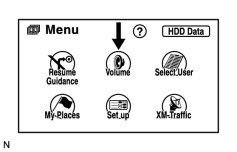
|
(a) Enter the "Menu" screen by pressing the "MENU" switch. |
(b) Select "Volume".
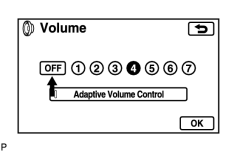
|
(c) Check that "OFF" is not selected. OK: OFF is not selected. |
|

|
2. |
CHECK NAVIGATION SETTING |
|
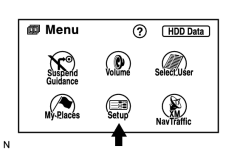
(a) Enter the "Menu" screen by pressing the "MENU" switch. |
(b) Select "Setup".
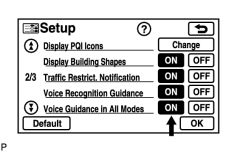
|
(c) Check that "Voice Guidance in All Modes" is not OFF. OK: "Voice Guidance in All Modes" is not OFF. |
|
|
3. |
CHECK NAVIGATION SETTING |
|
|
(a) Enter the "Menu" screen by pressing the "MENU" switch. |
(b) Select "Setup".
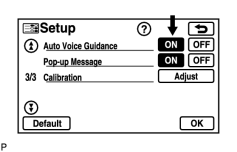
|
(c) Check that "Auto Voice Guidance" is not OFF. OK: "Auto Voice Guidance" is not OFF. |
|
|
4. |
CHECK RADIO RECEIVER ASSEMBLY |
(a) Check that audio can be heard from the speakers.
OK:
Audio can be heard.
|

|

|