|
Last Modified: 11-27-2007 |
1.6 J |
|
Service Category: Audio/Visual/Telematics |
Section: Audio/Video |
|
Model Year: 2008 |
Model: LX570 |
Doc ID: RM000000OBB01IX |
|
Title: AUDIO / VIDEO: AUDIO AND VISUAL SYSTEM: INSPECTION PROCEDURE (2008 LX570) |
|
Cannot Call in a Certain Place
|
INSPECTION PROCEDURE
PROCEDURE
|
1.
|
CHECK SURROUNDING CONDITION
|
(a) Check if the cellular phone can make calls in a certain location.
OK:
Cellular phone can make calls.
| OK |

|
|
|
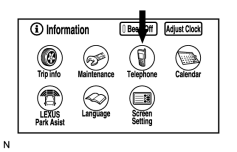
(a) Enter the "Information" screen by pressing the "INFO" switch.
|
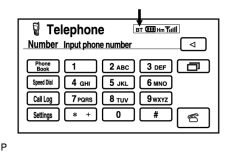
(b) Select "Telephone".
|
(c) Check the "BT" mark.
Result
|
Result
|
Proceed to
|
|
Yellow color
|
A
|
|
Blue color (w/ Navigation System)
|
B
|
|
Blue color (w/o Navigation System)
|
C
|
|
No connection mark is displayed
|
D
|
|
| A |
|
|
|
|

