- Replace certification ECU (smart key ECU assembly)
- Reregister all keys (new key ID registration)
| Last Modified: 11-27-2007 | 1.6 M | |
| Service Category: Vehicle Interior | Section: Theft Deterrent/Keyless Entry | |
| Model Year: 2008 | Model: LX570 | Doc ID: RM000000QYF00YX |
| Title: THEFT DETERRENT / KEYLESS ENTRY: ENGINE IMMOBILISER SYSTEM: REGISTRATION (2008 LX570) | ||
REGISTRATION
1. DESCRIPTION OF CODE REGISTRATION
HINT:
- The engine immobiliser function ID code is the same as the recognition code for the smart access system with push-button start and wireless transmitter. Registering an ID code enables the smart access system with push-button start, wireless door lock control function and engine immobiliser function to be operated.
- Code registration is needed when the certification ECU (smart key ECU assembly), ID code box (immobiliser code ECU), steering lock ECU, ECM or key is replaced with a new one.
-
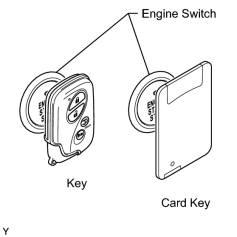
This vehicle does not have a key slot. Therefore, touch the logo of the key to the engine switch to register the key, as shown in the illustration.
2. PART REPLACEMENT AND KEY REGISTRATION PROCEDURES
(a) If a malfunctioning ECU is discovered through troubleshooting of the smart access system with push-button start, use the ECU replacement and key registration procedures in the table below.
HINT:
-
The following procedures require the use of the Techstream:
- New key ID registration
- When simply adding a new key (without losing or replacing any existing keys), refer to "Additional key ID registration" under Key Registration Procedures.
- If all of the registered keys are not available, replacement of the ID code box (immobiliser code ECU), certification ECU (smart key ECU assembly) and steering lock ECU is also required.
- A maximum of 7 keys can be registered.
|
Part to be Replaced |
Condition |
Procedure |
|
|---|---|---|---|
|
Certification ECU (smart key ECU assembly) |
Customer has brought all keys |
|
|
|
Some keys are lost |
Key ID codes can be registered and cleared |
HINT: If some keys are not registered during above steps, they will be disabled because they cannot be registered later. |
|
|
Key ID codes cannot be either registered or cleared |
HINT: If key codes cannot be cleared or additional keys cannot be registered due to malfunction in certification ECU (smart key ECU assembly), replace ID code box (immobiliser code ECU) and certification ECU (smart key ECU assembly). If some keys are not registered during above steps, they will be disabled because they cannot be registered later. |
||
|
All keys are lost |
|
||
|
ID code box (immobiliser code ECU) |
At least 1 key is available |
|
|
|
All keys are lost |
|
||
|
Steering lock ECU |
Customer has brought at least 1 key |
|
|
|
All keys are lost |
|
||
|
Main body ECU |
No condition required |
Replace main body ECU |
|
|
ECM |
No condition required |
|
|
|
Key |
Customer has brought at least 1 key HINT: After key ID erasure, any remaining keys that are not registered at this time cannot be used. Therefore, after key ID erasure, register all remaining keys. |
|
|
|
All keys are lost |
|
||
3. KEY REGISTRATION PROCEDURES
(a) New key ID registration (when replacing certification ECU (smart key ECU assembly) and ID code box (immobiliser code ECU), or certification ECU (smart key ECU assembly), ID code box (immobiliser code ECU) and steering lock ECU):
|
Process |
Procedure |
|---|---|
|
1. Start of registration |
|
|
2. Confirmation of ECU code |
Perform operation according to prompts on the Techstream screen HINT: Mode is automatically selected by the Techstream (new registration mode or add mode). |
|
3. Verification of unregistered key* |
|
|
4. Registration of ID code |
Perform operation according to prompts on the Techstream screen |
|
5. End of registration |
Finish new key ID code registration |
HINT:
*: Repeat this process for each key which is to be registered to the vehicle. Finish the procedure for each key within 30 seconds. If the procedure for any of the keys has not been finished within the specified time, perform the registration from process 1 again. Make sure that only 1 key is in the cabin during registration. If 2 or more keys are in the cabin simultaneously, the electric waves will interfere with each other, preventing normal registration.
(b) New key ID registration (when replacing certification ECU (smart key ECU assembly)):
|
Process |
Procedure |
|---|---|
|
1. Start of registration |
|
|
2. Confirmation of ECU code |
Perform operation according to prompts on the Techstream screen HINT: Mode is automatically selected by the Techstream (new registration mode or add mode). |
|
3. Confirmation of all registered keys*1 |
|
|
4. Confirmation of ECU code |
Perform operation according to prompts on the Techstream screen |
|
5. Verification of unregistered key*2 |
|
|
6. Registration of ID code |
Perform operation according to prompts on the Techstream screen |
|
7. End of registration |
Finish new key ID code registration |
HINT:
- *1: Repeat this process for each key registered to the vehicle. Finish the procedure for each key within 30 seconds. If the procedure for any of the keys has not been finished within the specified time, perform the registration from process 1 again. When performing the key confirmation procedure for a key, the security indicator light comes on and remains on until all the keys are confirmed.
- *2: Repeat this process for each key which is to be registered to the vehicle. Finish the procedure for each key within 30 seconds. If the procedure for any of the keys has not been finished within the specified time, perform the registration from process 1 again. Make sure that only 1 key is in the cabin during registration. If 2 or more keys are in the cabin simultaneously, the electric waves will interfere with each other, preventing normal registration.
(c) Additional key ID registration:
|
Process |
Procedure |
|---|---|
|
1. Start of registration |
|
|
2. Confirmation of registered key*1 |
|
|
3. Confirmation of ECU code |
Perform operation according to prompts on the Techstream screen |
|
4. Verification of unregistered key*2 |
|
|
5. Registration of ID code |
Perform operation according to prompts on the Techstream screen |
|
6. End of registration |
Finish key ID code registration |
HINT:
- *1: Perform this process for one of the keys registered to the vehicle. Finish the procedure within 30 seconds. If the procedure has not been finished within the specified time, perform the registration from process 1 again.
- *2: Repeat this process for each key which is to be registered to the vehicle. Finish the procedure for each key within 30 seconds. If the procedure for any of the keys has not been finished within the specified time, perform the registration from process 1 again. Make sure that only 1 key is in the cabin during registration. If 2 or more keys are in the cabin simultaneously, the electric waves will interfere with each other, preventing normal registration.
(d) Key ID erasure (clear all registered key codes except one):
|
Process |
Procedure |
|---|---|
|
1. Start of erasure |
|
|
2. Confirmation of registered key* |
|
|
3. Erasure of ID code |
Perform operation according to prompts on the Techstream screen |
|
4. End of erasure |
Finish key ID code erasure |
HINT:
*: Perform this process for one of the keys registered to the vehicle. Finish the procedure within 30 seconds. If the procedure has not been finished within the specified time, perform the erasure from process 1 again.
(e) All keys ID erasure:
|
Process |
Procedure |
|---|---|
|
1. Start of erasure |
|
|
2. Confirmation of registered key* |
Touch logo of registered key to engine switch |
|
3. Erasure of ID code |
Perform operation according to prompts on the Techstream screen |
|
4. End of erasure |
Finish key ID code erasure |
HINT:
*: Perform this process for one of the keys registered to the vehicle. Finish the procedure within 30 seconds. If the procedure has not been finished within the specified time, perform the erasure from process 1 again.
(f) ECU code registration:
|
Process |
Procedure |
|---|---|
|
1. Start of registration |
|
|
2. Confirmation of registered key* |
|
|
3. Erasure of ECU code |
Perform operation according to prompts on the Techstream screen |
|
4. End of registration |
Finish ECU code registration |
HINT:
*: Perform this process for one of the keys registered to the vehicle. Finish the procedure within 30 seconds. If the procedure has not been finished within the specified time, perform the registration from process 1 again.
(g) ECU communication ID registration:
NOTICE:
- The ECU communication ID should be registered when the ID code box (immobiliser code ECU), steering lock ECU or ECM is replaced in order to match the ECU communication ID.
- The engine cannot be started unless ECU communication ID is registered.
- After the registration, pressing the engine switch may not start the engine on the first try. If so, press the engine switch again.
-
After the engine is started, clear DTC B2799 (code for ECM immobiliser communication error) using either of the following methods:
- Use the Techstream.
- Disconnect the cable from the negative (-) battery terminal for 30 seconds.
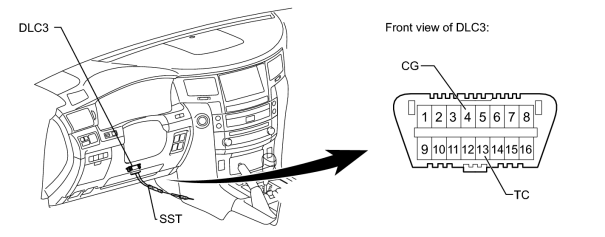
(1) Using SST, connect terminals 13 (TC) and 4 (CG) of the DLC3.
SST: 09843-18040
(2) Turn the engine switch on (IG) (do not start the engine) and leave it as is for 30 minutes.
(3) Turn the engine switch off and disconnect terminals 13 (TC) and 4 (CG).
(4) Check that the engine starts and stays on for more than 3 seconds.
(h) ECU communication ID reregistration:
NOTICE:
The ECU communication ID should be registered when the ECM is replaced in order to match the ECU communication ID.
|
Procedure |
Time |
Security Indicator Light Condition |
|---|---|---|
|
1. Start |
- |
Off |
|
2. While holding registered key, turn the engine switch on (IG) with brake pedal depressed |
||
|
3. Check that engine starts and stays on for more than 3 seconds |
||
|
4. End |
||

|

|